
Layers
By default TikZ draws objects in the order they appear in the source, so
later objects appear on top of earlier ones. tikzfigure exposes a
layer system (backed by pgfonlayer) that lets you control the
stacking order independently of code order.
This tutorial shows: - why layers matter - how to assign elements to numbered layers - a practical example combining filled shapes and curves
import numpy as np
from tikzfigure import TikzFigure
Why layers matter
Section titled “Why layers matter”Without explicit layers, the last drawn element always sits on top. Consider two overlapping filled circles: whichever is drawn second covers the first.
# Without layers - drawing order determines visibilityfig = TikzFigure()
# Blue drawn first → red on topfig.node(    (0.25, 1),    minimum_size="2cm",    shape="circle",    fill="blue",)fig.node(    (-0.25, 1),    minimum_size="2cm",    shape="circle",    fill="red",)
fig.node(    (0.05, -0.3),    content="red on top (default)",    draw="none",)fig.show()
warning: The `fitz` API is deprecated and will be removed in future. Use `import pymupdf` instead.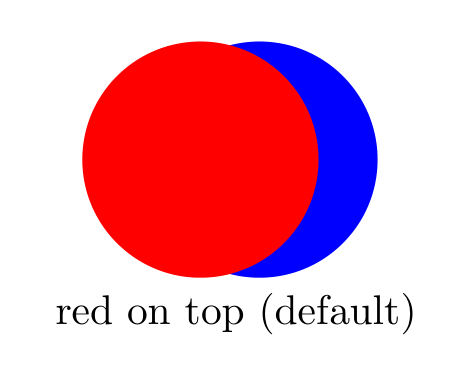
Show Tikz code
print(fig)% --------------------------------------------- %% Tikzfigure generated by tikzfigure v0.3.1 %% https://github.com/max-models/tikzfigure %% --------------------------------------------- %\begin{tikzpicture} \node[shape=circle, fill=blue, minimum size=2cm] (node0) at ({0.25}, {1}) {}; \node[shape=circle, fill=red, minimum size=2cm] (node1) at ({-0.25}, {1}) {}; \node[draw=none] (node2) at ({0.05}, {-0.3}) {red on top (default)};\end{tikzpicture}print(fig.generate_standalone())\documentclass[border=10pt]{standalone}\PassOptionsToPackage{dvipsnames,svgnames,x11names}{xcolor}\usepackage{tikz}\usepackage{pgfplots}\pgfplotsset{compat=newest}\usepgfplotslibrary{groupplots}\usetikzlibrary{arrows.meta}\begin{document}% --------------------------------------------- %% Tikzfigure generated by tikzfigure v0.3.1 %% https://github.com/max-models/tikzfigure %% --------------------------------------------- %\begin{tikzpicture} \node[shape=circle, fill=blue, minimum size=2cm] (node0) at ({0.25}, {1}) {}; \node[shape=circle, fill=red, minimum size=2cm] (node1) at ({-0.25}, {1}) {}; \node[draw=none] (node2) at ({0.05}, {-0.3}) {red on top (default)};\end{tikzpicture}
\end{document}# With layers - blue on layer 2 even though it is drawn first in codefig = TikzFigure()
fig.node( (0.25, 1), minimum_size="2cm", shape="circle", fill="blue", layer=2,)fig.node( (-0.25, 1), minimum_size="2cm", shape="circle", fill="red", layer=1,)
fig.node( (0.0, -0.3), content="blue on top (layer=2)", draw="none",)fig.show()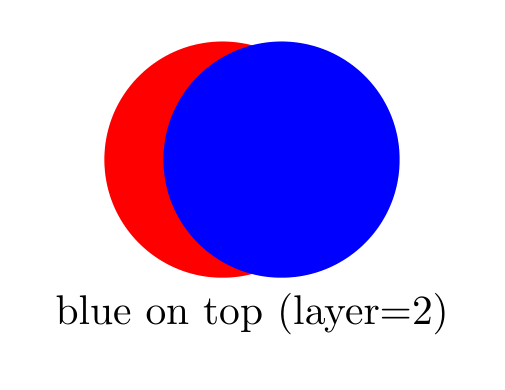
Show Tikz code
print(fig)% --------------------------------------------- %% Tikzfigure generated by tikzfigure v0.3.1 %% https://github.com/max-models/tikzfigure %% --------------------------------------------- %\begin{tikzpicture} % Define the layers library \pgfdeclarelayer{0} \pgfdeclarelayer{1} \pgfdeclarelayer{2} \pgfsetlayers{0,1,2}
% Layer 2 \begin{pgfonlayer}{2} \node[shape=circle, fill=blue, minimum size=2cm] (node0) at ({0.25}, {1}) {}; \end{pgfonlayer}{2}
% Layer 1 \begin{pgfonlayer}{1} \node[shape=circle, fill=red, minimum size=2cm] (node1) at ({-0.25}, {1}) {}; \end{pgfonlayer}{1}
% Layer 0 \begin{pgfonlayer}{0} \node[draw=none] (node2) at ({0.0}, {-0.3}) {blue on top (layer=2)}; \end{pgfonlayer}{0}\end{tikzpicture}print(fig.generate_standalone())\documentclass[border=10pt]{standalone}\PassOptionsToPackage{dvipsnames,svgnames,x11names}{xcolor}\usepackage{tikz}\usepackage{pgfplots}\pgfplotsset{compat=newest}\usepgfplotslibrary{groupplots}\usetikzlibrary{arrows.meta}\begin{document}% --------------------------------------------- %% Tikzfigure generated by tikzfigure v0.3.1 %% https://github.com/max-models/tikzfigure %% --------------------------------------------- %\begin{tikzpicture} % Define the layers library \pgfdeclarelayer{0} \pgfdeclarelayer{1} \pgfdeclarelayer{2} \pgfsetlayers{0,1,2}
% Layer 2 \begin{pgfonlayer}{2} \node[shape=circle, fill=blue, minimum size=2cm] (node0) at ({0.25}, {1}) {}; \end{pgfonlayer}{2}
% Layer 1 \begin{pgfonlayer}{1} \node[shape=circle, fill=red, minimum size=2cm] (node1) at ({-0.25}, {1}) {}; \end{pgfonlayer}{1}
% Layer 0 \begin{pgfonlayer}{0} \node[draw=none] (node2) at ({0.0}, {-0.3}) {blue on top (layer=2)}; \end{pgfonlayer}{0}\end{tikzpicture}
\end{document}Letters and a sine wave
Section titled “Letters and a sine wave”A more elaborate example: the letters M, T, and L are filled polygons drawn on different layers, with a sine wave winding between them.
- M and T on layer 0 (background)
- sine wave on layer 1 (middle)
- L on layer 2 (foreground) - it visually overlaps the wave
fig = TikzFigure()
style = ["draw", "rounded corners=8pt", "line width=6"]
nodes_M = [    [0, 0],    [0, 3.5],    [1, 3.5],    [1.25, 2.75],    [1.5, 3.5],    [2.5, 3.5],    [2.5, 0],    [2, 0],    [2, 2.75],    [1.25, 2.0],    [0.5, 2.75],    [0.5, 0],]fig.draw(    nodes_M,    options=style,    layer=0,    cycle=True,    color="purple",    fill="purple!50!white",)
nodes_T = [    [3.125, 0],    [3.125, 4],    [0, 4],    [0, 4.75],    [7, 4.75],    [7, 4],    [3.875, 4],    [3.875, 0],]fig.draw(    nodes_T,    options=style,    layer=0,    cycle=True,    color="blue",    fill="blue!50!white",)
nodes_L = [    [4.5, 0],    [4.5, 3.5],    [5.25, 3.5],    [5.25, 0.75],    [7, 0.75],    [7, 0],]fig.draw(    nodes_L,    options=style,    layer=2,    cycle=True,    color="purple",    fill="purple!50!white",)
xvec = np.arange(0, 7, 0.05)wave = [(x, np.sin(x) * 0.25 + 1.25) for x in xvec]fig.draw(    wave,    options=style,    layer=1,    color="black",)
fig.show()
Show Tikz code
print(fig)% --------------------------------------------- %% Tikzfigure generated by tikzfigure v0.3.1 %% https://github.com/max-models/tikzfigure %% --------------------------------------------- %\begin{tikzpicture} % Define the layers library \pgfdeclarelayer{0} \pgfdeclarelayer{1} \pgfdeclarelayer{2} \pgfsetlayers{0,1,2}
% Layer 0 \begin{pgfonlayer}{0} \draw[draw, rounded corners=8pt, line width=6, color=purple, fill=purple!50!white] (0, 0) to (0, 3.5) to (1, 3.5) to (1.25, 2.75) to (1.5, 3.5) to (2.5, 3.5) to (2.5, 0) to (2, 0) to (2, 2.75) to (1.25, 2.0) to (0.5, 2.75) to (0.5, 0) -- cycle; \draw[draw, rounded corners=8pt, line width=6, color=blue, fill=blue!50!white] (3.125, 0) to (3.125, 4) to (0, 4) to (0, 4.75) to (7, 4.75) to (7, 4) to (3.875, 4) to (3.875, 0) -- cycle; \end{pgfonlayer}{0}
% Layer 2 \begin{pgfonlayer}{2} \draw[draw, rounded corners=8pt, line width=6, color=purple, fill=purple!50!white] (4.5, 0) to (4.5, 3.5) to (5.25, 3.5) to (5.25, 0.75) to (7, 0.75) to (7, 0) -- cycle; \end{pgfonlayer}{2}
% Layer 1 \begin{pgfonlayer}{1} \draw[draw, rounded corners=8pt, line width=6, color=black] (0.0, 1.25) to (0.05, 1.2624947923176695) to (0.1, 1.274958354161707) to (0.15000000000000002, 1.2873595331183998) to (0.2, 1.2996673326987653) to (0.25, 1.3118509898136308) to (0.30000000000000004, 1.3238800516653348) to (0.35000000000000003, 1.335724451863863) to (0.4, 1.3473545855771627) to (0.45, 1.3587413835278075) to (0.5, 1.3698563846510508) to (0.55, 1.3806718072326647) to (0.6000000000000001, 1.3911606183487588) to (0.65, 1.4012966014340098) to (0.7000000000000001, 1.4110544218094228) to (0.75, 1.4204096900058336) to (0.8, 1.4293390227248808) to (0.8500000000000001, 1.437820101285073) to (0.9, 1.4458317274068708) to (0.9500000000000001, 1.4533538761973435) to (1.0, 1.4603677462019742) to (1.05, 1.4668558063985042) to (1.1, 1.4728018400153589) to (1.1500000000000001, 1.4781909850651302) to (1.2000000000000002, 1.4830097714918067) to (1.25, 1.4872461548388967) to (1.3, 1.4908895463542982) to (1.35, 1.4939308394566648) to (1.4000000000000001, 1.496362432497115) to (1.4500000000000002, 1.4981782477593972) to (1.5, 1.4993737466510135) to (1.55, 1.4999459410473392) to (1.6, 1.4998934007603764) to (1.6500000000000001, 1.4992162571134797) to (1.7000000000000002, 1.4979162026131172) to (1.75, 1.4959964867184843) to (1.8, 1.4934619077195488) to (1.85, 1.490318800743825) to (1.9000000000000001, 1.4865750219218536) to (1.9500000000000002, 1.4822399287509673) to (2.0, 1.4773243567064205) to (2.0500000000000003, 1.4718405921583437) to (2.1, 1.4658023416622183) to (2.15, 1.4592246976996244) to (2.2, 1.4521241009548975) to (2.25, 1.4445182992219803) to (2.3000000000000003, 1.43642630304418) to (2.35, 1.427868338197711) to (2.4000000000000004, 1.4188657951377877) to (2.45, 1.409441175533626) to (2.5, 1.399618036025989) to (2.5500000000000003, 1.389420929347854) to (2.6, 1.378875342955366) to (2.6500000000000004, 1.3680076353224706) to (2.7, 1.3568449700584575) to (2.75, 1.345415248013083) to (2.8000000000000003, 1.3337470375389762) to (2.85, 1.321869503085636) to (2.9000000000000004, 1.3098123323034956) to (2.95, 1.2976056618402567) to (3.0, 1.2852800020149668) to (3.0500000000000003, 1.272866160558109) to (3.1, 1.2603951656083225) to (3.1500000000000004, 1.2478981881582127) to (3.2, 1.235406464143105) to (3.25, 1.222951216367473) to (3.3000000000000003, 1.2105635764641878) to (3.35, 1.19827450708165) to (3.4000000000000004, 1.1861147244932921) to (3.45, 1.1741146218228926) to (3.5, 1.162304193077595) to (3.5500000000000003, 1.15071295817851) to (3.6, 1.139369889176287) to (3.6500000000000004, 1.128303337836075) to (3.7, 1.1175409647728767) to (3.75, 1.107109670314414) to (3.8000000000000003, 1.0970355272643202) to (3.85, 1.0873437157337082) to (3.9000000000000004, 1.0780584602040064) to (3.95, 1.069202968978372) to (4.0, 1.060799376173018) to (4.05, 1.0528686863934513) to (4.1000000000000005, 1.0454307222338972) to (4.15, 1.0385040747311383) to (4.2, 1.032106056896603) to (4.25, 1.0262526604428541) to (4.3, 1.0209585158126362) to (4.3500000000000005, 1.0162368556103876) to (4.4, 1.012099481527621) to (4.45, 1.0085567348448403) to (4.5, 1.0056174705837257) to (4.55, 1.0032890353741908) to (4.6000000000000005, 1.001577249091634) to (4.65, 1.00048639031028) to (4.7, 1.0000191856089748) to (4.75, 1.0001768027561555) to (4.800000000000001, 1.0009588477910398) to (4.8500000000000005, 1.0023633660083218) to (4.9, 1.004386846843917) to (4.95, 1.0070242326495449) to (5.0, 1.0102689313342155) to (5.050000000000001, 1.0141128328410234) to (5.1000000000000005, 1.018546329418067) to (5.15, 1.0235583396328238) to (5.2, 1.0291363360699617) to (5.25, 1.035266376643352) to (5.300000000000001, 1.0419331394440248) to (5.3500000000000005, 1.0491199610369613) to (5.4, 1.0568088781110032) to (5.45, 1.0649806723777764) to (5.5, 1.073614918607402) to (5.550000000000001, 1.0826900356809346) to (5.6000000000000005, 1.09218334053192) to (5.65, 1.1020711048422476) to (5.7, 1.1123286143505906) to (5.75, 1.1229302306251854) to (5.800000000000001, 1.1338494551465608) to (5.8500000000000005, 1.1450589955400352) to (5.9, 1.156530833792441) to (5.95, 1.1682362962825648) to (6.0, 1.1801461254502685) to (6.050000000000001, 1.1922305529251522) to (6.1000000000000005, 1.2044593739319762) to (6.15, 1.2168020227868708) to (6.2, 1.229227649295626) to (6.25, 1.241705195863111) to (6.300000000000001, 1.2542034751210875) to (6.3500000000000005, 1.2666912478803891) to (6.4, 1.2791373012126235) to (6.45, 1.2915105264662392) to (6.5, 1.303779997021954) to (6.550000000000001, 1.3159150455931947) to (6.6000000000000005, 1.3278853408783446) to (6.65, 1.3396609633732002) to (6.7, 1.3512124801541496) to (6.75, 1.3625110184451543) to (6.800000000000001, 1.3735283377846523) to (6.8500000000000005, 1.384236900612003) to (6.9, 1.39460994109705) to (6.95, 1.404621532040756); \end{pgfonlayer}{1}\end{tikzpicture}print(fig.generate_standalone())\documentclass[border=10pt]{standalone}\PassOptionsToPackage{dvipsnames,svgnames,x11names}{xcolor}\usepackage{tikz}\usepackage{pgfplots}\pgfplotsset{compat=newest}\usepgfplotslibrary{groupplots}\usetikzlibrary{arrows.meta}\begin{document}% --------------------------------------------- %% Tikzfigure generated by tikzfigure v0.3.1 %% https://github.com/max-models/tikzfigure %% --------------------------------------------- %\begin{tikzpicture} % Define the layers library \pgfdeclarelayer{0} \pgfdeclarelayer{1} \pgfdeclarelayer{2} \pgfsetlayers{0,1,2}
% Layer 0 \begin{pgfonlayer}{0} \draw[draw, rounded corners=8pt, line width=6, color=purple, fill=purple!50!white] (0, 0) to (0, 3.5) to (1, 3.5) to (1.25, 2.75) to (1.5, 3.5) to (2.5, 3.5) to (2.5, 0) to (2, 0) to (2, 2.75) to (1.25, 2.0) to (0.5, 2.75) to (0.5, 0) -- cycle; \draw[draw, rounded corners=8pt, line width=6, color=blue, fill=blue!50!white] (3.125, 0) to (3.125, 4) to (0, 4) to (0, 4.75) to (7, 4.75) to (7, 4) to (3.875, 4) to (3.875, 0) -- cycle; \end{pgfonlayer}{0}
% Layer 2 \begin{pgfonlayer}{2} \draw[draw, rounded corners=8pt, line width=6, color=purple, fill=purple!50!white] (4.5, 0) to (4.5, 3.5) to (5.25, 3.5) to (5.25, 0.75) to (7, 0.75) to (7, 0) -- cycle; \end{pgfonlayer}{2}
% Layer 1 \begin{pgfonlayer}{1} \draw[draw, rounded corners=8pt, line width=6, color=black] (0.0, 1.25) to (0.05, 1.2624947923176695) to (0.1, 1.274958354161707) to (0.15000000000000002, 1.2873595331183998) to (0.2, 1.2996673326987653) to (0.25, 1.3118509898136308) to (0.30000000000000004, 1.3238800516653348) to (0.35000000000000003, 1.335724451863863) to (0.4, 1.3473545855771627) to (0.45, 1.3587413835278075) to (0.5, 1.3698563846510508) to (0.55, 1.3806718072326647) to (0.6000000000000001, 1.3911606183487588) to (0.65, 1.4012966014340098) to (0.7000000000000001, 1.4110544218094228) to (0.75, 1.4204096900058336) to (0.8, 1.4293390227248808) to (0.8500000000000001, 1.437820101285073) to (0.9, 1.4458317274068708) to (0.9500000000000001, 1.4533538761973435) to (1.0, 1.4603677462019742) to (1.05, 1.4668558063985042) to (1.1, 1.4728018400153589) to (1.1500000000000001, 1.4781909850651302) to (1.2000000000000002, 1.4830097714918067) to (1.25, 1.4872461548388967) to (1.3, 1.4908895463542982) to (1.35, 1.4939308394566648) to (1.4000000000000001, 1.496362432497115) to (1.4500000000000002, 1.4981782477593972) to (1.5, 1.4993737466510135) to (1.55, 1.4999459410473392) to (1.6, 1.4998934007603764) to (1.6500000000000001, 1.4992162571134797) to (1.7000000000000002, 1.4979162026131172) to (1.75, 1.4959964867184843) to (1.8, 1.4934619077195488) to (1.85, 1.490318800743825) to (1.9000000000000001, 1.4865750219218536) to (1.9500000000000002, 1.4822399287509673) to (2.0, 1.4773243567064205) to (2.0500000000000003, 1.4718405921583437) to (2.1, 1.4658023416622183) to (2.15, 1.4592246976996244) to (2.2, 1.4521241009548975) to (2.25, 1.4445182992219803) to (2.3000000000000003, 1.43642630304418) to (2.35, 1.427868338197711) to (2.4000000000000004, 1.4188657951377877) to (2.45, 1.409441175533626) to (2.5, 1.399618036025989) to (2.5500000000000003, 1.389420929347854) to (2.6, 1.378875342955366) to (2.6500000000000004, 1.3680076353224706) to (2.7, 1.3568449700584575) to (2.75, 1.345415248013083) to (2.8000000000000003, 1.3337470375389762) to (2.85, 1.321869503085636) to (2.9000000000000004, 1.3098123323034956) to (2.95, 1.2976056618402567) to (3.0, 1.2852800020149668) to (3.0500000000000003, 1.272866160558109) to (3.1, 1.2603951656083225) to (3.1500000000000004, 1.2478981881582127) to (3.2, 1.235406464143105) to (3.25, 1.222951216367473) to (3.3000000000000003, 1.2105635764641878) to (3.35, 1.19827450708165) to (3.4000000000000004, 1.1861147244932921) to (3.45, 1.1741146218228926) to (3.5, 1.162304193077595) to (3.5500000000000003, 1.15071295817851) to (3.6, 1.139369889176287) to (3.6500000000000004, 1.128303337836075) to (3.7, 1.1175409647728767) to (3.75, 1.107109670314414) to (3.8000000000000003, 1.0970355272643202) to (3.85, 1.0873437157337082) to (3.9000000000000004, 1.0780584602040064) to (3.95, 1.069202968978372) to (4.0, 1.060799376173018) to (4.05, 1.0528686863934513) to (4.1000000000000005, 1.0454307222338972) to (4.15, 1.0385040747311383) to (4.2, 1.032106056896603) to (4.25, 1.0262526604428541) to (4.3, 1.0209585158126362) to (4.3500000000000005, 1.0162368556103876) to (4.4, 1.012099481527621) to (4.45, 1.0085567348448403) to (4.5, 1.0056174705837257) to (4.55, 1.0032890353741908) to (4.6000000000000005, 1.001577249091634) to (4.65, 1.00048639031028) to (4.7, 1.0000191856089748) to (4.75, 1.0001768027561555) to (4.800000000000001, 1.0009588477910398) to (4.8500000000000005, 1.0023633660083218) to (4.9, 1.004386846843917) to (4.95, 1.0070242326495449) to (5.0, 1.0102689313342155) to (5.050000000000001, 1.0141128328410234) to (5.1000000000000005, 1.018546329418067) to (5.15, 1.0235583396328238) to (5.2, 1.0291363360699617) to (5.25, 1.035266376643352) to (5.300000000000001, 1.0419331394440248) to (5.3500000000000005, 1.0491199610369613) to (5.4, 1.0568088781110032) to (5.45, 1.0649806723777764) to (5.5, 1.073614918607402) to (5.550000000000001, 1.0826900356809346) to (5.6000000000000005, 1.09218334053192) to (5.65, 1.1020711048422476) to (5.7, 1.1123286143505906) to (5.75, 1.1229302306251854) to (5.800000000000001, 1.1338494551465608) to (5.8500000000000005, 1.1450589955400352) to (5.9, 1.156530833792441) to (5.95, 1.1682362962825648) to (6.0, 1.1801461254502685) to (6.050000000000001, 1.1922305529251522) to (6.1000000000000005, 1.2044593739319762) to (6.15, 1.2168020227868708) to (6.2, 1.229227649295626) to (6.25, 1.241705195863111) to (6.300000000000001, 1.2542034751210875) to (6.3500000000000005, 1.2666912478803891) to (6.4, 1.2791373012126235) to (6.45, 1.2915105264662392) to (6.5, 1.303779997021954) to (6.550000000000001, 1.3159150455931947) to (6.6000000000000005, 1.3278853408783446) to (6.65, 1.3396609633732002) to (6.7, 1.3512124801541496) to (6.75, 1.3625110184451543) to (6.800000000000001, 1.3735283377846523) to (6.8500000000000005, 1.384236900612003) to (6.9, 1.39460994109705) to (6.95, 1.404621532040756); \end{pgfonlayer}{1}\end{tikzpicture}
\end{document}Try changing the layer values to see how the stacking order changes.