Parsing TikZ
Most tutorials start from Python and produce TikZ. This one goes the other way:
TikzFigure.from_tikz_code reads existing TikZ source and rebuilds it as
tikzfigure objects, so you can edit a figure you already have - or a figure
someone sent you - with the Python API.
This tutorial covers: - importing a tikzpicture and editing it - inspecting
what the parser understood - the raw-TikZ fallback for constructs tikzfigure
does not model - strict mode and parse errors - turning TikZ into Python code
from tikzfigure import TikzFigurefrom tikzfigure.parser import TikzParseError, parse_tikzImporting an existing figure
Section titled “Importing an existing figure”Pass any tikzpicture to from_tikz_code. Nodes, paths, coordinates, scopes,
loops, layers and definitions become real objects.
source = r"""\begin{tikzpicture}[scale=1.2, box/.style={draw, rounded corners, fill=blue!15}]    \node[box] (input) at (0, 0) {Input};    \node[box] (model) at (3, 0) {Model};    \node[box] (output) at (6, 0) {Output};    \draw[->, thick] (input) -- node[above] {$x$} (model);    \draw[->, thick] (model) -- node[above] {$y$} (output);\end{tikzpicture}"""
fig = TikzFigure.from_tikz_code(source)fig.show()
/home/runner/work/tikzfigure/tikzfigure/.venv/lib/python3.12/site-packages/fitz/__init__.py:17: FutureWarning: The `fitz` API is deprecated and will be removed in future. Use `import pymupdf` instead. warnings.warn(
The figure is a normal TikzFigure, so you can look up the nodes it contains
and keep building on it:
model = fig.layers.get_node("model")print(f"{model.label!r} at ({model.x}, {model.y}) with options {model.options}")'model' at (3, 0) with options ['box']loss = fig.add_node(3, -2, label="loss", content="Loss", options=["box"], fill="red!20")fig.draw(["output", "loss"], options=["->", "dashed"], color="red")fig.draw(["loss", "model"], options=["->", "dashed"], color="red")fig.show()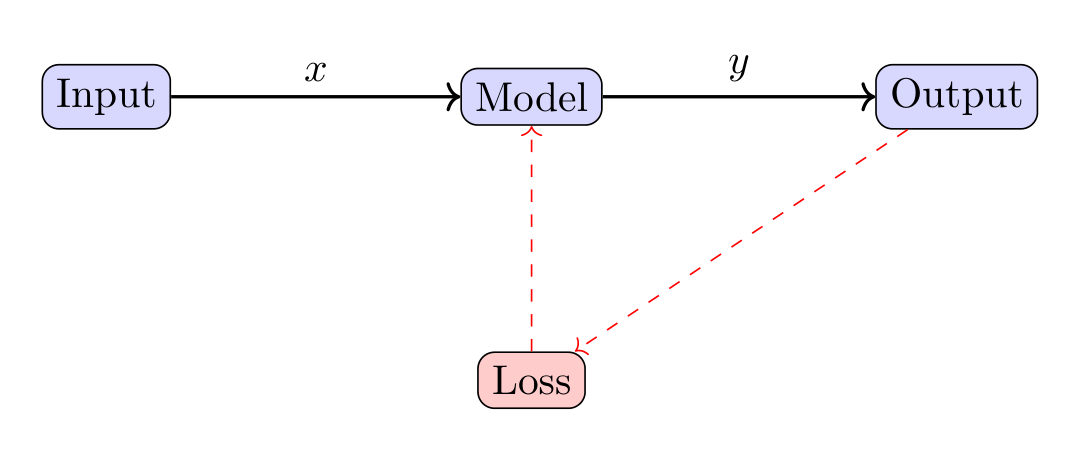
Seeing what the parser understood
Section titled “Seeing what the parser understood”parse_tikz returns the figure together with one diagnostic per statement, so
you can check what became a tikzfigure object and what did not.
result = parse_tikz(source)
print(f"coverage: {result.coverage:.0%}")for diagnostic in result.diagnostics:    print(diagnostic)
coverage: 100%line 3: \node -> Nodeline 4: \node -> Nodeline 5: \node -> Nodeline 6: \draw -> TikzPathline 7: \draw -> TikzPathRaw TikZ fallback
Section titled “Raw TikZ fallback”TikZ is much larger than tikzfigure’s API. Anything the library cannot
represent is kept verbatim as raw TikZ instead of being dropped, so the figure
still renders exactly as before. Here edge and plot have no Python
equivalent yet:
mixed = r"""\begin{tikzpicture}    \node[draw, circle] (a) at (0, 0) {a};    \node[draw, circle] (b) at (3, 0) {b};    \draw (a) edge[bend left, ->] (b);    \draw[domain=0:3, smooth, blue] plot (\x, {0.3*\x*\x - 1});\end{tikzpicture}"""
result = parse_tikz(mixed)print(result.summary())
2/4 statements mapped (50%) line 5: \draw kept as raw TikZ: path operation 'edge' line 6: \draw kept as raw TikZ: path element (plot)summary() lists the statements that stayed raw and why. The figure still
draws the curve and the bent arrow:
result.figure.show()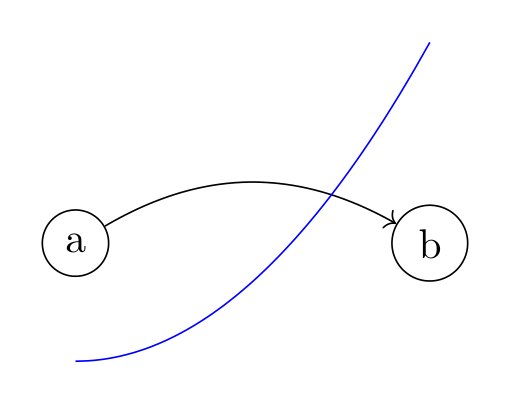
Because those statements survive untouched, you can keep editing the parts that were understood:
b = result.figure.layers.get_node("b")b.kwargs["fill"] = "green!30"result.figure.show()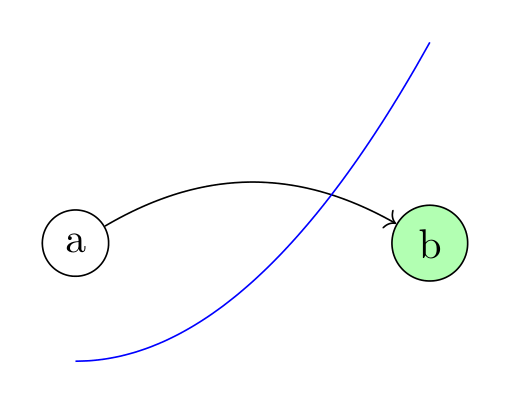
Strict mode
Section titled “Strict mode”When you want to know that a figure is fully represented as objects - for
instance before rewriting it programmatically - pass strict=True and handle
the error:
try: TikzFigure.from_tikz_code(mixed, strict=True)except TikzParseError as error: print(error)2 statement(s) could not be mapped to tikzfigure objects: line 5: \draw kept as raw TikZ: path operation 'edge' line 6: \draw kept as raw TikZ: path element (plot)Malformed input is reported with a line number rather than failing silently:
broken = "\\begin{tikzpicture}\n    \\node at (0, 0) {unclosed;\n\\end{tikzpicture}"
try:    TikzFigure.from_tikz_code(broken)except TikzParseError as error:    print(error)
line 2: unclosed '{'From TikZ to Python code
Section titled “From TikZ to Python code”to_python() writes the Python that rebuilds a figure. Combined with the
parser, it converts existing TikZ into a tikzfigure script:
print(TikzFigure.from_tikz_code(source).to_python())from tikzfigure import TikzFigure
fig = TikzFigure(figure_setup='scale=1.2')fig.add_style('box', options=['draw', 'rounded corners'], fill='blue!15')fig.add_node(0, 0, label='input', content='Input', options=['box'])fig.add_node(3, 0, label='model', content='Model', options=['box'])fig.add_node(6, 0, label='output', content='Output', options=['box'])fig.draw(['input', 'model'], segment_options=[{'connector': '--', 'node': {'content': '$x$', 'options': ['above']}}], options=['->', 'thick'])fig.draw(['model', 'output'], segment_options=[{'connector': '--', 'node': {'content': '$y$', 'options': ['above']}}], options=['->', 'thick'])The generated code is executed and compared against the original figure before it is returned, so it is verified rather than merely plausible. The same thing is available on the command line:
python -m tikzfigure.codegen figure.tikz -o figure.pyWhat survives a round trip
Section titled “What survives a round trip”A statement is only turned into an object when that object renders back to equivalent TikZ, which means importing a figure never quietly changes it:
imported = TikzFigure.from_tikz_code(source)reparsed = TikzFigure.from_tikz_code(imported.generate_tikz())
print(imported.generate_tikz() == reparsed.generate_tikz())TrueShow the TikZ code
% --------------------------------------------- %% Tikzfigure generated by tikzfigure v0.5.0 %% https://github.com/max-models/tikzfigure %% --------------------------------------------- %\begin{tikzpicture}[ scale=1.2, box/.style={draw, rounded corners, fill=blue!15} ] \node[box] (input) at ({0}, {0}) {Input}; \node[box] (model) at ({3}, {0}) {Model}; \node[box] (output) at ({6}, {0}) {Output}; \draw[->, thick] (input) -- node[above] {$x$} (model); \draw[->, thick] (model) -- node[above] {$y$} (output); \node[box, fill=red!20] (loss) at ({3}, {-2}) {Loss}; \draw[->, dashed, color=red] (output) to (loss); \draw[->, dashed, color=red] (loss) to (model);\end{tikzpicture}Show the standalone LaTeX document
\documentclass[border=10pt]{standalone}\PassOptionsToPackage{dvipsnames,svgnames,x11names}{xcolor}\usepackage{tikz}\usepackage{pgfplots}\pgfplotsset{compat=newest}\usepgfplotslibrary{groupplots}\usetikzlibrary{arrows.meta}\begin{document}% --------------------------------------------- %% Tikzfigure generated by tikzfigure v0.5.0     %% https://github.com/max-models/tikzfigure      %% --------------------------------------------- %\begin{tikzpicture}[        scale=1.2,        box/.style={draw, rounded corners, fill=blue!15}    ]    \node[box] (input) at ({0}, {0}) {Input};    \node[box] (model) at ({3}, {0}) {Model};    \node[box] (output) at ({6}, {0}) {Output};    \draw[->, thick] (input) -- node[above] {$x$} (model);    \draw[->, thick] (model) -- node[above] {$y$} (output);    \node[box, fill=red!20] (loss) at ({3}, {-2}) {Loss};    \draw[->, dashed, color=red] (output) to (loss);    \draw[->, dashed, color=red] (loss) to (model);\end{tikzpicture}
\end{document}
The tikz_catalogue/ directory in the repository collects TikZ documents used
to measure this. Run
python -m tikzfigure.parser.catalogue tikz_catalogue --detailsfor a report of how much of each example maps onto tikzfigure objects, and which TikZ constructs still fall back to raw output.