Aperture3D
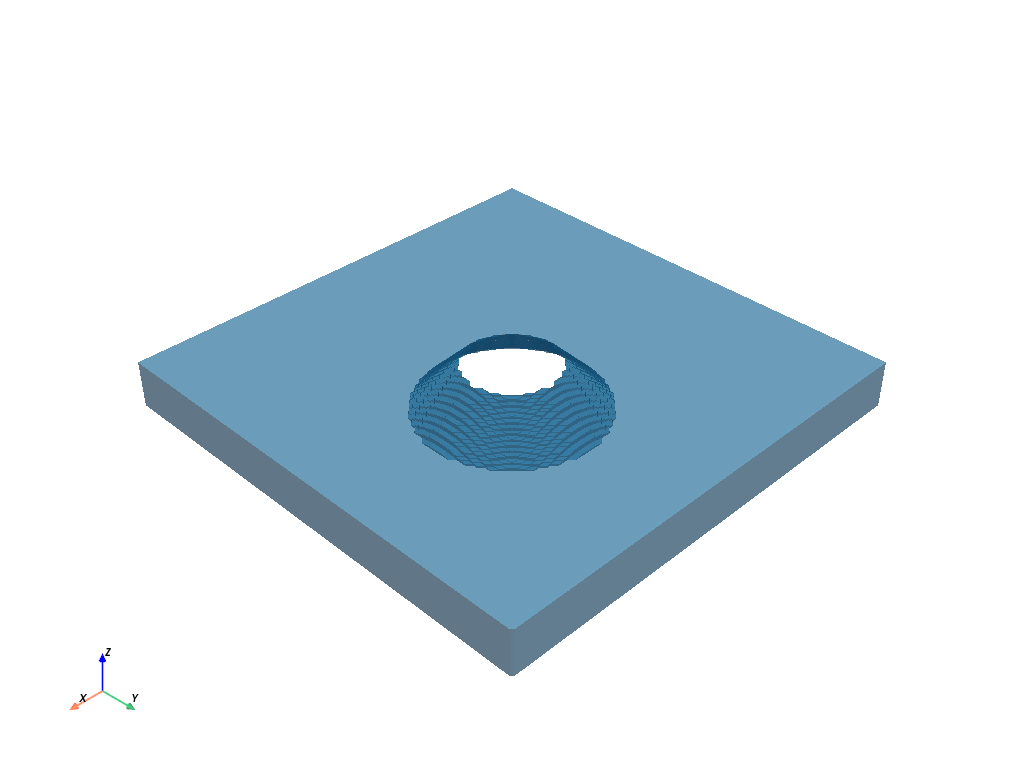
A plate with a round opening along a coordinate axis: the extraction or acceleration grid of an ion source, a skimmer or a beam-limiting aperture.
Aperture3D(axis, center_coords, vertices, lower_bound, upper_bound) takes the opening’s
radius along the axis as (axial, radius) vertices, interpolated linearly between them, and
the box the plate fills. It is inverted by default: the solid is the material around the
opening, and nothing outside the box. It has no level set, so crossings are sampled.
import matplotlib.pyplot as plt
from simgeometry import Aperture3D
# a 0.2 thick plate whose bore narrows from radius 0.4 to 0.2grid_plate = Aperture3D(    axis="z",    center_coords=(0.0, 0.0),    vertices=[(0.0, 0.4), (0.2, 0.2)],    lower_bound=(-1.0, -1.0, 0.0),    upper_bound=(1.0, 1.0, 0.2),)print("on the axis:", grid_plate.contains((0.0, 0.0, 0.1)))print("radius 0.3 at the front:", grid_plate.contains((0.3, 0.0, 0.01)))print("radius 0.3 at the back:", grid_plate.contains((0.3, 0.0, 0.19)))assert not grid_plate.contains((0.3, 0.0, 0.01)) and grid_plate.contains(    (0.3, 0.0, 0.19))
on the axis: Falseradius 0.3 at the front: Falseradius 0.3 at the back: TrueSection and surface
Section titled “Section and surface”The section y = 0 shows the tapered bore through the plate.
ax = grid_plate.show(y=0.0, resolution=200, display=False)ax.set_title("The section y = 0 of an Aperture3D")plt.show()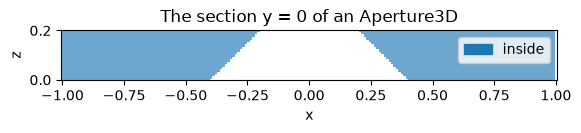
import plasma_plotsimport pyvista as pv
pv.OFF_SCREEN = True  # render without a window, e.g. on a docs server
plotter = grid_plate.show_3d(    backend="pyvista", display=False, resolution=96, show_bounds=False)plasma_plots.scene(plotter, alt="A square plate with a tapered round hole")