Plotting with the CLI
Install for this page:
pip install "scope-profiler[pproc]", including the optional interactive PyVis call-graph backend.
scope-profiler plot turns one or more profiling_data.h5 files into
charts and an aggregate statistics JSON. scope-profiler export writes the
same plot data and external viewer formats without rendering images. Together
they cover the same ground as the plotting functions described in
HDF5 output & post-processing from Python, without writing any code. For text/JSON
summaries instead of figures — including LIKWID hardware counters — see
scope-profiler inspect in CLI reference.
This page walks through the command with a concrete example. For the complete list of flags, see CLI reference.
The example run
Section titled “The example run”Every figure below comes from the same mock solver: a setup phase followed
by three timesteps, each containing assemble, solve and
halo_exchange, with io on every second step. It was run at 1, 2 and 4 MPI
ranks, producing run_1.h5, run_2.h5 and run_4.h5:
with ProfileManager.region("setup"):    ...
for step in range(3):    with ProfileManager.region("timestep"):        with ProfileManager.region("assemble"):            ...        with ProfileManager.region("solve"):            ...        with ProfileManager.region("halo_exchange"):            ...        if step % 2 == 1:            with ProfileManager.region("io"):                ...
The complete script, including the commands used to render every figure on
this page, is examples/generate_cli_docs_figures.py. The cell below runs the
same solver (under mpirun) into a temporary directory, so every command and
figure on this page is produced when the page is built.
Show code
import osimport shleximport shutilimport subprocessimport sysimport tempfilefrom importlib.util import find_specfrom pathlib import Path
from IPython.display import Image, display
WORKDIR = Path(tempfile.mkdtemp(prefix="scope-profiler-guide-"))
# The mock solver: a `setup` phase, then three `timestep`s with nested regions.# Work per rank shrinks with the rank count (imperfectly), communication grows.SOLVER = """import sysimport time
from mpi4py import MPI
from scope_profiler import ProfileManager
size = MPI.COMM_WORLD.Get_size()

def scaled(seconds, serial_fraction=0.15):    return seconds * (serial_fraction + (1.0 - serial_fraction) / size)

ProfileManager.setup(file_path=sys.argv[1])
with ProfileManager.region("setup"):    time.sleep(scaled(0.060))
for step in range(3):    with ProfileManager.region("timestep"):        with ProfileManager.region("assemble"):            time.sleep(scaled(0.025))        with ProfileManager.region("solve"):            time.sleep(scaled(0.060))        with ProfileManager.region("halo_exchange"):            time.sleep(0.004 * size)        if step % 2 == 1:            with ProfileManager.region("io"):                time.sleep(0.012)
ProfileManager.finalize(verbose=False)"""(WORKDIR / "solver.py").write_text(SOLVER)
mpirun = shutil.which("mpirun")if mpirun is None or find_spec("mpi4py") is None:    raise RuntimeError(        "This page needs mpirun and mpi4py to run the solver on 1, 2 and 4 ranks"    )
env = {    **os.environ,    "HDF5_USE_FILE_LOCKING": "FALSE",    "OMPI_ALLOW_RUN_AS_ROOT": "1",    "OMPI_ALLOW_RUN_AS_ROOT_CONFIRM": "1",}for ranks in (1, 2, 4):    subprocess.run(        [            mpirun,            "--oversubscribe",            "-n",            str(ranks),            sys.executable,            "solver.py",            f"run_{ranks}.h5",        ],        cwd=WORKDIR,        env=env,        check=True,    )
print(sorted(path.name for path in WORKDIR.glob("*.h5")))
['run_1.h5', 'run_2.h5', 'run_4.h5']Basic usage
Section titled “Basic usage”Choose a plot preset and give it an output directory:
sp("plot default run_2.h5 -o figures")$ scope-profiler plot default run_2.h5 -o figuresPlotting Gantt chart for ranks: [0, 1]Plotting duration comparison (total) for files: run_2Outputs saved to: figures/gantt_plot.png figures/durations_plot.png figures/region_statistics.jsonWithout -o/--output nothing is written; use --show to open the charts
interactively instead. The two can be combined.
Text summary instead of figures
Section titled “Text summary instead of figures”plot is for figures; for the numbers over ssh (or anywhere a plot isn’t
needed), use scope-profiler inspect instead — it prints the same
per-region statistics table ProfileManager.finalize() renders, plus a
LIKWID hardware counter table per rank and event group when the run recorded
any:
sp("inspect run_2.h5 --regions-only")Show output
$ scope-profiler inspect run_2.h5 --regions-only==============================================================================run_2.h52 rank(s), 6 region(s), 0.02 MiB, 0.218156 s wall clock, 0.230616 s total (setup to finalize)==============================================================================
  ╭──────────────────────────────────────╮  │ region                   total [s]   │  ├──────────────────────────────────────┤  │ setup (2x)               0.069147    │  │ timestep (6x)            0.366977    │  │ └─ (own)                    0.000297 │  │ └─ assemble (6x)            0.086668 │  │ └─ solve (6x)               0.207445 │  │ └─ halo_exchange (6x)       0.048428 │  │ └─ io (2x)                  0.024139 │  ╰──────────────────────────────────────╯
  ╭─ Info ────────────────────────────────────────────────────────────────╮  │ Summary: Regions (6)                                                  │  │                                                                       │  │ Explore:                                                              │  │   Inspect: scope-profiler inspect run_2.h5                            │  │   TUI:     scope-profiler tui run_2.h5                                │  │                                                                       │  │ Visualize and export:                                                 │  │   Plot:    scope-profiler plot default run_2.h5 -o plots --show       │  │   Report:  scope-profiler report run_2.h5 -o report.html              │  │   Export:  scope-profiler export plot-data run_2.h5 -o data           │  │   Lines:   scope-profiler line-profile run_2.h5                       │  │                                                                       │  │ Compare runs:                                                         │  │   Diff:    scope-profiler diff BASE.h5 CANDIDATE.h5                   │  │   Check:   scope-profiler check BASE.h5 CANDIDATE.h5                  │  │                                                                       │  │ Durations are in seconds.                                             │  │ Regions may nest, so the summed total can exceed the wall-clock time. │  ╰───────────────────────────────────────────────────────────────────────╯
--sort reorders it (total, calls, avg, min, max, std or
name), and --include/--exclude/--ranks narrow it as plot’s do for
the charts. See LIKWID hardware counters for the LIKWID counter table, and CLI reference
for the full flag list.
Gantt chart
Section titled “Gantt chart”gantt_plot.png places one lane per (region, rank) pair, with a bar for every
recorded call. It is the chart to reach for when the question is when things
happened — startup cost, gaps between steps, ranks drifting apart:
show("figures/gantt_plot.png")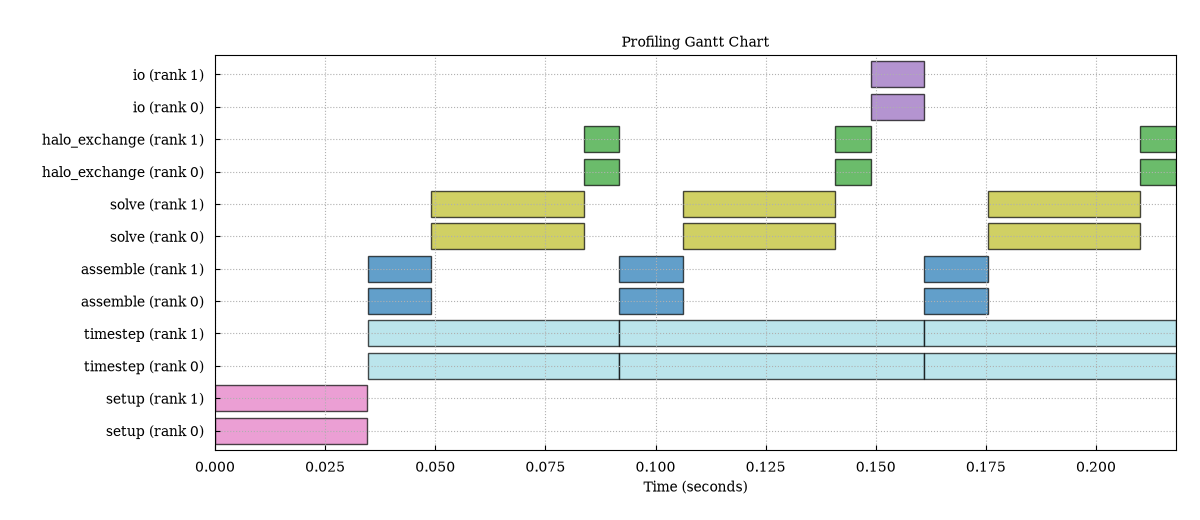
Both ranks appear by default, one lane per rank. Calls of the same region
share a color, and nested regions such as assemble and solve get their own
lanes rather than being drawn inside timestep — the flame graph below is the
view that shows the nesting.
Flame chart
Section titled “Flame chart”flame_chart_plot.png answers when the calls happened instead. The call stack is
reconstructed from timestamp containment — a region whose interval lies
inside another’s is drawn one level above it:
sp("plot flame_chart run_2.h5 -o figures")show("figures/flame_chart_plot.png")$ scope-profiler plot flame_chart run_2.h5 -o figuresPlotting flame chart for: run_2 (rank 0)For interactive flame-chart hover details, use --backend plotly.Outputs saved to: figures/flame_chart_plot.png figures/region_statistics.json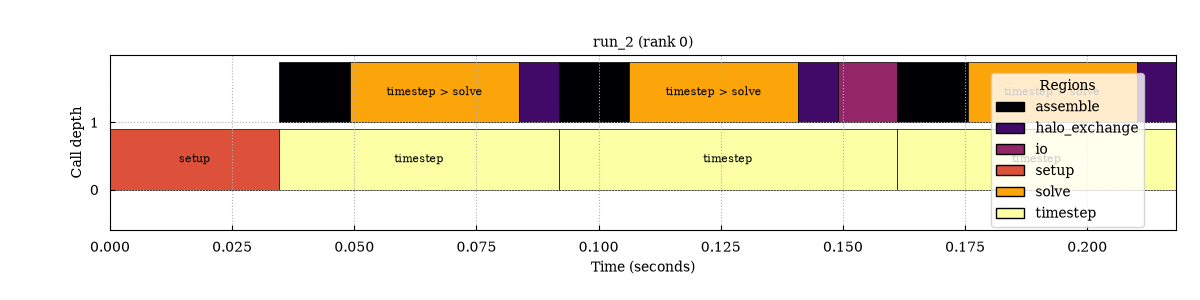
Like the Gantt chart, the flame chart is drawn per rank and defaults to
rank 0 only; pass --ranks to render more (one panel each).
Both flame views use the warm inferno colormap by default; override it with
--cmap when needed.
Flame graph
Section titled “Flame graph”flame_graph_plot.png aggregates repeated call paths. Its horizontal axis is
accumulated duration rather than wall-clock position, so it shows where the
recorded time went rather than when calls happened:
sp("plot flame_graph run_2.h5 -o figures")show("figures/flame_graph_plot.png")$ scope-profiler plot flame_graph run_2.h5 -o figuresPlotting flame graph for: run_2 (rank 0)For interactive flame-chart hover details, use --backend plotly.Outputs saved to: figures/flame_graph_plot.png figures/region_statistics.json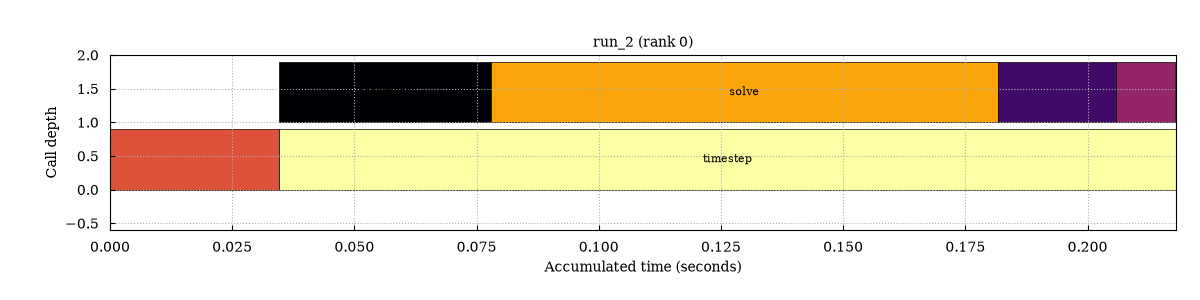
Duration bar charts
Section titled “Duration bar charts”One bar chart is written per duration statistic. By default only total time
is shown; request other statistics with --metrics:
sp("plot durations run_2.h5 -o figures")show("figures/durations_plot.png")$ scope-profiler plot durations run_2.h5 -o figuresPlotting duration comparison (total) for files: run_2Outputs saved to: figures/durations_plot.png figures/region_statistics.json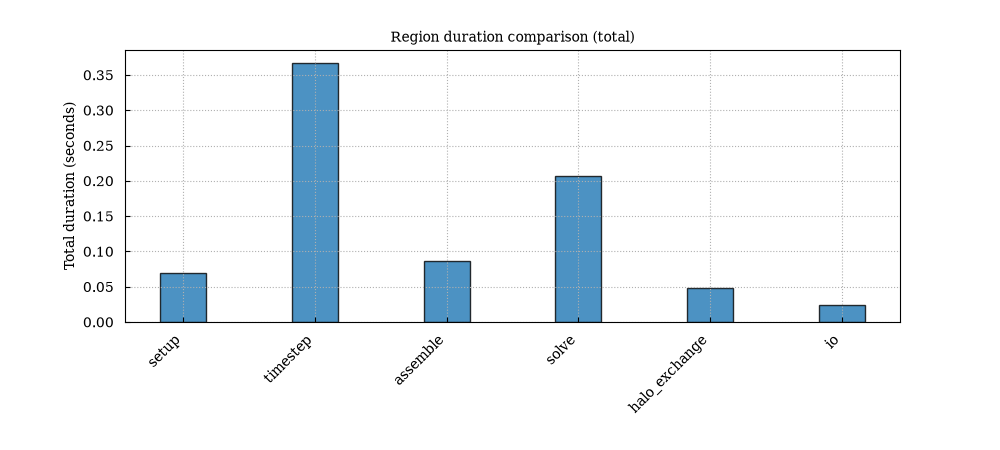
For example, --metrics avg total also writes an average-per-call chart. With
several input files, bars are grouped per region so runs can be compared side
by side.
sp("plot durations run_2.h5 -o figures_avg --metrics avg total")listing("figures_avg")$ scope-profiler plot durations run_2.h5 -o figures_avg --metrics avg totalPlotting duration comparison (avg, total) for files: run_2Outputs saved to: figures_avg/durations_plot_avg.png figures_avg/durations_plot_total.png figures_avg/region_statistics.jsonfigures_avg/durations_plot_avg.png (41579 bytes)figures_avg/durations_plot_total.png (41968 bytes)figures_avg/region_statistics.json (8453 bytes)Duration over time
Section titled “Duration over time”duration_timeseries_plot.png plots each region’s per-call duration against
wall-clock time, with a band spanning the minimum and maximum across the
selected ranks. Rank imbalance shows up as a widening band, and slow drift
(cache growth, memory pressure, throttling) as a trend:
sp("plot timeseries run_2.h5 -o figures")show("figures/duration_timeseries_plot.png")$ scope-profiler plot timeseries run_2.h5 -o figuresPlotting duration over time for files: run_2Outputs saved to: figures/duration_timeseries_plot.png figures/region_statistics.json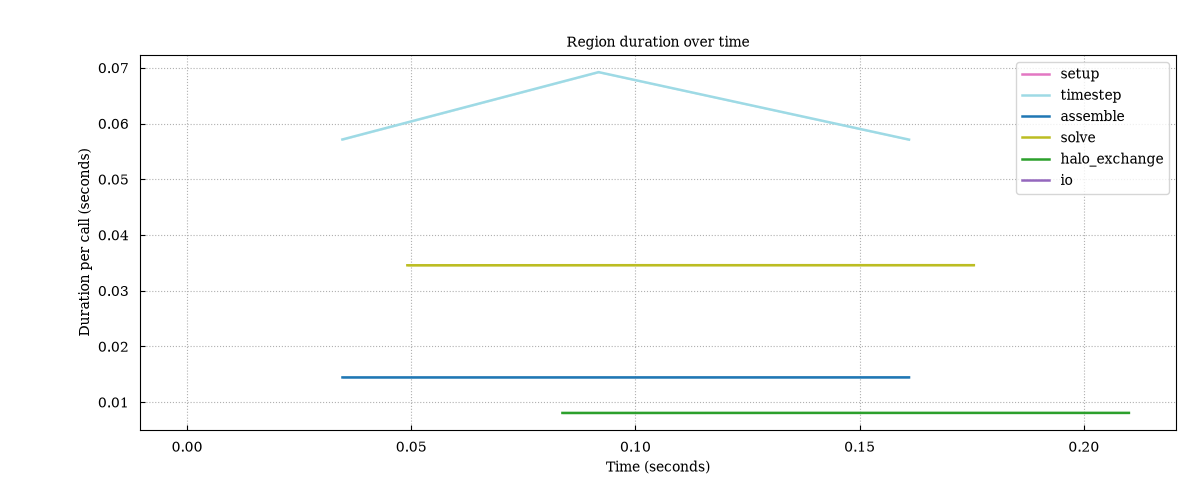
Here the middle timestep stands out, because that is the step that also
writes io. Regions called only once — setup and io in this run — are a
single point and stay invisible between the lines.
Comparing several runs
Section titled “Comparing several runs”Passing several files compares them. Each chart then either stacks one panel per file (Gantt, flame chart, flame graph) or groups the files together (durations), and a speedup plot is added:
sp("plot default run_1.h5 run_2.h5 run_4.h5 -o figures_scaling")show("figures_scaling/durations_plot.png")$ scope-profiler plot default run_1.h5 run_2.h5 run_4.h5 -o figures_scalingPlotting combined Gantt chart for files: run_1, run_2, run_4Plotting duration comparison (total) for files: run_1, run_2, run_4Outputs saved to: figures_scaling/gantt_plot.png figures_scaling/durations_plot.png figures_scaling/region_statistics.json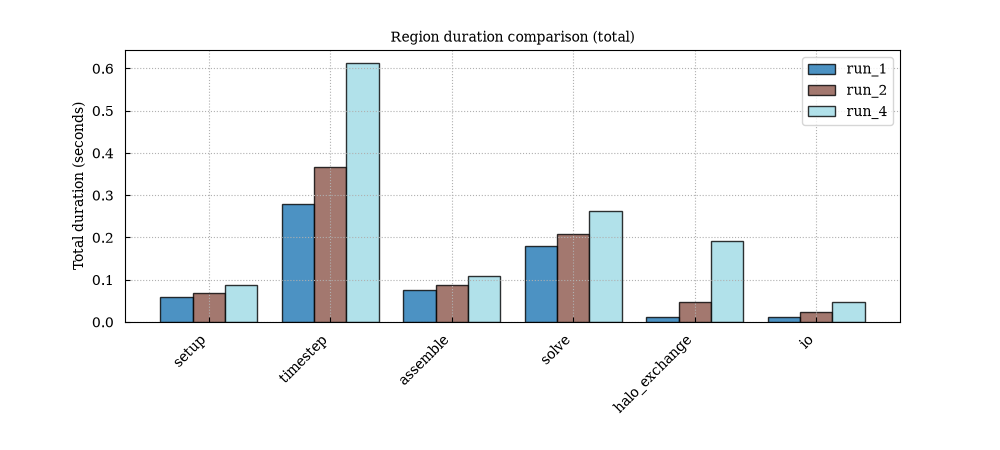
sp("plot speedup run_1.h5 run_2.h5 run_4.h5 -o figures_scaling")show("figures_scaling/speedup_plot.png")$ scope-profiler plot speedup run_1.h5 run_2.h5 run_4.h5 -o figures_scalingPlotting speedup comparison using x_field='num_ranks', values: 1, 2, 4Outputs saved to: figures_scaling/speedup_plot.png figures_scaling/region_statistics.json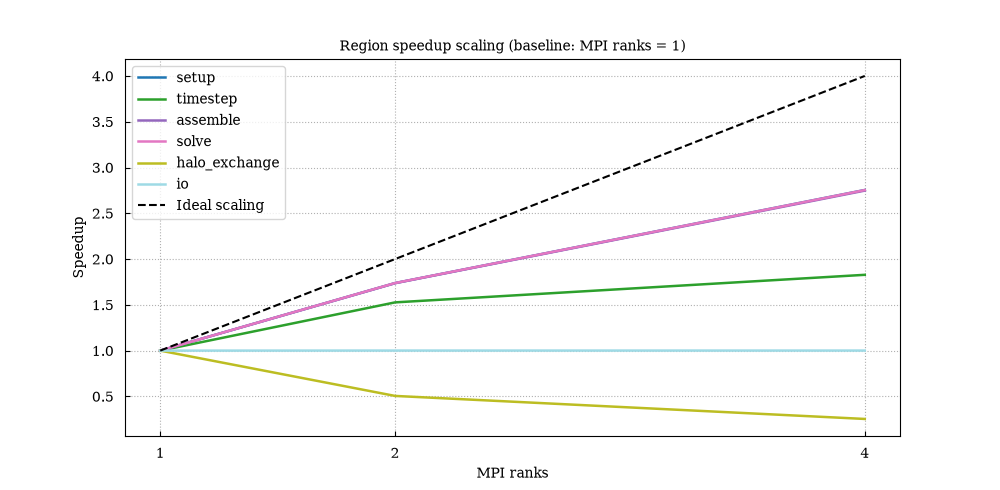
Each line is one region’s speedup relative to the smallest run, derived from
average per-call durations, against the dashed ideal-scaling line. The mock
solver behaves as designed: solve and assemble scale well, io is serial
and flat, and halo_exchange gets slower with more ranks, dragging
timestep below the ideal line.
The x-axis is the MPI rank count by default. --x switches it to
num_nodes, omp_num_threads or total_cores (all read from the run
metadata), or to
any other metadata field — in which case the files stay in the order given on
the command line and no ideal-scaling line is drawn. This needs runs that
recorded such metadata, which the MPI-only example runs here did not, so the
command is shown, not run:
scope-profiler plot speedup omp_*.h5 -o figures_scaling --x omp_num_threadsFiles can also be selected with wildcards. Quote the pattern to let scope-profiler expand it rather than the shell:
runs = WORKDIR / "runs"runs.mkdir()for path in WORKDIR.glob("run_*.h5"):    shutil.copy(path, runs / path.name)
sp('plot default "runs/run_*.h5" -o figures_wildcard')
$ scope-profiler plot default "runs/run_*.h5" -o figures_wildcardPlotting combined Gantt chart for files: run_1, run_2, run_4Plotting duration comparison (total) for files: run_1, run_2, run_4Outputs saved to: figures_wildcard/gantt_plot.png figures_wildcard/durations_plot.png figures_wildcard/region_statistics.jsonNaming the runs
Section titled “Naming the runs”Each run is named after its label — set with
ProfileManager.setup(label=...), see Configuration — or, for runs
that set none, after its file’s stem. That name is what appears in chart
legends and panel titles, region_statistics.json and the exported .prof /
speedscope filenames.
--label overrides it for one invocation, once per file, in the order the
files are given:
sp( "plot default run_1.h5 run_2.h5 run_4.h5 -o figures_labeled " '--label "1 rank" --label "2 ranks" --label "4 ranks"')show("figures_labeled/durations_plot.png")$ scope-profiler plot default run_1.h5 run_2.h5 run_4.h5 -o figures_labeled --label "1 rank" --label "2 ranks" --label "4 ranks"Plotting combined Gantt chart for files: 1 rank, 2 ranks, 4 ranksPlotting duration comparison (total) for files: 1 rank, 2 ranks, 4 ranksOutputs saved to: figures_labeled/gantt_plot.png figures_labeled/durations_plot.png figures_labeled/region_statistics.json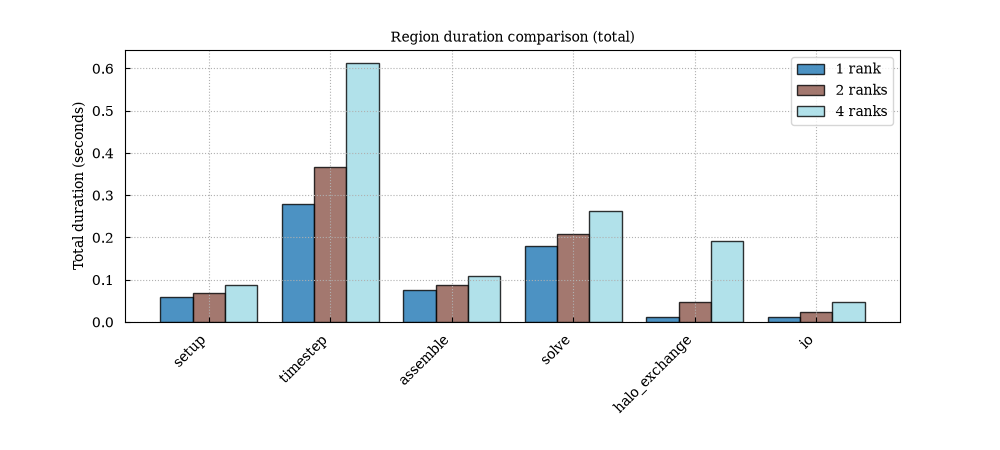
The files themselves are not modified. Labels are free text; where one is used in a filename, spaces and other awkward characters become underscores.
Selecting which plots to generate
Section titled “Selecting which plots to generate”Use a named plot kind for a single chart, or a preset for a common group:
# the quick preset for several runssp("plot quick run_1.h5 run_2.h5 run_4.h5 -o figures_quick")
# just the Gantt chart, written to a specific filesp("plot gantt run_2.h5 -o gantt.png")
$ scope-profiler plot quick run_1.h5 run_2.h5 run_4.h5 -o figures_quickPlotting duration comparison (total) for files: run_1, run_2, run_4Plotting speedup comparison using x_field='num_ranks', values: 1, 2, 4Plotting weak scaling comparison using x_field='num_ranks', values: 1, 2, 4Plotting rank × region duration heatmapOutputs saved to: figures_quick/durations_plot.png figures_quick/speedup_plot.png figures_quick/weak_scaling_plot.png figures_quick/rank_heatmap_plot.png figures_quick/scaling_efficiency_plot.png figures_quick/region_statistics.json$ scope-profiler plot gantt run_2.h5 -o gantt.pngPlotting Gantt chart for ranks: [0, 1]Outputs saved to: gantt.pngRun scope-profiler plot list to see the available names. The built-in
presets are default (gantt and total durations), quick (durations,
rank_heatmap, scaling_efficiency, speedup and weak_scaling), and all
(every plot except LIKWID unless --metric is given):
sp("plot list")Show the plot kinds and presets
$ scope-profiler plot listpresets:  default    durations, gantt  quick      durations, rank_heatmap, scaling_efficiency, speedup, weak_scaling  all        every plot except counter plots (select those explicitly)
plots:  gantt      per-rank timeline of every call (default)  density    binned timeline occupancy heatmap (optional)  flame_chart time-based nested call-stack flame chart (optional)  flame_graph aggregated call-stack flame graph (optional)  callgraph  parent/child call graph from explicit call ids (optional)  durations  bar chart of duration statistics per region (default)  timeseries duration per call over wall-clock time (optional)  speedup    scaling across multiple files (2+ files only) (optional)  weak_scaling weak scaling across multiple files (2+ files only) (optional)  weak_scaling_efficiency weak-scaling efficiency, for runs of constant work per rank (optional)  rank_heatmap total duration by rank and region (optional)  scaling_efficiency measured versus ideal parallel efficiency (optional)  histogram  call-duration distribution per region (optional)  imbalance  per-rank duration comparison, to spot stragglers (optional)  likwid     one LIKWID hardware-counter metric (needs --likwid-metric) (optional)  roofline   LIKWID FLOP/byte roofline (needs FLOP-rate and bandwidth metrics) (optional)  perf_events one Linux perf-event metric (needs --metric, e.g. ipc) (optional)
Filtering regions and ranks
Section titled “Filtering regions and ranks”--include and --exclude take regular expressions matched against region
names, and --ranks selects ranks — as individual values, dash ranges, or a
mix (0,2,4-7 expands to 0, 2, 4, 5, 6, 7):
sp("plot gantt run_2.h5 -o figures_filtered --include solve assemble --ranks 0")show("figures_filtered/gantt_plot.png")$ scope-profiler plot gantt run_2.h5 -o figures_filtered --include solve assemble --ranks 0Plotting Gantt chart for ranks: [0]Outputs saved to: figures_filtered/gantt_plot.png figures_filtered/region_statistics.json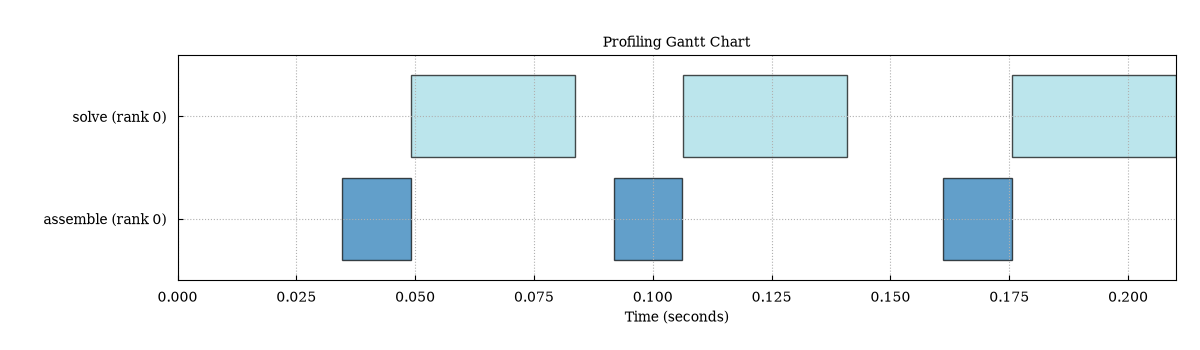
Filtering applies to every output of the run, including
region_statistics.json. On a large run it is also the quickest way to make
the charts readable again.
Region statistics JSON
Section titled “Region statistics JSON”Whenever -o/--output is given, region_statistics.json is written
alongside the figures. It holds the numbers behind the charts: per-file,
per-region aggregates, the same statistics per rank, and the region names
common to all input files.
Each file’s label — the name it is given in chart legends here too — is
the one the run set with ProfileManager.setup(label=...), falling back to the
file’s stem for runs that set none.
{ "units": { "durations": "seconds" }, "filters": { "include": null, "exclude": null, "ranks": null }, "common_regions": ["setup", "timestep", "assemble", "solve", "halo_exchange", "io"], "files": [ { "label": "run_2", "file_path": "/scratch/run/run_2.h5", "num_ranks": 2, "region_statistics": { "setup": { "count": 2, "average_duration_seconds": 0.039551083, "min_duration_seconds": 0.0395205, "max_duration_seconds": 0.039581666, "std_duration_seconds": 3.0583e-05, "total_duration_seconds": 0.079102166, "per_rank": { "0": { "count": 1, "average_duration_seconds": 0.0395205, "...": "..." }, "1": { "count": 1, "average_duration_seconds": 0.039581666, "...": "..." } } } } } ]}The same structure from the run above, with only the setup region and the
first rank kept:
import json
stats = json.loads((WORKDIR / "figures" / "region_statistics.json").read_text())entry = stats["files"][0]region = entry["region_statistics"]["setup"]region["per_rank"] = {"0": region["per_rank"]["0"]}entry["region_statistics"] = {"setup": region}print(json.dumps(stats, indent=2))
Show region_statistics.json (abridged)
{ "format": "scope-profiler-plot-data", "format_version": 1, "plot": "region_statistics", "units": { "durations": "seconds" }, "filters": { "include": null, "exclude": null, "ranks": null }, "common_regions": [ "setup", "timestep", "assemble", "solve", "halo_exchange", "io" ], "files": [ { "label": "run_2", "file_path": "/tmp/scope-profiler-guide-ffzepm8k/run_2.h5", "num_ranks": 2, "total_time_seconds": 0.2306159569999977, "region_statistics": { "setup": { "count": 2, "average_duration_seconds": 0.034573581, "min_duration_seconds": 0.034571658, "max_duration_seconds": 0.034575504, "first_duration_seconds": 0.034571658, "last_duration_seconds": 0.034575504, "std_duration_seconds": 1.9230000000008962e-06, "total_duration_seconds": 0.069147162, "per_rank": { "0": { "count": 1, "average_duration_seconds": 0.034571658, "min_duration_seconds": 0.034571658, "max_duration_seconds": 0.034571658, "first_duration_seconds": 0.034571658, "last_duration_seconds": 0.034571658, "std_duration_seconds": 0.0, "total_duration_seconds": 0.034571658 } } } } } ]}Interactive HTML charts
Section titled “Interactive HTML charts”--backend plotly renders the same charts as self-contained interactive
.html files instead of PNGs, with zooming and hover labels — useful for
long runs where a static Gantt chart becomes a smear. With --show, the
pages open in a browser:
sp("plot default run_2.h5 -o figures_html --backend plotly")listing("figures_html")$ scope-profiler plot default run_2.h5 -o figures_html --backend plotlyPlotting Gantt chart for ranks: [0, 1]Plotting duration comparison (total) for files: run_2Outputs saved to: figures_html/gantt_plot.html figures_html/durations_plot.html figures_html/region_statistics.jsonfigures_html/durations_plot.html (4826168 bytes)figures_html/gantt_plot.html (4841836 bytes)figures_html/region_statistics.json (8453 bytes)Each .html file embeds the whole Plotly bundle, so it is a few MB and is
listed here rather than embedded in this page; open it in a browser.
Hovering any bar, point, cell or flame frame shows the summary of the region
it belongs to — the same statistics
Region.get_summary() reports (calls, total, self, average,
min, max, first, last, std, and the GPU totals when there are any), plus what
identifies the thing under the cursor: the hovered call’s own start and
duration on the Gantt chart, the bin on the histogram, the run behind a
scaling point. A bar showing one rank’s data is described by that rank’s
region; a bar pooled over ranks by the pooled one. A --combine-regions bar
has no single region behind it, so it lists its members and their pooled
statistics instead.
The matplotlib backend (the default) writes .png and needs no extra
dependency; the Plotly backend writes .html and likewise needs nothing
beyond Plotly itself.
Build a chart in your own site
Section titled “Build a chart in your own site”@scope-profiler/plotly turns the JSON written by export plot-data into a
plain Plotly { data, layout } figure. It does not bundle Plotly, so a site
can choose its own Plotly build and renderer. This live example is rendered by
the published npm package in the documentation page itself:
npm install @scope-profiler/plotly plotly.js-dist-minThe same pattern works with real output:
import Plotly from "plotly.js-dist-min";import { buildGanttFigure, renderFigure } from "@scope-profiler/plotly";
const payload = await fetch("/figures/gantt_data.json").then((response) => response.json());await renderFigure(Plotly, document.querySelector("#gantt"), buildGanttFigure(payload));
See Plotly figures for the web for Gantt, durations, flame, and speedup examples.
For terminal-friendly simple plots, use Plotext 6 (pip install plotext):
if find_spec("plotext") is None: print("plotext is not installed: pip install plotext")else: sp("plot durations run_2.h5 --backend plotext -o durations.txt") print((WORKDIR / "durations.txt").read_text())Show durations.txt
$ scope-profiler plot durations run_2.h5 --backend plotext -o durations.txtPlotting duration comparison (total) for files: run_2Outputs saved to: durations.txt Region duration comparison (total) ┌──┬─────────────┬─────────────┬────────────┬─────────────┬─────────────┬──┐0.37┼──┼───────────█████───────────┼────────────┼─────────────┼─────────────┼──┤ │ │ █████ │ │ │ │ │ │ │ █████ │ │ │ │ │ │ │ █████ │ │ │ │ │0.28┼──┼───────────█████───────────┼────────────┼─────────────┼─────────────┼──┤ │ │ █████ │ │ │ │ │ │ │ █████ │ │ │ │ │ │ │ █████ │ ██████ │ │ │0.18┼──┼───────────█████───────────┼──────────██████──────────┼─────────────┼──┤ │ │ █████ │ ██████ │ │ │ │ │ █████ │ ██████ │ │ │ │ │ █████ │ ██████ │ │ │0.09┼──┼───────────█████────────██████────────██████──────────┼─────────────┼──┤ │██████ █████ ██████ ██████ │ │ │ │██████ █████ ██████ ██████ █████ │ │ │██████ █████ ██████ ██████ █████ ██████│0.00┼██████────────█████────────██████────────██████────────█████────────██████┤ └──┼─────────────┼─────────────┼────────────┼─────────────┼─────────────┼──┘ setup timestep assemble solve halo_exchange ioTotal duration (seconds)Plotext writes plain text and is intentionally limited to simple duration, scaling, histogram, and imbalance plots; use Matplotlib or Plotly for Gantt, flame, heatmap, and hardware-counter visualizations.
PyVis renders the interactive callgraph only; it cannot render timeline or
flame charts. For example, use scope-profiler plot callgraph run.h5 --backend pyvis, or choose Matplotlib/Plotly for flame_chart or flame_graph:
sp("plot callgraph run_2.h5 --backend pyvis -o figures_callgraph")print( (WORKDIR / "figures_callgraph" / "callgraph_plot.html").stat().st_size, "bytes of HTML",)$ scope-profiler plot callgraph run_2.h5 --backend pyvis -o figures_callgraphOutputs saved to: figures_callgraph/callgraph_plot.html figures_callgraph/region_statistics.json8563 bytes of HTMLExporting the data behind the charts
Section titled “Exporting the data behind the charts”scope-profiler export plot-data writes the exact series each chart was drawn
from, so the figures can be reproduced — or re-styled elsewhere — without the
HDF5 files:
sp("export plot-data run_2.h5 -o data")$ scope-profiler export plot-data run_2.h5 -o dataPlotting Gantt chart for ranks: [0, 1]Plotting duration comparison (total) for files: run_2Outputs saved to: data/gantt_data.csv data/durations_data.csv data/region_statistics.jsonEach plot kind has its own file; the CSV columns are:
gantt_data.csv file, rank, region, start_seconds, end_secondsflame_chart_data.csv file, rank, call_id, parent_call_id, region, call_path, source_file, source_lineno, depth, start_seconds, end_seconds, inclusive_duration_seconds, exclusive_duration_secondsdurations_data.csv file, region, metric, value_secondsduration_timeseries_data.csv file, region, call_index, time_seconds, mean/min/max_duration_seconds, num_ranksspeedup_data.csv only when several files are passedThe start of gantt_data.csv from the run above:
for line in (WORKDIR / "data" / "gantt_data.csv").read_text().splitlines()[:4]: print(line)file,rank,region,start_seconds,end_secondsrun_2,0,setup,0.0,0.03457165799997597run_2,1,setup,1.349999934063817e-07,0.03457563899999627run_2,0,timestep,0.03463021700000013,0.09179187399999478--format json writes JSON instead, including a colors map
matching the colors used in the plots, so a re-rendered chart keeps the same
region colors. Gantt, flame and roofline data also carry file_ranks, each
run’s rank count: plots name a rank - solve (rank 0) - only for a run with
more than one, and the @scope-profiler/plotly builders follow the same rule.
Gantt JSON intervals also carry depth, the call’s nesting level (0 for a
top-level call), when the rank’s calls nest; the builders’ maxDepth and
topN options use it to hide nested calls and keep the most expensive regions.
sp("export plot-data run_2.h5 -o data_json --format json")
payload = json.loads((WORKDIR / "data_json" / "gantt_data.json").read_text())print(json.dumps({**payload, "intervals": payload["intervals"][:2]}, indent=2))
Show gantt_data.json (first two intervals)
$ scope-profiler export plot-data run_2.h5 -o data_json --format jsonPlotting Gantt chart for ranks: [0, 1]Plotting duration comparison (total) for files: run_2Outputs saved to: data_json/gantt_data.json data_json/durations_data.json data_json/region_statistics.json{ "format": "scope-profiler-plot-data", "format_version": 1, "plot": "gantt", "intervals": [ { "file": "run_2", "rank": 0, "region": "setup", "start_seconds": 0.0, "end_seconds": 0.03457165799997597, "depth": 0 }, { "file": "run_2", "rank": 1, "region": "setup", "start_seconds": 1.349999934063817e-07, "end_seconds": 0.03457563899999627, "depth": 0 } ], "colors": { "setup": "#e377c2", "timestep": "#9edae5", "assemble": "#1f77b4", "solve": "#bcbd22", "halo_exchange": "#2ca02c", "io": "#9467bd" }, "file_ranks": { "run_2": 2 }}Exporting to external profile viewers
Section titled “Exporting to external profile viewers”scope-profiler export also writes the run in formats other tools understand:
# cProfile/pstats format, one file per exported ranksp("export prof run_2.h5 -o figures")
# speedscope, one file holding one profile per exported ranksp("export speedscope run_2.h5 -o figures")
$ scope-profiler export prof run_2.h5 -o figuresOutputs saved to: figures/profile_rank0.prof
View a .prof file with: snakeviz figures/profile_rank0.prof$ scope-profiler export speedscope run_2.h5 -o figuresOutputs saved to: figures/profile.speedscope.json
View figures/profile.speedscope.json at https://www.speedscope.app (or: npx speedscope <file>)Open them with the viewers, which need a terminal or a browser and are not run here:
snakeviz figures/profile_rank0.profnpx speedscope figures/profile.speedscope.jsonBoth reconstruct the call graph from region nesting the same way the flame
graph does, and both export only the ranks selected with --ranks (rank 0 by
default). CLI reference documents what that reconstruction implies for
partially overlapping regions and recursion.
The .prof export preserves reconstructed call paths for SnakeViz: a solve
region reached through assembly and one reached through postprocess
appear as assembly > solve and postprocess > solve respectively. This
makes the tree larger, but prevents different call sites from being conflated.
Files without timing data
Section titled “Files without timing data”A run that entered no region records nothing to plot. Rather than failing
inside the plotting code, plot reports what is there and stops:
(WORKDIR / "empty.py").write_text(    "from scope_profiler import ProfileManager\n"    'ProfileManager.setup(file_path="empty_run.h5")\n'    "ProfileManager.finalize(verbose=False)\n")subprocess.run([sys.executable, "empty.py"], cwd=WORKDIR, env=env, check=True)
sp("plot default empty_run.h5")
$ scope-profiler plot default empty_run.h5No timing data found - these files recorded no calls.
empty_run.h5:Reproducing the figures on this page
Section titled “Reproducing the figures on this page”python examples/generate_cli_docs_figures.pyThe script runs the mock solver at 1, 2 and 4 ranks (via mpirun, if
available), invokes the plot commands shown above, and copies the
resulting PNGs into figures/cli/, which the docs build serves at
figures/cli/ of the site. Pass --keep DIR to also keep the HDF5 files and the
raw CLI output around. The figures on this page are no longer taken from there:
the cells above regenerate them each time the page is built.