Jupyter/IPython magics
Install for this page:
pip install "scope-profiler[notebook,pproc,line-profiler]"enables every example.notebookalone covers the basic magics,pprocadds plots and DataFrames, andline-profilerenables%%scope_line.
scope_profiler.ipython_magics adds eleven magics to a notebook or IPython
session, so a quick “how long is this cell/line taking, and where” doesn’t
need the ProfileManager.session()/region() boilerplate spelled
out by hand each time. It is a thin adapter, not a second implementation:
every magic calls straight into the same API the HDF5 output & post-processing from Python
page describes - ProfileManager.session/region,
ProfilingResults.print_summary/to_dataframe, read_h5, the
diff_rows/print_diff_table functions behind scope-profiler diff, and
prof_export/speedscope_export.
%%scope / %scope_timeit / %%scope_line / %%scope_recursive / %%scope_agg | ProfileManager.session(return_results=True) vProfilingResults ---kept in memory, keyed by name--- <-- %scope_load (read_h5) | +-- print_summary() (the recording magics, %scope_last) +-- to_dataframe() / to_events_dataframe() (%scope_df) +-- plot_durations() (-p / --plot) +-- diff_rows() + print_diff_table() (%scope_compare) +-- export_prof() / export_speedscope() (%scope_export)A rule of thumb for which recording magic to reach for:
| You want | Magic |
|---|---|
| Time this cell as one block | %%scope |
| Time one statement, repeatedly | %scope_timeit |
| Find the slow line in a function | %%scope_line |
| Find the slow function, with nothing instrumented | %%scope_recursive |
| Time a region entered millions of times | %%scope_agg |
Every cell below runs live in this notebook. The examples work on a tiny toy
workload (time.sleep stands in for real work, so the timings are stable on
any machine), and nothing is written outside a scratch directory.
Installing and loading
Section titled “Installing and loading”pip install "scope-profiler[notebook]"This is a separate extra from the base install (it pulls in IPython);
pip install scope-profiler alone is unaffected. -p/--plot additionally
needs the pproc extra, exactly as scope-profiler plot does.
Load the extension once per kernel:
%load_ext scope_profiler.ipython_magics%%scope - profile a cell
Section titled “%%scope - profile a cell”%%scope solveresult = solve(problem)%%scope 'solve' ╭──────────────────────────────────────────────────────╮ │ region % session total [s] │ ├──────────────────────────────────────────────────────┤ │ scope_profiler.session 100.00% 0.002334 │ │ └─ (own) 2.97% 0.000069 │ │ └─ solve 97.03% 0.002265 │ ╰──────────────────────────────────────────────────────╯Runs the cell inside a profiling region named solve (the name is optional;
it defaults to "cell") and prints the region summary table immediately
after. Nothing is written to disk - the result lives in the kernel’s memory
for the rest of the session, stored under that name for %scope_last and
%scope_compare to refer back to.
Options:
-q/--quiet- suppress the printed table (still records the run).-p/--plot- also show a duration bar chart (plot_durations).--include PATTERN- regex restricting which regions the table/plot show, same matchingProfilingResults.get_regionsuses.
To profile sub-parts of the cell separately, nest ProfileManager.region
calls inside it as usual - %%scope only adds the outer region and the
in-memory session, everything nested inside works exactly as it does in a
script. With --include, only the matching regions are shown:
%%scope --include load|processwith ProfileManager.region("load"):    time.sleep(0.002)
with ProfileManager.region("process"):    time.sleep(0.001)
%%scope 'cell' ╭─────────────────────────╮ │ region total [s] │ ├─────────────────────────┤ │ load 0.002067 │ │ process 0.001061 │ ╰─────────────────────────╯-p adds the duration bar chart, and -q records the run without printing anything:
%%scope -presult = solve(problem)Show output
%%scope 'cell' ╭──────────────────────────────────────────────────────╮ │ region % session total [s] │ ├──────────────────────────────────────────────────────┤ │ scope_profiler.session 100.00% 0.002319 │ │ └─ (own) 1.81% 0.000042 │ │ └─ cell 98.19% 0.002277 │ ╰──────────────────────────────────────────────────────╯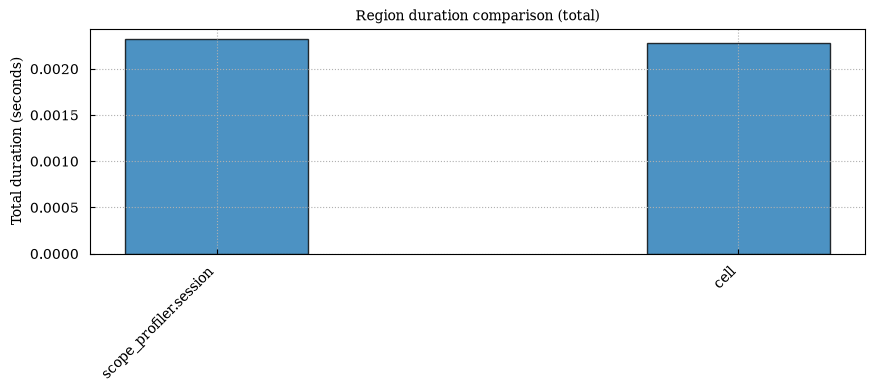
%%scope -q quiet_runresult = solve(problem)%scope_timeit - time a statement
Section titled “%scope_timeit - time a statement”%scope_timeit -n 20 solve(problem)%scope_timeit 'solve(problem)' (20 runs) ╭──────────────────────────────────────────────────────────────────────────────────────────╮ │ region n total [s] avg/call [s] min [s] max [s] │ ├──────────────────────────────────────────────────────────────────────────────────────────┤ │ scope_profiler.session 1 0.041497 4.150e-02 0.041 0.041 │ │ └─ (own) 0.000066 6.553e-05 │ │ └─ timeit 20 0.041431 2.072e-03 0.002 0.002 │ ╰──────────────────────────────────────────────────────────────────────────────────────────╯Runs the given statement n times (default 7) inside a profiling region
named "timeit" and prints calls/total/avg/min/max. It answers the same
question as the built-in %timeit, but through scope-profiler’s own region
timer and table instead of the timeit module - useful when you want the
result to be comparable with %%scope/%scope_compare output. The run is
stored as timeit, so %scope_last timeit -p shows it as a bar chart.
-q suppresses the printed table, same as for %%scope.
%%scope_line - line-by-line profiling for a cell
Section titled “%%scope_line - line-by-line profiling for a cell”%%scope_linefrom scope_profiler import ProfileManager
@ProfileManager.profile("compute")def compute(n): total = 0 for i in range(n): total += i * i return total
compute(100_000)Show the line-by-line tables
333328333350000%%scope_line 'cell' ╭──────────────────────────────────────────────────────╮ │ region % session total [s] │ ├──────────────────────────────────────────────────────┤ │ scope_profiler.session 100.00% 0.040706 │ │ └─ (own) 9.01% 0.003666 │ │ └─ compute 90.99% 0.037040 │ ╰──────────────────────────────────────────────────────╯
Timer unit: 1e-09 s
Total time: 0.0291715 sFile: /tmp/ipykernel_3777/1654967424.pyFunction: compute at line 3
Line # Hits Time Per Hit % Time Line Contents============================================================== 3 @ProfileManager.profile("compute") 4 def compute(n): 5 1 440.0 440.0 0.0 total = 0 6 100001 13894649.0 138.9 47.6 for i in range(n): 7 100000 15275338.0 152.8 52.4 total += i * i 8 1 1081.0 1081.0 0.0 return totalRuns the cell with use_line_profiler=True and prints per-line hit
counts/time for whatever the cell itself hands to line_profiler, the same as
running the cell as a script (see Line profiler and
examples/ex_line_profiling.py). Needs the line-profiler extra:
pip install "scope-profiler[line-profiler]"Prefer decorating the function you care about with @ProfileManager.profile,
as above - it registers cleanly regardless of where it’s called from. A bare
with ProfileManager.region(...): at the cell’s top level also
works, but line_profiler’s own handling of a module-level code object
containing a nested def can cut the printed table off at that def —
the same limitation a plain script hits, not something specific to the
magic.
-q suppresses the region summary table, -Q suppresses the line-by-line
tables; both can be combined.
%%scope_recursive - profile a cell with nothing instrumented
Section titled “%%scope_recursive - profile a cell with nothing instrumented”%%scope_recursivedef inner(values): return sum(value * value for value in values)
def outer(rounds): return [inner(range(2_000)) for _ in range(rounds)]
result = outer(2)%%scope_recursive 'cell' ╭────────────────────────────────────────────────────────────────────────────────────────────────╮ │ region % session total [s] │ ├────────────────────────────────────────────────────────────────────────────────────────────────┤ │ scope_profiler.session 100.00% 0.006479 │ │ └─ (own) 1.96% 0.000127 │ │ └─ cell 98.04% 0.006352 │ │ │ └─ (own) 0.27% 0.000017 │ │ │ └─ __main__.<module> 97.77% 0.006334 │ │ │ │ └─ (own) 0.13% 0.000009 │ │ │ │ └─ __main__.outer 97.64% 0.006326 │ │ │ │ │ └─ (own) 0.15% 0.000010 │ │ │ │ │ └─ __main__.inner (2x) 97.49% 0.006316 │ │ │ │ │ │ └─ (own) 74.11% 0.004802 │ │ │ │ │ │ └─ __main__.inner.<locals>.<genexpr> (4kx) 23.38% 0.001515 │ ╰────────────────────────────────────────────────────────────────────────────────────────────────╯Records every Python call the cell makes as its own region, named
<module>.<qualname>, with no decorators and no region blocks —
recursive_profile=True, the same thing scope-profiler run does to a
script. The summary comes back sorted by total time, so the answer to “where
did this cell’s time actually go?” is the top of the table, as above.
This is the magic to reach for first, before you know what to instrument:
use it to find the hot function, then wrap that one in %%scope/%%scope_line
for a cheap, focused measurement.
Two things to know, both inherited from how recursive profiling works in a script rather than from the magic:
- Tracing is not limited to your own functions - library internals called
from the cell are recorded too, and each traced call carries per-call
overhead. Keep the cell small and use
--includeto filter the table. - The cell is run with
execrather than IPython’s own execution, so a trailing expression is not echoed asOut[n]. Assignments land in the notebook namespace exactly as usual.
A cell that raises is reported the way any other failing cell is, and the profile of everything up to the failure is still recorded and printed — which is often exactly what you want to see when a run dies halfway:
%%scope halfwaywith ProfileManager.region("step 1"): time.sleep(0.001)raise RuntimeError("the run died after step 1")---------------------------------------------------------------------------RuntimeError Traceback (most recent call last)Cell In[11], line 3 1 with ProfileManager.region("step 1"): 2 time.sleep(0.001)----> 3 raise RuntimeError("the run died after step 1")
RuntimeError: the run died after step 1%%scope 'halfway' ╭────────────────────────────────────────────────────────╮ │ region % session total [s] │ ├────────────────────────────────────────────────────────┤ │ scope_profiler.session 100.00% 0.109459 │ │ └─ (own) 0.04% 0.000039 │ │ └─ halfway 99.96% 0.109419 │ │ │ └─ (own) 98.99% 0.108353 │ │ │ └─ step 1 0.97% 0.001067 │ ╰────────────────────────────────────────────────────────╯That holds for %%scope (as above) and %%scope_agg too.
%%scope_agg - aggregation mode for very hot regions
Section titled “%%scope_agg - aggregation mode for very hot regions”%%scope_aggfor step in range(20_000): with ProfileManager.region("step"): advance(step)%%scope_agg 'cell' ╭──────────────────────────────────────────────────────╮ │ region % session total [s] │ ├──────────────────────────────────────────────────────┤ │ scope_profiler.session 100.00% 0.015558 │ │ cell 99.79% 0.015525 │ │ step (20kx) 21.83% 0.003396 │ ╰──────────────────────────────────────────────────────╯Runs the cell with aggregation_mode=True: each region keeps its count,
inclusive total, min/max and exclusive total, and no per-call timeline at
all. A region entered a million times therefore costs a few numbers instead
of a million timestamps, which is what makes such a cell measurable at all
(the cell above uses 20 000 steps only to stay quick).
The trade-off is that the per-call event data is gone: the Gantt chart,
%scope_df --events and the timeline exports have nothing to show. The
summary table, %scope_compare and %scope_df (region rows) work as usual.
Aggregation mode cannot be combined with line, GPU, NVTX or LIKWID timing.
%scope_load - bring in a run from outside the notebook
Section titled “%scope_load - bring in a run from outside the notebook”Profiling data from an MPI job or a scope-profiler run is just an HDF5
file. The two files below stand in for such runs, written by plain sessions
into results/:
%scope_load results/run_128ranks.h5%scope_load -n baseline results/before.h5%scope_load results/run_128ranks.h5 as 'run_128ranks' ╭──────────────────────────────────────────────────────╮ │ region % session total [s] │ ├──────────────────────────────────────────────────────┤ │ scope_profiler.session 100.00% 0.002094 │ │ └─ (own) 1.23% 0.000026 │ │ └─ solve 98.77% 0.002068 │ ╰──────────────────────────────────────────────────────╯
%scope_load results/before.h5 as 'baseline' ╭──────────────────────────────────────────────────────╮ │ region % session total [s] │ ├──────────────────────────────────────────────────────┤ │ scope_profiler.session 100.00% 0.005609 │ │ └─ (own) 0.48% 0.000027 │ │ └─ solve 99.52% 0.005582 │ ╰──────────────────────────────────────────────────────╯Reads an HDF5 file with read_h5 and stores it under the same names the
other magics use - so a run from an MPI job, a scope-profiler run, or a
colleague becomes directly comparable with what you just measured in a cell:
%%scope candidateresult = solve(problem)%%scope 'candidate' ╭──────────────────────────────────────────────────────╮ │ region % session total [s] │ ├──────────────────────────────────────────────────────┤ │ scope_profiler.session 100.00% 0.002320 │ │ └─ (own) 1.39% 0.000032 │ │ └─ candidate 98.61% 0.002288 │ ╰──────────────────────────────────────────────────────╯%scope_compare run_128ranks candidate'run_128ranks' -> 'candidate' ╭─────────────────────────────────────────────────────────────────────────────────────────────╮ │ region total [s] (a) total [s] (b) delta delta [%] │ ├─────────────────────────────────────────────────────────────────────────────────────────────┤ │ candidate - 0.00228757 +0.00228757 - │ │ solve 0.00206795 - -0.00206795 -100% │ │ scope_profiler.session 0.00209378 0.00231991 +0.000226131 +10.8% │ ╰─────────────────────────────────────────────────────────────────────────────────────────────╯
Only in a: solve Only in b: candidateThe name defaults to the file’s stem; -n/--name overrides it and -q
skips the summary table.
%scope_df - a run as a pandas DataFrame
Section titled “%scope_df - a run as a pandas DataFrame”df = %scope_dfdf.nlargest(5, "total_duration")Show output
| name | num_ranks | num_calls | total_duration | inclusive_duration | exclusive_duration | average_duration | min_duration | max_duration | first_duration | ... | tags | p50_duration | p95_duration | p99_duration | rank_imbalance | rank_imbalance_pct | p50 | p95 | p99 | imbalance | |
|---|---|---|---|---|---|---|---|---|---|---|---|---|---|---|---|---|---|---|---|---|---|
| 0 | scope_profiler.session | 1 | 1 | 0.002320 | 0.002320 | 0.000032 | 0.002320 | 0.002320 | 0.002320 | 0.002320 | ... | () | 0.002320 | 0.002320 | 0.002320 | 0.0 | 0.0 | 0.002320 | 0.002320 | 0.002320 | 0.0 |
| 1 | candidate | 1 | 1 | 0.002288 | 0.002288 | 0.002288 | 0.002288 | 0.002288 | 0.002288 | 0.002288 | ... | () | 0.002288 | 0.002288 | 0.002288 | 0.0 | 0.0 | 0.002288 | 0.002288 | 0.002288 | 0.0 |
2 rows × 22 columns
Returns the recorded run as a DataFrame (to_dataframe), so it both renders
as a table on its own and can be captured for analysis, grouping or plotting
in the notebook - everything 2. Post-processing profiling data does with a
file, on the run you just measured. Needs pandas (the pproc extra).
-n/--name- which recorded run (default: the most recent).--per-rank- one row per (region, rank) instead of one aggregated row.--events- one row per recorded call (to_events_dataframe) instead of one per region. An aggregation-mode run records no per-call events, so this comes back empty with a note saying why.--include/--exclude- regex region filters.
%scope_df --events -n timeitShow output
| name | rank | call_index | start | end | duration | |
|---|---|---|---|---|---|---|
| 0 | scope_profiler.session | 0 | 0 | 0.001086 | 0.042583 | 0.041497 |
| 1 | timeit | 0 | 0 | 0.001138 | 0.003243 | 0.002105 |
| 2 | timeit | 0 | 1 | 0.003244 | 0.005322 | 0.002078 |
| 3 | timeit | 0 | 2 | 0.005323 | 0.007391 | 0.002068 |
| 4 | timeit | 0 | 3 | 0.007391 | 0.009459 | 0.002068 |
| 5 | timeit | 0 | 4 | 0.009460 | 0.011529 | 0.002069 |
| 6 | timeit | 0 | 5 | 0.011530 | 0.013606 | 0.002076 |
| 7 | timeit | 0 | 6 | 0.013607 | 0.015687 | 0.002080 |
| 8 | timeit | 0 | 7 | 0.015689 | 0.017771 | 0.002082 |
| 9 | timeit | 0 | 8 | 0.017772 | 0.019838 | 0.002066 |
| 10 | timeit | 0 | 9 | 0.019838 | 0.021904 | 0.002067 |
| 11 | timeit | 0 | 10 | 0.021905 | 0.023972 | 0.002067 |
| 12 | timeit | 0 | 11 | 0.023973 | 0.026040 | 0.002067 |
| 13 | timeit | 0 | 12 | 0.026040 | 0.028106 | 0.002066 |
| 14 | timeit | 0 | 13 | 0.028107 | 0.030173 | 0.002067 |
| 15 | timeit | 0 | 14 | 0.030174 | 0.032241 | 0.002067 |
| 16 | timeit | 0 | 15 | 0.032241 | 0.034308 | 0.002067 |
| 17 | timeit | 0 | 16 | 0.034308 | 0.036377 | 0.002068 |
| 18 | timeit | 0 | 17 | 0.036377 | 0.038445 | 0.002067 |
| 19 | timeit | 0 | 18 | 0.038445 | 0.040513 | 0.002068 |
| 20 | timeit | 0 | 19 | 0.040513 | 0.042581 | 0.002068 |
%scope_last - reprint a previous run
Section titled “%scope_last - reprint a previous run”With no name, it reprints the most recently recorded run:
%scope_last'candidate' (last) ╭──────────────────────────────────────────────────────╮ │ region % session total [s] │ ├──────────────────────────────────────────────────────┤ │ scope_profiler.session 100.00% 0.002320 │ │ └─ (own) 1.39% 0.000032 │ │ └─ candidate 98.61% 0.002288 │ ╰──────────────────────────────────────────────────────╯or a specific one, by name:
%scope_last solve'solve' (last) ╭──────────────────────────────────────────────────────╮ │ region % session total [s] │ ├──────────────────────────────────────────────────────┤ │ scope_profiler.session 100.00% 0.002334 │ │ └─ (own) 2.97% 0.000069 │ │ └─ solve 97.03% 0.002265 │ ╰──────────────────────────────────────────────────────╯Reprints the summary table for a run recorded earlier by %%scope or
%scope_timeit, without re-running anything. Takes the same -p/--plot
and --include options as %%scope. Useful after scrolling past a result,
or to re-render it with a different --include filter.
%scope_compare - compare two runs
Section titled “%scope_compare - compare two runs”%%scope baselineresult = solve_naive(problem)%%scope 'baseline' ╭──────────────────────────────────────────────────────╮ │ region % session total [s] │ ├──────────────────────────────────────────────────────┤ │ scope_profiler.session 100.00% 0.005802 │ │ └─ (own) 0.55% 0.000032 │ │ └─ baseline 99.45% 0.005769 │ ╰──────────────────────────────────────────────────────╯%%scope candidateresult = solve_optimized(problem)%%scope 'candidate' ╭──────────────────────────────────────────────────────╮ │ region % session total [s] │ ├──────────────────────────────────────────────────────┤ │ scope_profiler.session 100.00% 0.001271 │ │ └─ (own) 2.54% 0.000032 │ │ └─ candidate 97.46% 0.001239 │ ╰──────────────────────────────────────────────────────╯%scope_compare baseline candidate'baseline' -> 'candidate' ╭────────────────────────────────────────────────────────────────────────────────────────────╮ │ region total [s] (a) total [s] (b) delta delta [%] │ ├────────────────────────────────────────────────────────────────────────────────────────────┤ │ baseline 0.00576936 - -0.00576936 -100% │ │ scope_profiler.session 0.00580155 0.0012711 -0.00453045 -78.09% │ │ candidate - 0.00123882 +0.00123882 - │ ╰────────────────────────────────────────────────────────────────────────────────────────────╯
Only in a: baseline Only in b: candidateAligns the two runs’ regions by name and prints one row per region with the
change in a chosen metric - the same table scope-profiler diff prints for
two HDF5 files, here for two in-notebook runs. With no arguments, it compares
the two most recently recorded runs, so %scope_compare right after the two
cells above works without naming them:
%scope_compare'baseline' -> 'candidate' ╭────────────────────────────────────────────────────────────────────────────────────────────╮ │ region total [s] (a) total [s] (b) delta delta [%] │ ├────────────────────────────────────────────────────────────────────────────────────────────┤ │ baseline 0.00576936 - -0.00576936 -100% │ │ scope_profiler.session 0.00580155 0.0012711 -0.00453045 -78.09% │ │ candidate - 0.00123882 +0.00123882 - │ ╰────────────────────────────────────────────────────────────────────────────────────────────╯
Only in a: baseline Only in b: candidate--metric- one oftotal,avg,min,max,p50,p95,p99,imbalance,calls(defaulttotal).--sort-delta,pct, orname(defaultdelta).
%scope_compare baseline candidate --metric avg --sort name'baseline' -> 'candidate' ╭────────────────────────────────────────────────────────────────────────────────────────╮ │ region avg [s] (a) avg [s] (b) delta delta [%] │ ├────────────────────────────────────────────────────────────────────────────────────────┤ │ baseline 0.00576936 - -0.00576936 -100% │ │ candidate - 0.00123882 +0.00123882 - │ │ scope_profiler.session 0.00580155 0.0012711 -0.00453045 -78.09% │ ╰────────────────────────────────────────────────────────────────────────────────────────╯
Only in a: baseline Only in b: candidate%scope_export - export a run to a file
Section titled “%scope_export - export a run to a file”%scope_export candidate.prof%scope_export -n baseline baseline.speedscope.jsonwrote candidate_rank0.profwrote baseline.speedscope.jsonWrites a previously recorded run to a .prof file (openable in snakeviz or
any pstats viewer) or a speedscope JSON file, via
scope_profiler.prof_export.export_prof/
scope_profiler.speedscope_export.export_speedscope - the same functions
scope-profiler export uses on an HDF5 file, here applied directly to an
in-memory ProfilingResults. Format is inferred from filepath’s extension
(--format prof/--format speedscope to force one); -n/--name selects
which recorded run to export (default: the most recent one); --include/
--exclude restrict which regions are written. A .prof file is written per
rank, so candidate.prof ends up as candidate_rank0.prof. For .prof output,
--no-call-paths writes one entry per region instead of one per
parent > child path.
sorted(name for name in os.listdir() if name.endswith((".prof", ".json")))['baseline.speedscope.json', 'candidate_rank0.prof']%scope_reset - drop recorded runs
Section titled “%scope_reset - drop recorded runs”%scope_reset baseline%scope_resetcleared recorded run 'baseline'cleared all recorded scope-profiler runs%scope_reset baseline drops just one run, by name; plain %scope_reset
clears every recorded run. Recorded runs otherwise accumulate in memory for the life of the kernel.
Useful once %scope_last/%scope_compare have several names to choose from
and you want a clean slate, or to free a large run’s timeline once you are
done with it.
Tutorial
Section titled “Tutorial”7. Notebook magics walks through all eleven magics against a small toy workload, including comparing a “before” and “after” version of a function.