3. Visualizing results
Install for this tutorial:
pip install "scope-profiler[pproc]".
scope-profiler ships a growing set of chart types, all built on
maxplotlib. The ones this notebook
draws:
| function | answers |
| — | — |
| plot_gantt | when did each call happen, on which rank? |
| plot_flame (plot_flame_chart) | how does time break down across nested regions? |
| plot_durations | which regions cost the most (total / avg / min / max / first / last)? |
| plot_speedup | how does a region scale with ranks or threads? |
There are more for specific questions: plot_flame_graph (call stacks
aggregated by path), plot_duration_timeseries (duration per call over time),
plot_duration_histogram, plot_rank_heatmap and plot_imbalance (per-rank
views), plot_weak_scaling, plot_weak_scaling_efficiency and
plot_scaling_efficiency, and the hardware-counter charts plot_likwid,
plot_roofline and plot_perf_events. scope-profiler plot list names them
all.
They need the pproc extra:
pip install "scope-profiler[pproc]"Every function takes a results (or a list of runs), include / exclude
filters, a filepath to save to, show=True to display, and a backend of
either "matplotlib" (default) or "plotly" (interactive).
import time
from scope_profiler import ProfileManager, read_h5
ProfileManager.setup(file_path="profiling_data.h5")
with ProfileManager.region("setup"):    time.sleep(0.02)
for step in range(4):    with ProfileManager.region("timestep"):        with ProfileManager.region("assemble"):            time.sleep(0.006)        with ProfileManager.region("solve"):            time.sleep(0.010)        with ProfileManager.region("output"):            time.sleep(0.002)
ProfileManager.finalize(verbose=False)results = read_h5("profiling_data.h5")results.print_summary(suppress_notes=True)
╭─────────────────────────────────╮ │ region total [s] │ ├─────────────────────────────────┤ │ setup 0.020070 │ │ timestep (4x) 0.072818 │ │ └─ (own) 0.000085 │ │ └─ assemble (4x) 0.024247 │ │ └─ solve (4x) 0.040244 │ │ └─ output (4x) 0.008243 │ ╰─────────────────────────────────╯In a notebook, pass show=True to display each chart directly. You can still
pass filepath when you also want to save a chart. (PNG export with the
default matplotlib backend needs nothing extra; the plotly backend writes
self-contained .html, or .png if kaleido is installed.)
from scope_profiler import plot_durations, plot_flame, plot_ganttGantt chart — what ran when
Section titled “Gantt chart — what ran when”Each call becomes a bar on a timeline, with one lane per rank. This is the chart for spotting gaps, stragglers and serialization.
plot_gantt(results, show=True, verbose=False)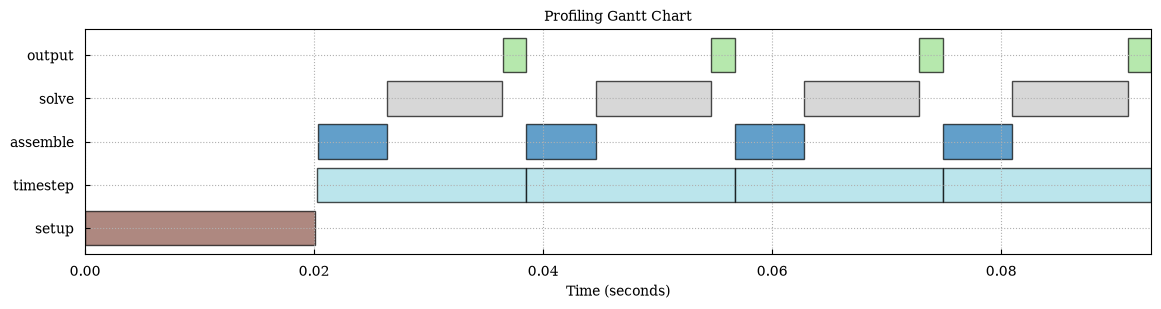
Flame chart — where the time goes
Section titled “Flame chart — where the time goes”The flame chart reconstructs the nesting from the timestamps: a region drawn on
top of another ran inside it. It covers rank 0 by default, since it represents a
single execution’s call stack; pass ranks=[...] for one chart per rank.
plot_flame(results, show=True, verbose=False)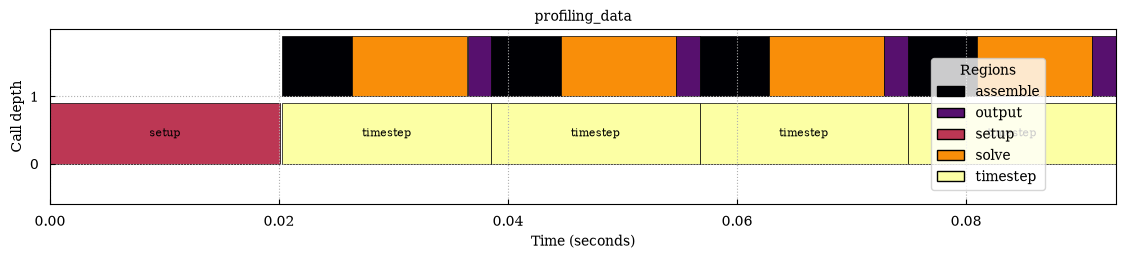
Duration charts — which region is expensive
Section titled “Duration charts — which region is expensive”plot_durations draws a bar chart of one duration statistic per region:
metric="total" by default, or avg, min, max, first or last (the
first and last call, which separate one-off warm-up from steady state). Pass
metrics=[...] to draw several, one figure each. It returns the paths of the
files it wrote, which is an empty list when you only display the chart.
written = plot_durations(results, metrics=["total", "avg"], show=True, verbose=False)print("files written:", written)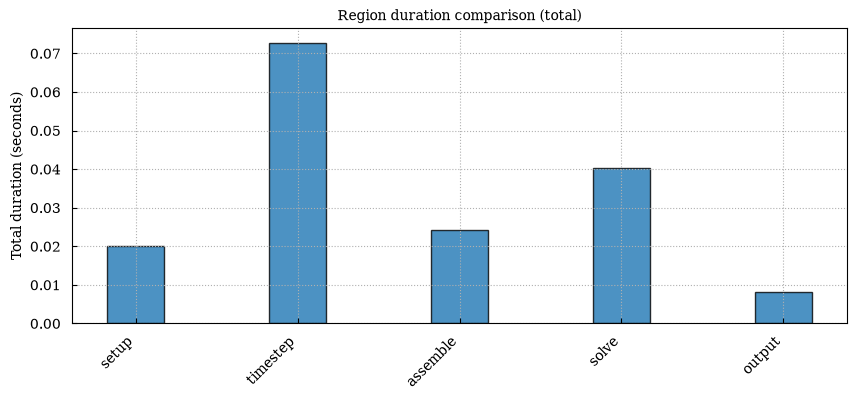
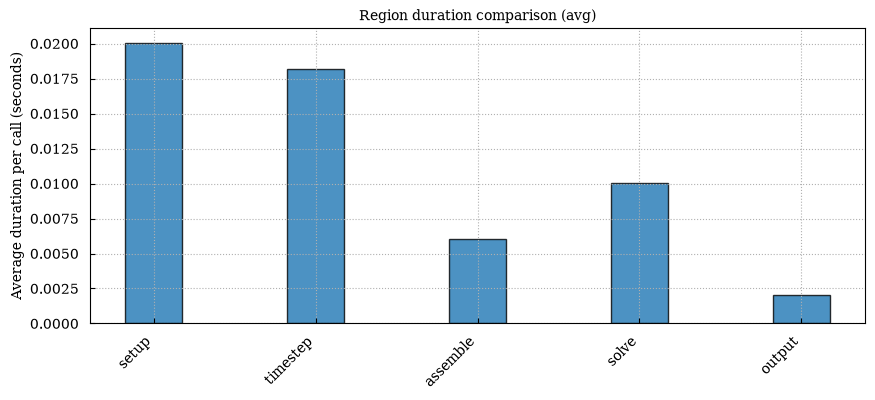
files written: []stack_children=True splits each bar into the region’s own (exclusive) time and
one segment per region called directly from it, so a container like timestep
shows where its time went instead of only how much there was:
written = plot_durations(results, stack_children=True, show=True, verbose=False)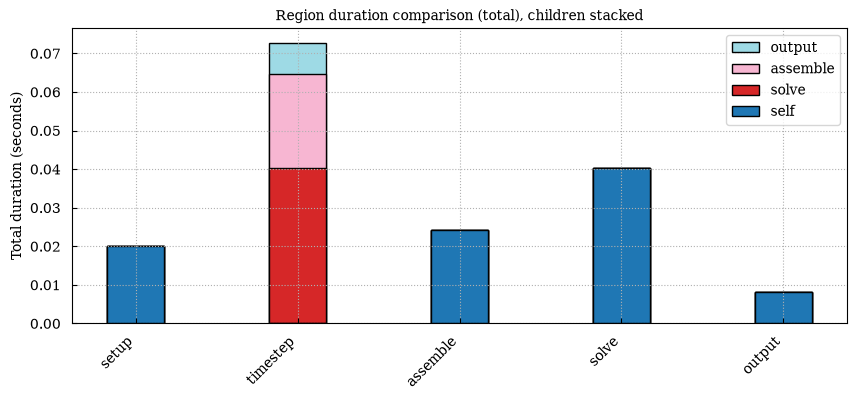
Filtering and colors
Section titled “Filtering and colors”include / exclude are regexes matched against region names, and cmap picks
any matplotlib colormap.
Region colors are consistent across chart types, so a region keeps its color
between the Gantt and flame views.
plot_gantt( results, include=["solve", "assemble"], cmap="viridis", show=True, verbose=False,)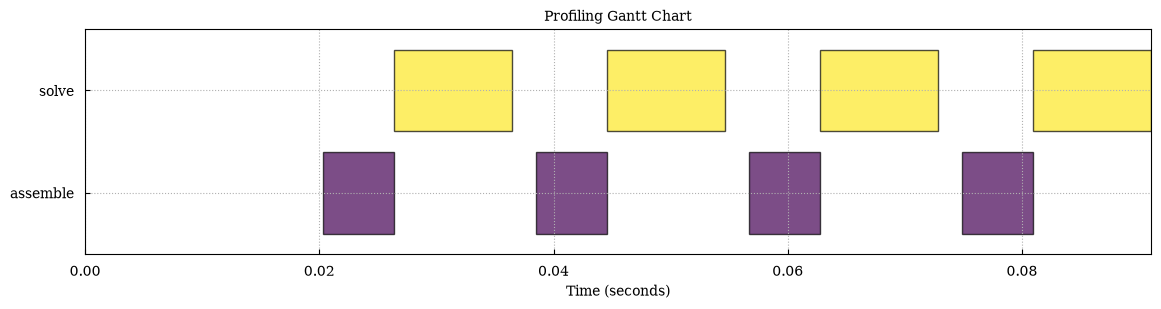
Speedup charts
Section titled “Speedup charts”plot_speedup compares the same region across several runs and plots speedup
against a metadata field — num_ranks (default), num_nodes,
omp_num_threads or total_cores. It needs at least two runs, so it is normally
fed a scaling study:
runs = [read_h5(f"run_{n}ranks.h5") for n in (1, 2, 4, 8)]plot_speedup(runs, x_field="num_ranks", filepath="speedup.png")To keep this notebook serial, the cell below assembles three small
ProfilingResults in memory that imitate a 1/2/4-thread run — the shape of a real
scaling study without needing the cores. (ProfilingResults, MPIRegion and
Region are the classes the reader builds for you; constructing them by hand is
only useful for demonstrations and tests.)
import numpy as np
from scope_profiler import MPIRegion, ProfilingResults, Region, plot_speedup

def synthetic_run(threads):    """A 0.4 s `solve` that scales perfectly with the thread count."""    start = np.array([0], dtype=np.int64)    end = start + int(0.4e9 / threads)  # nanoseconds    solve = MPIRegion("solve", {0: Region(start, end)})    metadata = {"omp_num_threads": threads, "mpi_size": 1, "total_cores": threads}    return ProfilingResults({"solve": solve}, metadata=metadata, num_ranks=1)

plot_speedup(    [synthetic_run(threads) for threads in (1, 2, 4)],    x_field="omp_num_threads",    show=True,    verbose=False,)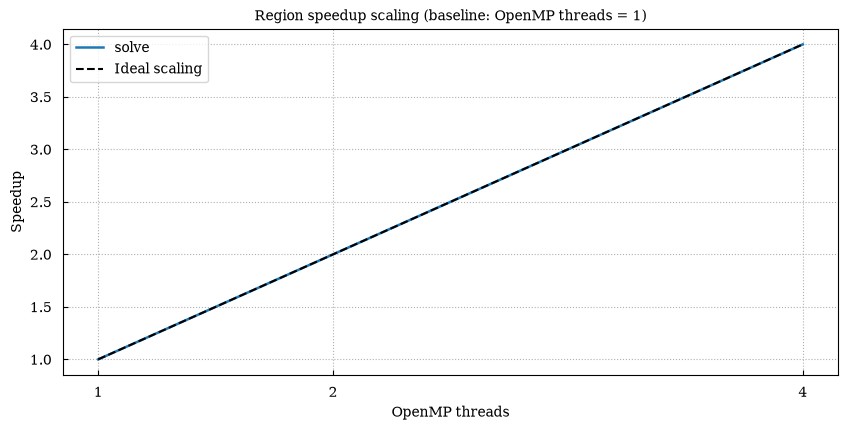
For a weak-scaling study, where the problem grows with the number of ranks,
plot_weak_scaling and plot_weak_scaling_efficiency plot the same ratio as an
efficiency against an ideal of 1.
Exporting the plotted numbers
Section titled “Exporting the plotted numbers”Every plotting function takes data_filepath (and data_format of "csv" or
"json") to write out exactly the values it drew — handy when you want the
chart in one tool and the numbers in another.
plot_durations( results, metric="total", filepath="durations_total.png", data_filepath="durations.csv", data_format="csv", verbose=False,)with open("durations.csv") as csv_file: print(csv_file.read())file,region,metric,value_secondsprofiling_data,setup,total,0.020069926profiling_data,timestep,total,0.07281806199999999profiling_data,assemble,total,0.024247045000000002profiling_data,solve,total,0.040243799profiling_data,output,total,0.008242649999999999The same thing from the command line
Section titled “The same thing from the command line”Everything above is also available through the CLI, which is usually what you want on a cluster:
scope-profiler plot default profiling_data.h5 -o figuresscope-profiler plot default profiling_data.h5 -o figures --backend plotly --cmap viridisscope-profiler plot flame_chart profiling_data.h5 -o figuresscope-profiler plot weak_scaling 'run_*.h5' -o figuresscope-profiler export plot-data 'run_*.h5' -o figures --format jsonplot default accepts several files (or a glob) and writes the Gantt and
duration charts plus region_statistics.json. plot quick adds the per-rank
and scaling charts for several runs (rank heatmap, speedup, weak scaling, scaling
efficiency), plot all draws every plot kind that applies, and
scope-profiler plot list lists the kinds and presets.
To get all of it in one self-contained file instead, with the charts interactive, write an HTML report — 8. Reports and comparison.
4. Profiling modes covers the configuration options that decide what gets recorded in the first place.