6. Building your own plots
Install for this tutorial:
pip install "scope-profiler[pproc]".
The built-in charts (notebook 3) cover the usual questions. When yours is
different, the data is one call away — this notebook draws five charts with
plain matplotlib on top of events() and call_stack().
Requires matplotlib and pandas, both part of the pproc extra:
pip install "scope-profiler[pproc]"import randomimport time
import matplotlib.pyplot as plt
from scope_profiler import ProfileManager, read_h5
def run(file_path, solve_cost, seed=0): """Record a run: a setup phase, then timesteps whose solve slows down.""" jitter = random.Random(seed) # seeded, so the notebook reproduces ProfileManager.setup(file_path=str(file_path))
with ProfileManager.region("setup"): time.sleep(0.02)
for step in range(24): with ProfileManager.region("timestep"): with ProfileManager.region("assemble"): time.sleep(0.002 + jitter.uniform(0, 0.0006)) with ProfileManager.region("solve"): time.sleep(solve_cost + 0.00008 * step + jitter.uniform(0, 0.0012)) if step % 8 == 7: with ProfileManager.region("checkpoint"): time.sleep(0.006)
ProfileManager.finalize(verbose=False) return read_h5(file_path)
results = run("run_a.h5", solve_cost=0.003)# Charts frame the x axis on the first region entry, so measure the events# from there too (the default is the run's start time, recorded by setup()).frame = results.to_events_dataframe(origin=results.minimum_start_time)frame.head()| name | rank | call_index | start | end | duration | |
|---|---|---|---|---|---|---|
| 0 | setup | 0 | 0 | 0.000000 | 0.020068 | 0.020068 |
| 1 | timestep | 0 | 0 | 0.020114 | 0.026701 | 0.006588 |
| 2 | timestep | 0 | 1 | 0.026703 | 0.032468 | 0.005764 |
| 3 | timestep | 0 | 2 | 0.032468 | 0.038541 | 0.006073 |
| 4 | timestep | 0 | 3 | 0.038542 | 0.044736 | 0.006194 |
A house style
Section titled “A house style”Two habits make a set of charts readable as a set:
- One colour per region, fixed. Assign colours by name, not by position, so a region keeps its colour when a filter changes which regions are on screen.
- Recede everything that is not data — thin gridlines, no box around the plot, muted tick labels.
The palette below is colourblind-safe; the helper applies the rest.
# Fixed categorical palette, assigned in order and never cycled.PALETTE = ["#2a78d6", "#eb6834", "#1baf7a", "#eda100", "#e87ba4"]REGION_COLOR = {    name: PALETTE[index % len(PALETTE)]    for index, name in enumerate(sorted(results.region_names))}
MUTED = "#898781"GRID = "#e1e0d9"

def style(ax, xlabel=None, ylabel=None, title=None, grid_axis="y"):    """Push the chrome into the background so the data reads first."""    ax.set_axisbelow(True)    ax.grid(axis=grid_axis, color=GRID, linewidth=0.8)    for side in ("top", "right"):        ax.spines[side].set_visible(False)    for side in ("left", "bottom"):        ax.spines[side].set_color(GRID)    ax.tick_params(colors=MUTED, length=0)    if xlabel:        ax.set_xlabel(xlabel, color=MUTED)    if ylabel:        ax.set_ylabel(ylabel, color=MUTED)    if title:        ax.set_title(title, loc="left", fontweight="bold")    return ax

REGION_COLOR
{'assemble': '#2a78d6', 'checkpoint': '#eb6834', 'setup': '#1baf7a', 'solve': '#eda100', 'timestep': '#e87ba4'}1. A timeline of the run
Section titled “1. A timeline of the run”events() gives every call a start and an end on a zero-based timeline, which
is exactly what broken_barh wants. One lane per region, and the nesting is
visible as bars stacked in time.
regions = [region.name for region in results.get_regions()]
fig, ax = plt.subplots(figsize=(10, 3.2))
for lane, name in enumerate(regions):    events = results.events(include=f"^{name}$", origin=results.minimum_start_time)    spans = [(event["start"], event["duration"]) for event in events]    ax.broken_barh(spans, (lane - 0.35, 0.7), facecolors=REGION_COLOR[name])
ax.set_yticks(range(len(regions)), regions)ax.set_xlim(0, results.time_span)style(ax, xlabel="time since first region entry [s]", grid_axis="x")ax.set_title("Timeline of a single run", loc="left", fontweight="bold")plt.tight_layout()plt.show()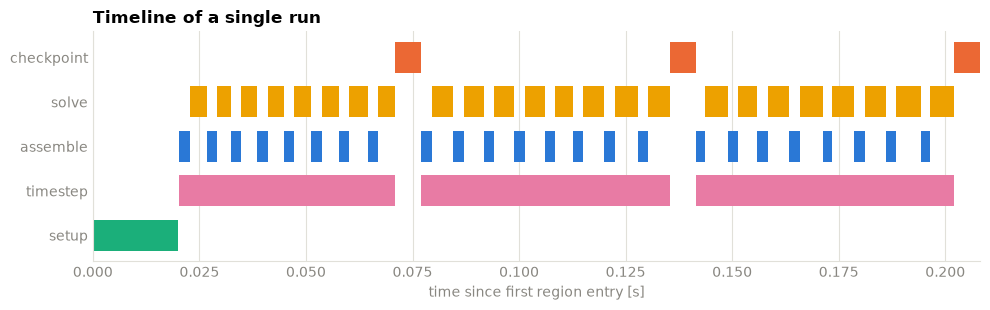
include uses re.match, so "solve" would also match "solver_setup" —
hence the anchored ^...$ pattern when you want exactly one region.
2. How long does a call take?
Section titled “2. How long does a call take?”For a region entered many times, the distribution says more than the mean: a long tail means a few slow calls, a wide spread means something is unstable. A single series needs no legend — the title names it.
durations = frame.query("name == 'solve'")["duration"] * 1e3
fig, ax = plt.subplots(figsize=(7, 3.2))ax.hist(durations, bins=10, color=REGION_COLOR["solve"])ax.axvline(durations.mean(), color="#0b0b0b", linewidth=2, linestyle="--")ax.annotate(    f"mean {durations.mean():.1f} ms",    (durations.mean(), ax.get_ylim()[1] * 0.9),    xytext=(6, 0),    textcoords="offset points",    color="#52514e",)
style(ax, xlabel="duration [ms]", ylabel="calls", title="Duration of 'solve' calls")plt.tight_layout()plt.show()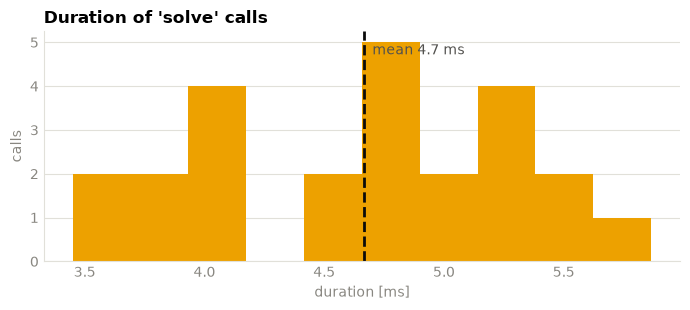
3. Does it drift over the run?
Section titled “3. Does it drift over the run?”Plotting duration against start time catches the things an average hides:
a solve that degrades as the simulation progresses, a cache warming up, memory
filling. Here solve is deliberately getting slower.
fig, ax = plt.subplots(figsize=(9, 3.6))
for name in ["assemble", "solve"]:    calls = frame[frame["name"] == name]    ax.plot(        calls["start"],        calls["duration"] * 1e3,        marker="o",        markersize=4,        linewidth=1.6,        color=REGION_COLOR[name],        label=name,    )    # Direct label at the end of the line, so identity is never colour alone.    last = calls.iloc[-1]    ax.annotate(        name,        (last["start"], last["duration"] * 1e3),        xytext=(8, 0),        textcoords="offset points",        color="#52514e",        va="center",    )
ax.legend(frameon=False, labelcolor=MUTED)ax.margins(x=0.12)style(    ax,    xlabel="time since first region entry [s]",    ylabel="duration [ms]",    title="Per-call duration over the run",)plt.tight_layout()plt.show()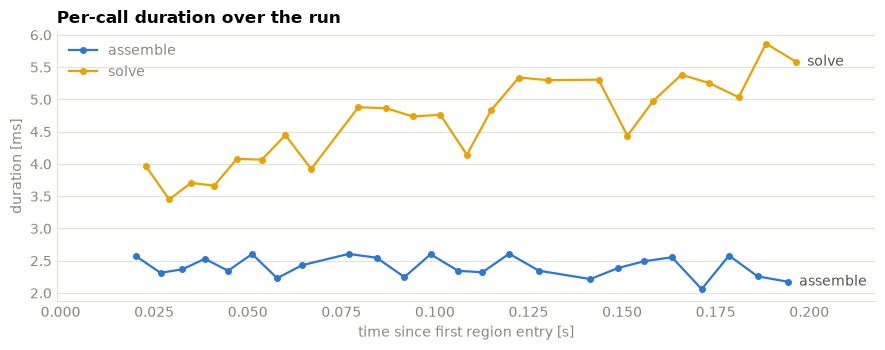
4. Where did the time go?
Section titled “4. Where did the time go?”Total time per region answers “what should I optimise” — but only once nested
time is separated out. total counts everything inside a region; self
(exclusive) time removes what its children spent, and that is the number worth
ranking by. Every call from call_stack() carries both as inclusive_duration
and exclusive_duration (notebook 5).
from collections import defaultdict
calls = results.call_stack(rank=0, origin=results.minimum_start_time)
total = defaultdict(float)exclusive = defaultdict(float)for call in calls:    total[call["name"]] += call["inclusive_duration"]    exclusive[call["name"]] += call["exclusive_duration"]
order = sorted(total, key=exclusive.get)positions = range(len(order))
fig, ax = plt.subplots(figsize=(8, 3.4))ax.barh(    [p + 0.2 for p in positions],    [total[n] for n in order],    height=0.36,    color="#9ec5f4",    label="total (with nested)",)ax.barh(    [p - 0.2 for p in positions],    [exclusive[n] for n in order],    height=0.36,    color="#2a78d6",    label="self (exclusive)",)
for position, name in zip(positions, order):    ax.annotate(        f"{exclusive[name] * 1e3:.0f} ms",        (exclusive[name], position - 0.2),        xytext=(6, 0),        textcoords="offset points",        va="center",        color="#52514e",    )
ax.set_yticks(list(positions), order)ax.legend(frameon=False, labelcolor=MUTED, loc="upper right")style(ax, xlabel="time [s]", title="Total vs self time per region", grid_axis="x")plt.tight_layout()plt.show()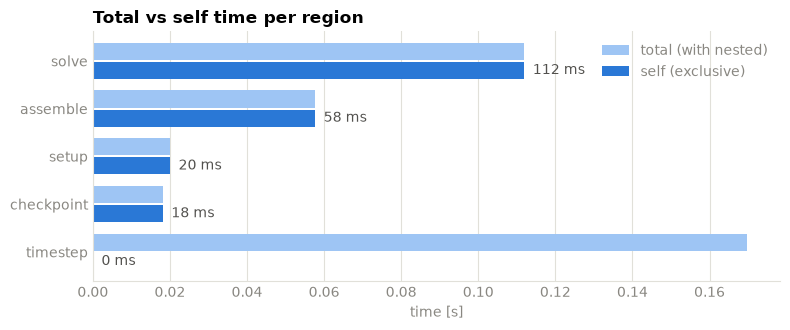
timestep is almost entirely nested time — it is a container, not work. The
bars that stay long in the dark series are the real hotspots.
5. Your own flame graph
Section titled “5. Your own flame graph”call_stack() returns each call with a depth and its parent’s index, so
drawing a flame graph is a rectangle per call: time on the x-axis, depth on the
y-axis. This is what plot_flame() does; twenty lines of matplotlib get you a
version you control.
Twenty-four timesteps do not fit legibly side by side, so this one zooms into a window - the calls are plain dicts, so narrowing the run down to an interesting interval is a list comprehension.
from matplotlib.patches import Patch
# Zoom into the setup plus the first three timesteps.timesteps = results.events(include="^timestep$", origin=results.minimum_start_time)window_end = timesteps[2]["end"]window = [call for call in calls if call["start"] < window_end]
fig, ax = plt.subplots(figsize=(10, 3.2))
for call in window:    ax.barh(        call["depth"],        call["duration"],        left=call["start"],        height=0.82,        color=REGION_COLOR[call["name"]],        edgecolor="#fcfcfb",  # a small surface gap keeps adjacent calls apart        linewidth=2,    )    # Label only the calls wide enough to hold the text.    if call["duration"] > 0.06 * window_end:        ax.annotate(            call["name"],            (call["start"] + call["duration"] / 2, call["depth"]),            ha="center",            va="center",            fontsize=8,            color="#0b0b0b",        )
# The narrow calls have no room for a label, so name the colours instead.present = dict.fromkeys(call["name"] for call in window)ax.legend(    handles=[Patch(facecolor=REGION_COLOR[name], label=name) for name in present],    frameon=False,    labelcolor=MUTED,    loc="lower left",)
ax.set_xlim(0, window_end)ax.set_yticks(range(max(call["depth"] for call in window) + 1))ax.invert_yaxis()style(    ax,    xlabel="time since first region entry [s]",    ylabel="stack depth",    title="Reconstructed call stack, rank 0 (first three timesteps)",    grid_axis="x",)plt.tight_layout()plt.show()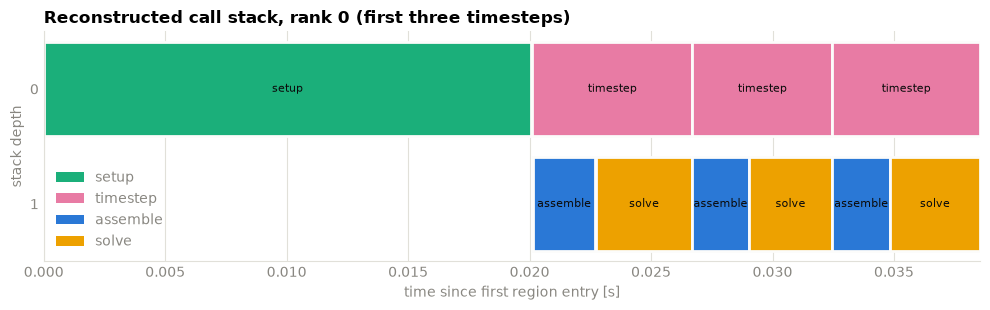
6. Comparing two runs
Section titled “6. Comparing two runs”Readers are cheap and independent, so a comparison is just two DataFrames with a label column. Colour follows the run here, since that is what the chart is about.
import pandas as pd
reader_b = run("run_b.h5", solve_cost=0.005, seed=1)
comparison = pd.concat( [ results.to_dataframe().assign(run="baseline"), reader_b.to_dataframe().assign(run="slower solve"), ])totals = comparison.pivot_table(index="name", columns="run", values="total_duration")totals| run | baseline | slower solve |
|---|---|---|
| name | ||
| assemble | 0.057730 | 0.056946 |
| checkpoint | 0.018200 | 0.018210 |
| setup | 0.020068 | 0.020069 |
| solve | 0.111989 | 0.156262 |
| timestep | 0.169790 | 0.213337 |
RUN_COLOR = {"baseline": "#2a78d6", "slower solve": "#eb6834"}
positions = range(len(totals))fig, ax = plt.subplots(figsize=(8, 3.4))
for offset, run_name in zip((-0.2, 0.2), totals.columns):    ax.bar(        [p + offset for p in positions],        totals[run_name],        width=0.36,        color=RUN_COLOR[run_name],        label=run_name,    )
ax.set_xticks(list(positions), totals.index)ax.legend(frameon=False, labelcolor=MUTED)style(ax, ylabel="total time [s]", title="Total time per region, two runs")plt.tight_layout()plt.show()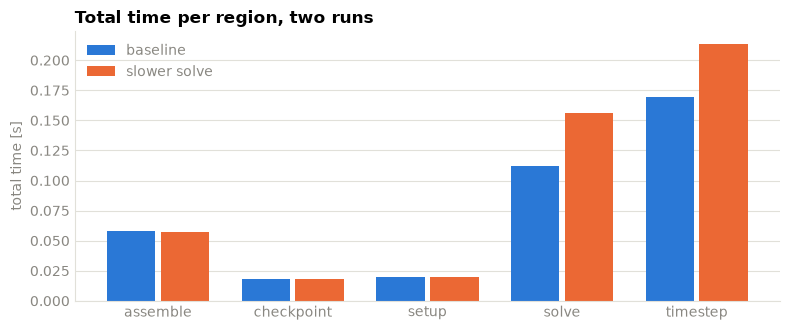
The built-in plot_durations() and plot_speedup() do this for you across any
number of files, and
scope-profiler plot durations run_a.h5 run_b.h5 -o figures/ does it without any
code at all. For a table of the differences instead of a chart, use
scope-profiler diff run_a.h5 run_b.h5, or put both runs in one interactive HTML
report with scope-profiler report run_a.h5 run_b.h5 -o comparison.html (see
8. Reports and comparison).
Reach for the custom route when the question is yours rather than theirs.
Where to go next
Section titled “Where to go next”- 3. Visualizing results — the built-in charts and their options.
- 5. Custom analysis — the data behind these plots.
scope-profiler plot listandscope-profiler plot durations --help— the same charts from the command line.