Profiling overhead
Install for this page:
pip install "scope-profiler[pproc]"; the benchmark uses maxplotlib to save its result as a figure.
scope-profiler is designed for production HPC workloads where instrumentation must not distort the measurements. This page documents the per-call overhead of each profiling mode.
The numbers in the tables below were measured on one machine with the full benchmark scripts, which take too long to run while the documentation is built. Every section therefore also has a small live measurement that runs when this notebook is executed: the absolute values will differ from the published ones (and between runs), but the relative ordering is stable.
Benchmark
Section titled “Benchmark”The benchmark script (examples/benchmark_overhead.py) times a small
workload function through each profiling mode and subtracts the bare
function-call baseline to isolate the overhead.
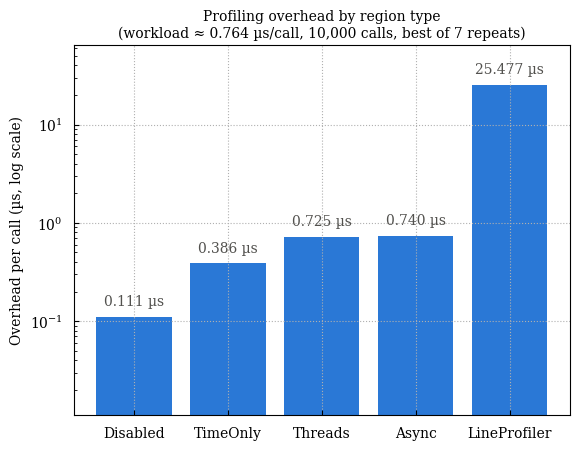
!python examples/benchmark_overhead.py # save figure!python examples/benchmark_overhead.py --show # display interactivelyPublished result of the full benchmark (10,000 calls, best of 7 repeats):
The cells below run the same measurement in miniature (fewer calls and repeats), with the same workload and the same modes.
import osimport tempfileimport timefrom pathlib import Path
import matplotlib.pyplot as plt
from scope_profiler import ProfileManager, read_h5, read_h5_summary
WORKDIR = Path(tempfile.mkdtemp(prefix="scope-profiler-overhead-"))os.chdir(WORKDIR)
NUM_CALLS = 2_000NUM_REPEATS = 3

def workload():    """Minimal workload used as the baseline."""    s = 0    for i in range(50):        s += i    return s

def time_calls(func, num_calls, num_repeats):    """Return the best (minimum) time per call in ns over *num_repeats* trials."""    best = float("inf")    for _ in range(num_repeats):        t0 = time.perf_counter_ns()        for _ in range(num_calls):            func()        t1 = time.perf_counter_ns()        best = min(best, t1 - t0)    return best / num_calls

baseline = time_calls(workload, NUM_CALLS, NUM_REPEATS)
configs = {    "Disabled": {"deactivate_profiling": True},    "TimeOnly": {},    "Threads": {"track_threads": True},    "Async": {"track_async": True},    "LineProfiler": {"use_line_profiler": True},}
overheads_us = {}for name, settings in configs.items():    buffer_limit = NUM_CALLS * NUM_REPEATS + 1    with ProfileManager.session(        buffer_limit=buffer_limit,        verbose=False,        deactivate_file_output=True,        **settings,    ):
        def _work():            s = 0            for i in range(50):                s += i            return s
        profiled = ProfileManager.profile("bench")(_work)        overheads_us[name] = (            time_calls(profiled, NUM_CALLS, NUM_REPEATS) - baseline        ) / 1e3
print(f"Baseline per call: {baseline / 1e3:.3f} µs\n")print(f"{'Region type':<14}{'Overhead / call (µs)':>22}")for name, value in overheads_us.items():    print(f"{name:<14}{value:>22.3f}")
Show output
Baseline per call: 0.621 µs
Region type     Overhead / call (µs)Disabled                       0.015TimeOnly                       0.407Threads                        0.706Async                          0.699LineProfiler                  21.978
fig, ax = plt.subplots(figsize=(7, 3.5))floor = 0.01ax.bar(list(overheads_us), [max(v, floor) for v in overheads_us.values()])ax.set_yscale("log")ax.set_ylabel("Overhead per call (µs, log scale)")ax.set_title("Profiling overhead by region type (small live run)")ax.grid(axis="y", alpha=0.3)plt.show()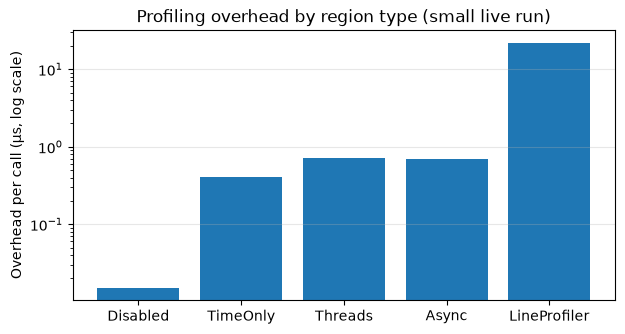
Results summary
Section titled “Results summary”| Region type | Overhead / call |
|---|---|
| Disabled | ~0.1 µs |
| TimeOnly | ~0.33 µs |
| LineProfiler | ~50 µs |
(Numbers measured on an Apple M-series CPU; absolute values will vary, but the relative ordering is stable.)
The benchmark script also measures the Threads (track_threads=True) and
Async (track_async=True) modes, which the live table above includes.
What this means for HPC
Section titled “What this means for HPC”The TimeOnly mode — the default and most commonly used — adds roughly 0.33 µs per instrumented call. In practice:
- A 64×64 matrix multiply takes ~36 µs, so the overhead is < 2 %.
- A 256×256 matrix multiply takes ~780 µs, giving < 0.1 % overhead.
- Typical simulation time steps run for milliseconds or longer, making the overhead unmeasurable.
The profiler can also be fully deactivated at startup
(deactivate_profiling=True) without removing any instrumentation from
the source code. In this mode the overhead drops to ~0.1 µs — barely
above the cost of a bare function call.
LineProfiler
Section titled “LineProfiler”The line_profiler mode is intentionally heavier (~50 µs per call)
because it instruments every source line in the profiled function. It
is meant for targeted debugging of individual functions, not for
always-on use in hot loops.
Regression guards
Section titled “Regression guards”The numbers above are benchmarks. What keeps them from drifting is a separate
set of budgets in the test suite, run with the overhead marker (from a
checkout of the repository, so the cell is shown but not run here):
!pytest -m overhead # per-call, write, and read budgets!pytest -s -m overhead # ...printing every measurement!pytest src/scope_profiler/tests/test_storage_size.py -s # file size| module | covers |
|---|---|
test_overhead.py | per-call cost of each region type, region lookup, source capture, buffer growth, nesting depth |
test_overhead_io.py | finalize() write cost, publication packing, read cost, summary-only reads, the timestamp codec |
test_storage_size.py | bytes per event, the fixed floor, scaling in events/ranks/regions, compression ratios |
The budgets sit roughly an order of magnitude above what an idle laptop measures, so a loaded CI machine still passes while a structural regression — an allocation or a lock on the hot path, a per-event Python loop in the writer, a quadratic index rebuild — does not. Each measurement takes the minimum over several repeats, which is the robust estimator for a cost: noise can only ever add time.
The scaling assertions matter more than the absolute ones, and are the reason the suite catches things a benchmark would not. An absolute budget can only catch a change large enough to blow it; a ratio between the same measurement at two sizes catches a change in the shape of the cost. For example, a summary-only read of a ten-times-larger profile must cost about the same (measured: 1.0x), which is what proves it never touches the event columns.
Writing and reading a profile
Section titled “Writing and reading a profile”The per-call numbers above are what instrumentation adds to the program. What
finalize() then spends turning the recorded buffers into a file is separate,
and matters for its own reasons: it happens at the end of a run that may have
been queued for hours, and under MPI it is collective, so a write that scales
badly stalls every rank.
Measured on an idle laptop, jittered synthetic data:
| cost | |
|---|---|
| write, 100,000 events | ~93 ns/event |
| write, 10,000 events | ~510 ns/event |
write with hdf5_compression="auto" | ~2x the plain write |
| publication packing, small profile | ~2.5 ms (fixed) |
| read, uncompressed | ~18 ns/event |
| read, gzip-compressed | ~66 ns/event |
| summary-only read | independent of event count |
| timestamp encode / decode | ~0.4 / ~2.1 ns/event |
examples/benchmark_io.py measures all of these, and --scaling sweeps the
rank count so the per-rank cost can be checked for flatness (again from a
checkout, so not run here):
!python examples/benchmark_io.py --scaling 8,32,128!python examples/benchmark_io.py --json # to diff between revisionsA small live version of the same measurement follows: it records 10,000 and
100,000 calls of one region, then times the write in finalize(), a full
read and a summary-only read. On this machine, with this synthetic data:
def measure_io(num_events, **settings):    ProfileManager.setup(file_path="io.h5", buffer_limit=num_events + 1, **settings)    for _ in range(num_events):        with ProfileManager.region("region"):            pass    t0 = time.perf_counter_ns()    ProfileManager.finalize(verbose=False)    t1 = time.perf_counter_ns()    read_h5("io.h5")    t2 = time.perf_counter_ns()    read_h5_summary("io.h5")    t3 = time.perf_counter_ns()    return (t1 - t0) / num_events, (t2 - t1) / num_events, (t3 - t2) / 1e6

print(f"{'':<34}{'write':>12}{'read':>12}{'summary read':>15}")print(f"{'':<34}{'ns/event':>12}{'ns/event':>12}{'ms':>15}")for label, num_events, settings in [    ("10,000 events", 10_000, {}),    ("100,000 events", 100_000, {}),    ("100,000 events, compression", 100_000, {"hdf5_compression": "auto"}),]:    write, read, summary = measure_io(num_events, **settings)    print(f"{label:<34}{write:>12.0f}{read:>12.0f}{summary:>15.2f}")
Show output
write read summary read ns/event ns/event ms10,000 events 3018 343 3.14100,000 events 591 133 2.87100,000 events, compression 513 209 2.83A small profile is dominated by the fixed ~2.5 ms publication pass, which is why the per-event figure is so much higher at 10,000 events than at 100,000. That pass is what removes the per-dataset chunk overhead; see Output file size.
Reading through gzip costs about 3.5x an uncompressed read. That is the other side of the ~5x space saving, and it is why compression is opt-in rather than the default.
Where the time goes
Section titled “Where the time goes”A recorded call is two perf_counter_ns() reads (~33 ns each from Python)
plus a slot reservation; the rest is the cost of the with statement or the
decorator wrapper itself. Those two together are about half the total and are
out of the library’s hands: an empty with on a Python object already costs
~109 ns, and on a C-implemented one ~76 ns. Nothing touches the filesystem: the timestamps accumulate in a
numpy buffer that doubles when it fills, and the whole buffer is written once,
at finalize(). Writing is therefore not part of the per-call cost at all —
deactivate_file_output changes what happens at the end of the run, not what
happens in the loop.
The two floor costs can be measured directly (again, absolute values depend on the machine):
import threadingimport timeit
N = 1_000_000

class PythonContext:    def __enter__(self):        return self
    def __exit__(self, *exc):        pass

def empty_with_ns(context):    t0 = time.perf_counter_ns()    for _ in range(N):        with context:            pass    return (time.perf_counter_ns() - t0) / N

perf_counter_ns = timeit.timeit(time.perf_counter_ns, number=N) / N * 1e9print(f"perf_counter_ns() read:           {perf_counter_ns:6.0f} ns")print(f"empty `with`, Python object:      {empty_with_ns(PythonContext()):6.0f} ns")print(f"empty `with`, C-implemented lock: {empty_with_ns(threading.Lock()):6.0f} ns")
perf_counter_ns() read: 36 nsempty `with`, Python object: 104 nsempty `with`, C-implemented lock: 112 ns