HDF5 output & post-processing from Python
Install for this page:
pip install "scope-profiler[pproc]"enables all examples. Reading HDF5 and inspecting regions need only the base install; pandas DataFrames and plotting needpproc.
Unless deactivate_file_output=True, finalize() writes the run’s timing
data into a single HDF5 file. Under MPI, ranks write their own event arrays
directly through parallel HDF5 or token-ordered access.
This page covers the file layout and the Python API for reading and plotting it. The same charts are available from the command line without writing any code — see Plotting with the CLI.
The examples below run on a small mock solver, profiled into a temporary directory (the setup cell is hidden), so every cell can be executed as is.
HDF5 file structure
Section titled “HDF5 file structure”The merged output file (default: profiling_data.h5) has the following
layout:
profiling_data.h5├── metadata/ (attributes describing the run)├── region_table/│ └── names (region ID → UTF-8 name)├── rank_region_index/│ ├── region_ids, ranks│ ├── event_offsets, event_counts│ ├── summary_statistics (fixed-size per-rank/region statistics)│ ├── exclusive_totals, event_metadata│ └── source_files, source_lines, source_texts, tags├── events/│ ├── start_deltas (int64, nanoseconds; gap to the previous call's start)│ ├── durations (int64, nanoseconds)│ ├── call_ids, parent_ids (optional int64; the call tree, -1 means no parent)│ ├── gpu_durations (optional int64, -1 means unavailable)│ ├── thread_ids (optional int64, -1 means unknown)│ ├── task_ids (optional int64, -1 means "outside any task")│ └── await_ns (optional int64, nanoseconds suspended)├── thread_table/ (optional; one row per thread, per rank)├── task_table/ (optional; one row per asyncio task or greenlet)└── rank<N>/ (only auxiliary line-profile/LIKWID records)The root attribute scope_profiler_schema identifies the HDF5 layout version.
New files currently use schema version 3. Files created before this
attribute was introduced are treated as version 1 for backward compatibility;
files from a newer, unsupported schema are rejected with an upgrade hint.
- Region names are stored once. Each rank/region pair indexes a contiguous slice of the shared event columns, avoiding thousands of small HDF5 objects.
- Times are stored as int64 nanoseconds from
time.perf_counter_ns(). Schema 3 stores, per region, the gap between the starts of consecutive calls (start_deltas; the first element is the absolute start) and each call’s length (durations) instead of absolute start and end timestamps: the numbers are much smaller, so they compress far better. The reader rebuilds the absolute timestamps with a cumulative sum. - Runs with
track_threads=Trueadd thethread_idsevent column and thethread_tablegroup;track_async=Trueaddstask_ids,await_nsandtask_table. The two tables describe what those per-call columns index into. A run without them writes none of the four, which is how a reader tells “single-threaded” from “threads not recorded”. See Threads, tasks and coroutines. - Runs with
use_likwid=Trueadditionally get arank<N>/likwid/group holding the hardware counters and derived metrics of every marker region. See LIKWID hardware counters.
Run metadata
Section titled “Run metadata”Every file records the environment it was produced in, as attributes on the
metadata group. This is what lets you tell two otherwise identical runs
apart months later.
Derived fields use lower-case names:
| Field | Description |
|---|---|
timestamp | ISO-8601 time the run started |
label | the run’s name, from setup(label=...); absent when none was given |
start_time_ns | run start on the perf_counter_ns clock, the origin of the relative timeline |
finalize_time_ns | run end (the call to finalize()) on the same clock |
user, hostname | who ran it, and where |
platform, uname | OS description, and the full uname tuple |
chip_information | CPU model (from /proc/cpuinfo or sysctl) |
python_version | interpreter version |
scope_profiler_version | version of this package |
working_directory | directory the run started in |
omp_num_threads, mpi_size, total_cores, num_nodes | parallelism, usable as scaling-plot x-axes; num_nodes counts the distinct hosts the ranks ran on |
modules | loaded environment modules, as a list of strings |
Captured environment variables keep their own upper-case names and are present only when set:
PATH,LD_LIBRARY_PATH,VIRTUAL_ENVLOADEDMODULES,MODULEPATH,MODULESHOME,MODULES_CMD,MODULES_RUN_QUARANTINEPYTHON_HOME,PYTHON_INC,PYTHON_INCLUDE,PYTHON_LIB- every
SLURM_*/SLURMD_*variable the batch system exported, so a run can be traced back to its job
user, hostname, uname, working_directory, modules and the
environment variables are only recorded with metadata_detail="full"; see
below. The run below uses the
default, so only the fields of the minimal set are present.
metadata = read_h5("profiling_data.h5").metadata
print(metadata["chip_information"])  # the CPU model of this machineprint(metadata.get("modules"))  # None: only recorded with metadata_detail="full"print(metadata.get("SLURM_JOB_ID"))  # a string inside a Slurm job, or None
AMD EPYC 9V45 96-Core ProcessorNoneNoneValues longer than 60 000 characters are truncated with a trailing
...[truncated], since HDF5 attributes cannot exceed 64 KB.
Metadata is collected on every rank but only rank 0’s copy is stored, so it
describes the run as a whole. Per-task values such as SLURM_PROCID reflect
rank 0.
Sharing a profile: what identifies you
Section titled “Sharing a profile: what identifies you”By default a profiling file records only what describes the run itself:
timestamp, platform, chip_information, python_version,
scope_profiler_version, omp_num_threads, mpi_size, total_cores,
num_nodes (a count, which names no machine), your
label, and the run’s start and finish times. Source files are stored relative
to the working directory (examples/run.py); a file outside it is stored
relative to the sys.path entry it was imported from
(struphy/feec/basis_projection_ops.py), or by name alone if neither applies.
So no home directory or user name ends up in the file, and a report can still
find the source. Line profiles also store the source of each profiled function,
so the report shows the code on any machine.
For runs that stay on the machine they were recorded on, more context can help
explain why two runs behaved differently. Opt into it with
metadata_detail="full":
simulate(file_path="run.h5", metadata_detail="full")
full = read_h5("run.h5").metadataprint(sorted(full))
['PATH', 'chip_information', 'finalize_time_ns', 'hostname', 'modules', 'mpi_size', 'num_nodes', 'omp_num_threads', 'platform', 'python_version', 'scope_profiler_version', 'start_time_ns', 'timestamp', 'total_cores', 'uname', 'user', 'working_directory']"minimal" (default) | "full" | |
|---|---|---|
timestamp, platform, chip_information, python_version, scope_profiler_version | recorded | recorded |
omp_num_threads, mpi_size, total_cores, num_nodes | recorded | recorded |
label, start_time_ns, finalize_time_ns | recorded | recorded |
user, hostname, uname, working_directory, modules | left out | recorded |
environment variables (PATH, LD_LIBRARY_PATH, VIRTUAL_ENV, module variables) | left out | recorded |
every SLURM_* / SLURMD_* variable | left out | recorded |
memory_profile_path (with use_memray) | left out | recorded |
| source file of a region or line profile | relative to the working directory or import root | absolute path |
Whatever the level, the file holds what you put there yourself: region names,
label and metadata(...) values as you wrote them; the source text of each
region when you turn on capture_region_source=True; and, when line profiling
is on, the source lines of each line-profiled function, so a report can show
the code without the source file. No other environment variable is read, so
secrets held in variables such as AWS_SECRET_ACCESS_KEY are never stored.
The level is applied when the file is recorded: a "full" file cannot be
reduced afterwards, and every export, report and the terminal UI show what the
file holds. Files written by the C library’s own HDF5 writer also record the
host name.
The same setting can go in a TOML settings file (metadata_detail = "full"
under [profiling]) or in a shared ProfilingOptions.
Reading data with read_h5
Section titled “Reading data with read_h5”from scope_profiler import read_h5
results = read_h5("profiling_data.h5")
# Number of MPI ranks in the fileprint(results.num_ranks)
# Number of nodes (distinct hosts) the ranks ran on; None for a multi-rank# file written before scope-profiler recorded itprint(results.num_nodes)
# Get all regions (sorted by first start time)for region in results.get_regions(): r0 = region[0] # Region data for rank 0 print(f"{region.name}: {r0.num_calls} calls, avg {r0.average_duration:.6f} s")Show output
11timestep: 3 calls, avg 0.000085 srhs.assemble: 3 calls, avg 0.000014 ssolver.precondition: 3 calls, avg 0.000007 ssolve: 3 calls, avg 0.000030 sexchange: 3 calls, avg 0.000003 sio.write: 3 calls, avg 0.000002 sDurations and timestamps on Region and MPIRegion are reported in
seconds, converted from the nanoseconds stored in the file.
Reading summaries without loading events
Section titled “Reading summaries without loading events”Large profiles can contain millions of events. Use read_h5_summary() when
you only need metadata or scalar region statistics:
from scope_profiler import read_h5_summary
results = read_h5_summary("profiling_data.h5")for region in results.get_regions():    print(region.name, region.num_calls, region.total_duration)
Show output
timestep 3 0.000253703rhs.assemble 3 4.3456e-05solver.precondition 3 2.0371e-05solve 3 9.1357e-05exchange 3 9.024e-06io.write 3 4.607e-06For large runs, restrict the compact read to selected region names or ranks, and skip optional profiler payloads when they are not needed. Ranks that the file does not have are simply absent (this file has rank 0 only):
results = read_h5_summary( "profiling_data.h5", regions=["solve", "exchange"], ranks=[0, 1], include_likwid=False, include_line_profile=False,)print([region.name for region in results.get_regions()])['solve', 'exchange']This reads one fixed-size record per rank/region instead of the event-sized
timestamp, call-ID, and GPU columns. Counts, totals, averages, min/max,
first/last, standard deviation, rank imbalance, wall-clock span, GPU totals,
sources, metadata, and exclusive totals remain exact. Per-call events, call
trees, timelines, and percentiles require read_h5(); percentile properties
are None on summary-only results.
Files created before summary records were added are accepted by default and
fall back to read_h5(). Pass fallback=False to require the bounded-memory
path instead. The diff, check, benchmark, metadata-only inspection, and
MCP comparison paths select this reader automatically when their requested
metric can be computed exactly from the stored statistics.
Filtering regions
Section titled “Filtering regions”get_regions() accepts include and exclude patterns (Python regex):
results = read_h5("profiling_data.h5")
# Only regions whose name starts with "solver"print([region.name for region in results.get_regions(include="solver.*")])
# Everything except IO regionsprint([region.name for region in results.get_regions(exclude="io.*")])['solver.precondition']['timestep', 'rhs.assemble', 'solver.precondition', 'solve', 'exchange']Where a region is defined
Section titled “Where a region is defined”A region records its defining filename and line by default: the with block
for the context-manager form, or the function for the decorator form. Full
source text is opt-in with capture_region_source=True (see
Configuration for what it costs and why it isn’t on unconditionally):
ProfileManager.setup(file_path="source.h5", capture_region_source=True)with ProfileManager.region("solve"):    work(3000)ProfileManager.finalize(verbose=False)
results = read_h5("source.h5")region = results.get_region("solve")print(f"line {region.source_lineno}, has_source={region.has_source}")print(region.source_text)
line 2, has_source=Truewith ProfileManager.region("solve"): work(3000)region.has_source is False when it was never enabled, for a file written
before this feature existed, or for a region created only by the recursive
tracer (recursive_profile=True) or scope-profiler run, none of which have
one call site to point at. If the same region name is used at more than one
call site, the source of whichever call created it first is kept - their
timings are pooled together under that one name either way. The same
information is available without writing any Python, via
scope-profiler inspect --source; see CLI reference.
Post-processing in the script that produced the data
Section titled “Post-processing in the script that produced the data”ProfileManager.read_results() opens the file the current configuration just
wrote, so a run can analyse itself without repeating the path:
simulate(file_path="self.h5") # setup(), the regions and finalize()results = ProfileManager.read_results()results.print_summary()results.print_summary(columns=["region", "ranks", "calls", "total", "avg"])Show output
  ╭──────────────────────────────────────────────╮  │ region                         total [s]     │  ├──────────────────────────────────────────────┤  │ timestep (3x)                  0.000251      │  │ └─ (own)                          0.000084   │  │ └─ rhs.assemble (3x)              0.000046   │  │ └─ solver.precondition (3x)       0.000021   │  │ └─ solve (3x)                     0.000095   │  │ │ └─ (own)                          0.000086 │  │ │ └─ exchange (3x)                  0.000009 │  │ └─ io.write (3x)                  0.000004   │  ╰──────────────────────────────────────────────╯
  ╭─ Info ────────────────────────────────────────────────────────────────╮  │ Summary: self.h5 (1 rank)                                             │  │                                                                       │  │ Explore:                                                              │  │   Inspect: scope-profiler inspect self.h5                             │  │   TUI:     scope-profiler tui self.h5                                 │  │                                                                       │  │ Visualize and export:                                                 │  │   Plot:    scope-profiler plot default self.h5 -o plots --show        │  │   Report:  scope-profiler report self.h5 -o report.html               │  │   Export:  scope-profiler export plot-data self.h5 -o data            │  │   Lines:   scope-profiler line-profile self.h5                        │  │                                                                       │  │ Compare runs:                                                         │  │   Diff:    scope-profiler diff BASE.h5 CANDIDATE.h5                   │  │   Check:   scope-profiler check BASE.h5 CANDIDATE.h5                  │  │                                                                       │  │ Durations are in seconds.                                             │  │ Regions may nest, so the summed total can exceed the wall-clock time. │  ╰───────────────────────────────────────────────────────────────────────╯
  ╭─────────────────────────────────────────────────────────────────────────────╮  │ region                    ranks      n      total [s]        avg/call [s]   │  ├─────────────────────────────────────────────────────────────────────────────┤  │ timestep                  1          3      0.000251         8.352e-05      │  │ └─ (own)                                       0.000084         2.798e-05   │  │ └─ rhs.assemble           1          3         0.000046         1.531e-05   │  │ └─ solver.precondition    1          3         0.000021         7.040e-06   │  │ └─ solve                  1          3         0.000095         3.171e-05   │  │ │ └─ (own)                                       0.000086         2.865e-05 │  │ │ └─ exchange             1          3           0.000009         3.061e-06 │  │ └─ io.write               1          3         0.000004         1.469e-06   │  ╰─────────────────────────────────────────────────────────────────────────────╯
  ╭─ Info ────────────────────────────────────────────────────────────────╮  │ Summary: self.h5 (1 rank)                                             │  │                                                                       │  │ Explore:                                                              │  │   Inspect: scope-profiler inspect self.h5                             │  │   TUI:     scope-profiler tui self.h5                                 │  │                                                                       │  │ Visualize and export:                                                 │  │   Plot:    scope-profiler plot default self.h5 -o plots --show        │  │   Report:  scope-profiler report self.h5 -o report.html               │  │   Export:  scope-profiler export plot-data self.h5 -o data            │  │   Lines:   scope-profiler line-profile self.h5                        │  │                                                                       │  │ Compare runs:                                                         │  │   Diff:    scope-profiler diff BASE.h5 CANDIDATE.h5                   │  │   Check:   scope-profiler check BASE.h5 CANDIDATE.h5                  │  │                                                                       │  │ Durations are in seconds.                                             │  │ Regions may nest, so the summed total can exceed the wall-clock time. │  ╰───────────────────────────────────────────────────────────────────────╯
Under MPI only rank 0 writes the merged file, so guard the call accordingly.
Getting the results without touching disk
Section titled “Getting the results without touching disk”finalize(return_results=True) hands back the run’s data directly from the
in-memory buffers, with no file to write and read back:
from scope_profiler.plotting_scripts import plot_gantt
ProfileManager.setup(deactivate_file_output=True)with ProfileManager.region("timestep"):    with ProfileManager.region("solve"):        work(3000)results = ProfileManager.finalize(return_results=True)
results.print_summary()df = results.to_dataframe()plot_gantt(results, show=True)
Show output
  ╭─────────────────────────╮  │ region      total [s]   │  ├─────────────────────────┤  │ timestep    0.000055    │  │ └─ (own)       0.000031 │  │ └─ solve       0.000025 │  ╰─────────────────────────╯
  ╭─ Info ───────────────────────────────────────────────────────────────────╮  │ Summary: profiling_data (in memory, 1 rank)                              │  │                                                                          │  │ Explore:                                                                 │  │   Inspect: scope-profiler inspect profiling_data.h5                      │  │   TUI:     scope-profiler tui profiling_data.h5                          │  │                                                                          │  │ Visualize and export:                                                    │  │   Plot:    scope-profiler plot default profiling_data.h5 -o plots --show │  │   Report:  scope-profiler report profiling_data.h5 -o report.html        │  │   Export:  scope-profiler export plot-data profiling_data.h5 -o data     │  │   Lines:   scope-profiler line-profile profiling_data.h5                 │  │                                                                          │  │ Compare runs:                                                            │  │   Diff:    scope-profiler diff BASE.h5 CANDIDATE.h5                      │  │   Check:   scope-profiler check BASE.h5 CANDIDATE.h5                     │  │                                                                          │  │ Durations are in seconds.                                                │  │ Regions may nest, so the summed total can exceed the wall-clock time.    │  ╰──────────────────────────────────────────────────────────────────────────╯
  ╭─────────────────────────╮  │ region      total [s]   │  ├─────────────────────────┤  │ timestep    0.000055    │  │ └─ (own)       0.000031 │  │ └─ solve       0.000025 │  ╰─────────────────────────╯
  ╭─ Info ───────────────────────────────────────────────────────────────────╮  │ Summary: profiling_data.h5 (1 rank)                                      │  │                                                                          │  │ Explore:                                                                 │  │   Inspect: scope-profiler inspect profiling_data.h5                      │  │   TUI:     scope-profiler tui profiling_data.h5                          │  │                                                                          │  │ Visualize and export:                                                    │  │   Plot:    scope-profiler plot default profiling_data.h5 -o plots --show │  │   Report:  scope-profiler report profiling_data.h5 -o report.html        │  │   Export:  scope-profiler export plot-data profiling_data.h5 -o data     │  │   Lines:   scope-profiler line-profile profiling_data.h5                 │  │                                                                          │  │ Compare runs:                                                            │  │   Diff:    scope-profiler diff BASE.h5 CANDIDATE.h5                      │  │   Check:   scope-profiler check BASE.h5 CANDIDATE.h5                     │  │                                                                          │  │ Durations are in seconds.                                                │  │ Regions may nest, so the summed total can exceed the wall-clock time.    │  ╰──────────────────────────────────────────────────────────────────────────╯
Plotting Gantt chart for ranks: [0]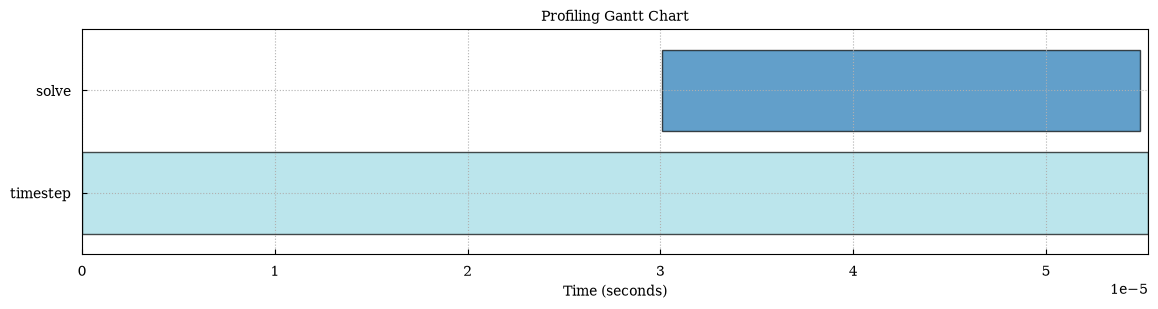
finalize() returns the very same ProfilingResults type that read_h5()
gives back — the only difference is where the data came from — so every method
on this page, every plot_* function and every exporter accepts it.
This works with deactivate_file_output=True, where no file is written at all
(as above).
Under MPI
Section titled “Under MPI”The gather is collective, so every rank must call
finalize(return_results=True) — don’t hide the call behind a rank guard. Rank
0 then holds the whole run, mirroring the merged file; the other ranks get an
empty result set.
You do not need a rank guard for anything downstream either. Everything that
produces output — print_summary(), the plot_* functions, the exporters —
does nothing for those empty result sets, so the script above prints its table
once and writes each figure once, from rank 0, whether you run it on 1 rank or
1000:
python simulation.pympirun -n 64 python simulation.py # same script, same output, onceAnalyses of your own need no guard as long as they iterate — get_regions()
and events() simply come back empty off rank 0. When you do need the
distinction (writing your own file, say), ask for it explicitly:
def my_report(results):    print("writing my own report for", len(results.get_regions()), "regions")

if results.is_root:    my_report(results)
writing my own report for 2 regionsSee examples/ex_in_memory_results.py for a complete script that runs
unchanged serially and under mpirun.
Building your own plots and analyses
Section titled “Building your own plots and analyses”The built-in charts cover the common cases; when you want something else, work from the raw calls rather than the aggregates.
One row per call
Section titled “One row per call”events() returns the long-form (“tidy”) view: one entry per recorded call,
with name, rank, call_index, start, end and duration in seconds.
Timestamps are measured from the first region entry in the file, so the
timeline starts at zero and is directly plottable — pass relative=False for
the raw monotonic-clock values.
results = read_h5("profiling_data.h5")
for event in results.events(include="solver.*", ranks=0):    plt.barh(event["name"], event["duration"], left=event["start"])plt.xlabel("time since the first region entry (s)")plt.show()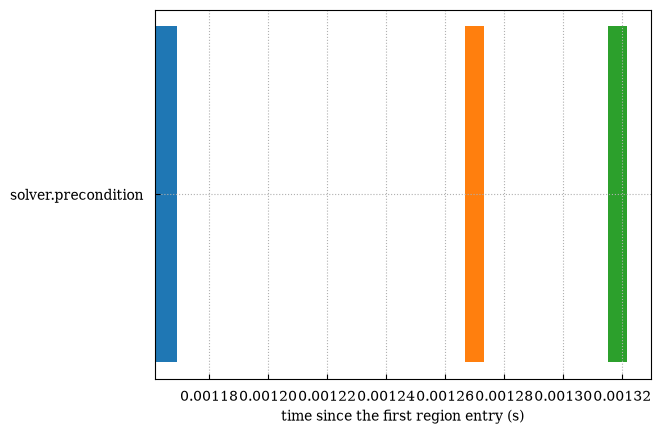
to_events_dataframe() returns the same data as a pandas DataFrame, which is
usually the shortest path to a custom chart:
events = results.to_events_dataframe()
# Which region has the most variable calls?events.groupby("name")["duration"].std().sort_values(ascending=False)
Show output
nametimestep 6.322224e-05solve 1.077568e-05rhs.assemble 9.345781e-07solver.precondition 5.548336e-07exchange 2.504137e-07io.write 2.427145e-07Name: duration, dtype: float64# Per-rank load imbalance in one lineevents.pivot_table(index="rank", columns="name", values="duration", aggfunc="sum")Show output
| name | exchange | io.write | rhs.assemble | solve | solver.precondition | timestep |
|---|---|---|---|---|---|---|
| rank | ||||||
| 0 | 0.000009 | 0.000005 | 0.000043 | 0.000091 | 0.00002 | 0.000254 |
# Distribution of a single region's call durationsevents.query("name == 'solve'")["duration"].hist(bins=50)plt.show()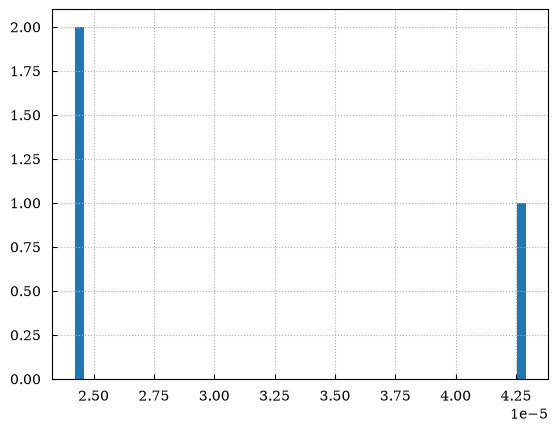
The same filters apply as everywhere else: include/exclude regexes and
ranks.
Individual Region and MPIRegion objects expose the same view for a single
region (results["solve"].events()), and Region also offers the stored
integer nanoseconds via start_times_ns, end_times_ns and durations_ns
for anyone who wants to avoid the float conversion.
One difference: the per-region events() accepts ranks and origin but
leaves the timestamps raw (origin=0.0) rather than measuring from the
timeline origin. Pass origin=results.time_origin to get the same zero as
results.events().
print(results["solve"].events()[0])print(results["solve"][0].durations_ns) # Region of rank 0print(results["solve"].events(origin=results.time_origin)[0]["start"]){'name': 'solve', 'rank': 0, 'call_index': 0, 'start': 203.63278228, 'end': 203.632825175, 'duration': 4.2895000007092676e-05, 'call_id': 3, 'parent_id': 0}[42895 24246 24216]0.0011882219999961308Useful timeline anchors
Section titled “Useful timeline anchors”results.minimum_start_time, results.maximum_end_time and results.time_span
bound the profiled window in seconds — handy for normalising axes or
computing what fraction of the run a region accounts for:
frame = results.to_dataframe()frame["fraction_of_run"] = frame["total_duration"] / results.time_spanframe[["total_duration", "fraction_of_run"]]Show output
| total_duration | fraction_of_run | |
|---|---|---|
| 0 | 0.000254 | 0.993842 |
| 1 | 0.000043 | 0.170232 |
| 2 | 0.000020 | 0.079800 |
| 3 | 0.000091 | 0.357877 |
| 4 | 0.000009 | 0.035350 |
| 5 | 0.000005 | 0.018047 |
results.run_start_time is when the run itself started, as registered by
ProfileManager.setup(), and results.startup_time is the gap from there to
the first region — the time the instrumentation never saw:
print(f"{results.startup_time:.3f} s elapsed before the first region was entered")0.001 s elapsed before the first region was enteredWhich zero the timeline uses
Section titled “Which zero the timeline uses”events() and call_stack() measure from results.time_origin: the
registered start time when the file has one, and the first region entry
otherwise. Two ways to override it:
raw = results.events(relative=False) # raw clock timestampsfirst = results.events(origin=results.minimum_start_time) # zero on the first regionprint(raw[0]["start"] > first[0]["start"], first[0]["start"])True 0.0The plot_* functions are the exception: they frame the x axis on the first
region entry, so that a long gap between setup() and the first region does
not fill a chart with empty space. The second line above reproduces exactly
what a chart’s axis shows.
Files that carry no start time — anything written before setup() began
recording one — need no special handling anywhere: run_start_time is None,
time_origin falls back to the first region entry, startup_time is 0.0,
and every ProfilingResults method, export and chart behaves exactly as it
did before.
Walking the reconstructed call stack
Section titled “Walking the reconstructed call stack”call_stack() recovers the nesting the flame graph draws, as plain dicts you
can render however you like. Each call carries its depth and the index of
its parent in the returned list:
from scope_profiler import call_stack_children, call_stack_roots
calls = results.call_stack(rank=0)
for call in calls[:6]:    print(f"{'  ' * call['depth']}{call['name']}")
# Or walk it as a treechildren = call_stack_children(calls)for root in call_stack_roots(calls):    print(calls[root]["name"], "has", len(children[root]), "direct children")
Show output
timestep rhs.assemble solver.precondition solve exchange io.writetimestep has 4 direct childrentimestep has 4 direct childrentimestep has 4 direct childrenCalls are identified by position rather than by name, because a region that is called repeatedly — or recursively — contributes several entries under one name.
Nesting is reconstructed by containment, so the intervals have to be properly
nested: any two calls on a rank either nest completely or do not overlap.
Anything else raises NestingError. Python regions always satisfy this; a
mismatched sp_begin/sp_end pair in native code is the way to break it.
On a long run, prefer build_call_arrays() to call_stack(). It is the same
reconstruction returned as numpy columns rather than a dict per call, which is
what makes it usable on millions of events:
from scope_profiler import build_call_arrays
calls = build_call_arrays(results.get_regions(), rank=0)print(calls.depth, calls.parent, calls.exclusive_ns)  # all indexed by call id
Show output
[0 1 1 1 2 1 0 1 1 1 2 1 0 1 1 1 2 1] [-1 0 0 0 3 0 -1 6 6 6 9 6 -1 12 12 12 15 12] [89875 15554 7431 39600 3295 1813 2354 14081 6470 21412 2834 1432 1683 13821 6470 21321 2895 1362]Gantt chart from Python
Section titled “Gantt chart from Python”from scope_profiler import read_h5from scope_profiler.plotting_scripts import plot_gantt
results = read_h5("profiling_data.h5")
plot_gantt( profiling_data=results, include=["solver.*", "rhs.*"], exclude=["io"], ranks=[0], # ranks=[0, 1] on a file with at least two ranks filepath="gantt.png", show=True,)Plotting Gantt chart for ranks: [0]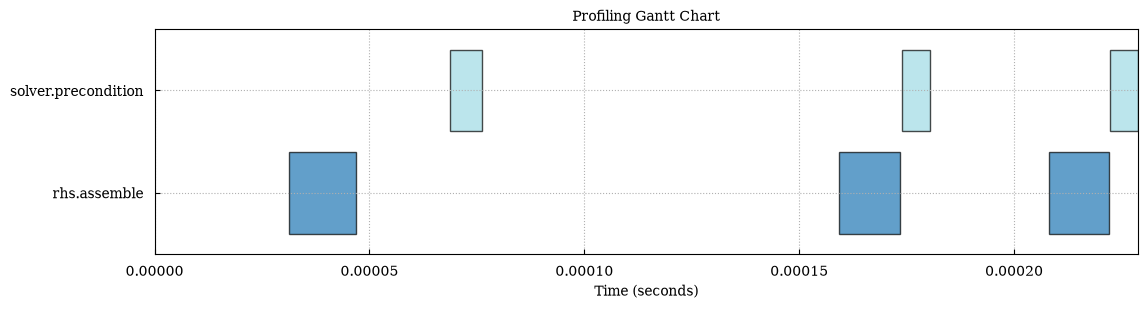
The chart displays one horizontal lane per (region, rank) combination, with bars spanning each recorded start-to-end interval. When multiple files are provided, each file gets its own stacked subplot in the exported chart.
Comparison bar charts from Python
Section titled “Comparison bar charts from Python”The comparison charts take several runs. The (hidden) cell below records three
more runs of the mock solver, run_a and run_b with different workloads and
run_1, run_2 and run_4 with OMP_NUM_THREADS set to 1, 2 and 4, so that
the scaling charts further down have something to scale over.
from scope_profiler import read_h5from scope_profiler.plotting_scripts import plot_durations
runs = [    read_h5("run_a.h5"),    read_h5("run_b.h5"),]
saved_paths = plot_durations(    runs,    filepath="durations.png",    show=True,)
Plotting duration comparison (total) for files: run_a, run_b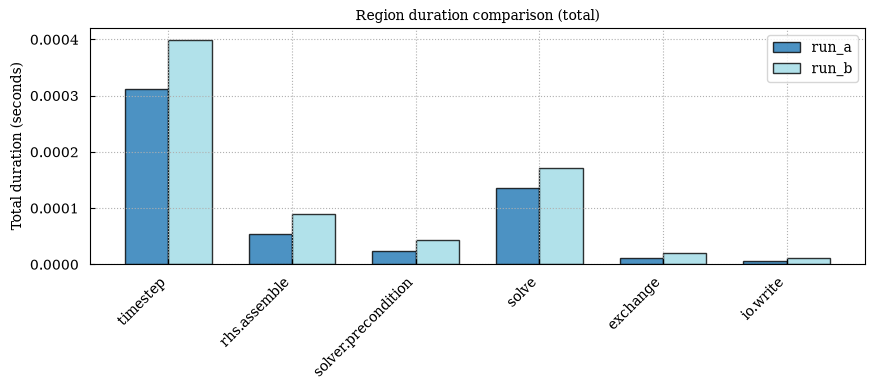
Each bar chart compares matching regions across files, with bars grouped by
file when several files are provided. plot_durations renders one figure per
requested statistic: total duration by default (the metric argument picks
another one: avg, min, max, first or last). Use the metrics argument
to render several at once, for example avg, min, max and total duration
per call:
saved_paths = plot_durations( runs, metrics=["avg", "total"], filepath="durations.png", show=True,)Plotting duration comparison (avg, total) for files: run_a, run_b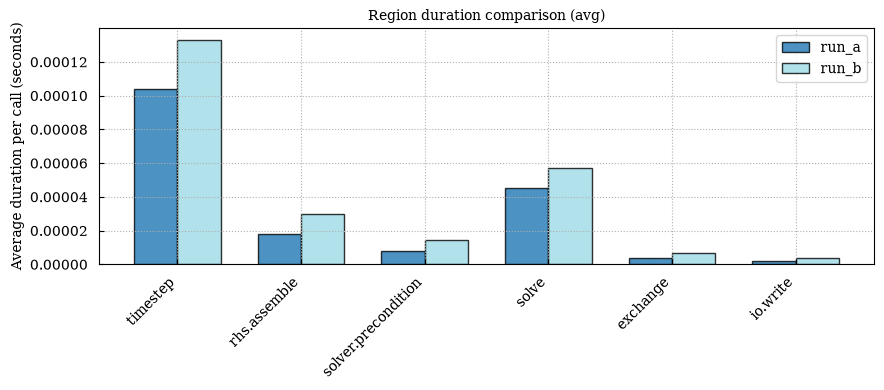
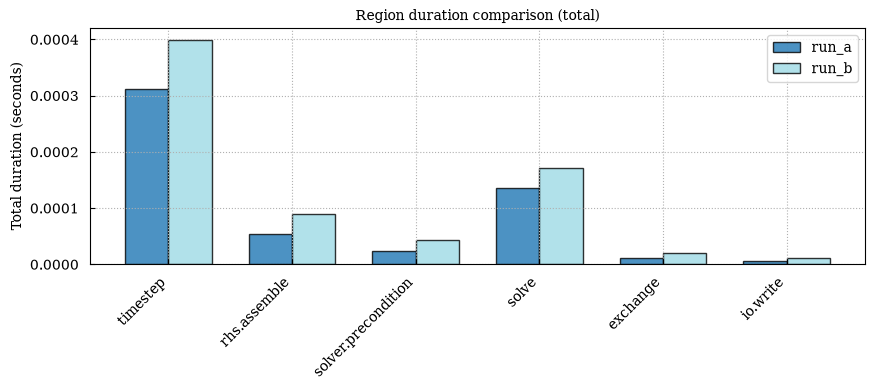
When filepath is given and more than one metric is plotted, the metric name
is inserted before the file extension, e.g. durations_avg.png,
durations_total.png. plot_durations returns the list of filepaths it
wrote (empty if filepath is None).
print([Path(path).name for path in saved_paths])['durations_avg.png', 'durations_total.png']Flame chart from Python
Section titled “Flame chart from Python”from scope_profiler.plotting_scripts import plot_flame_chart
results = read_h5("profiling_data.h5")
plot_flame_chart(results, ranks=[0], filepath="flame_chart.png", show=True)Plotting flame chart for: mock solverFor interactive flame-chart hover details, use --backend plotly.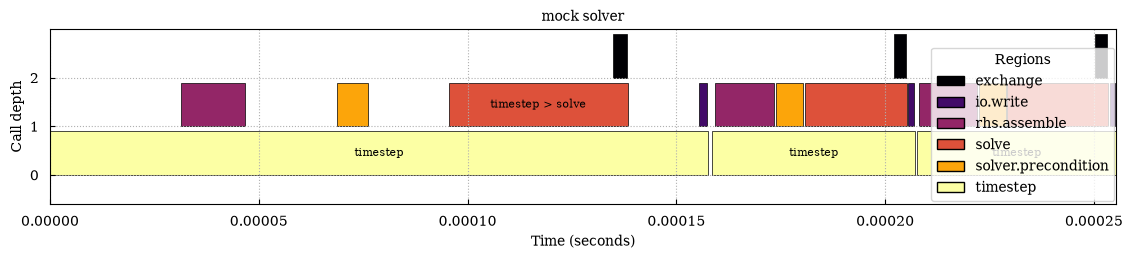
The call stack is reconstructed from timestamp containment: a region whose
interval falls inside another’s becomes its child. Unlike the Gantt chart,
the flame chart draws one panel per rank, defaulting to rank 0 only, with time
on the horizontal axis. The aggregated flame graph is available as
plot_flame_graph when the time axis is not needed.
Frame labels use the full reconstructed call path (for example,
timestep > assembly > solve), so same-named regions below different parents
remain distinguishable. Colors still identify the underlying region. When
source capture is enabled, the flame data export includes each frame’s
source_file and source_lineno; Plotly hover cards show the same location.
Duration over time from Python
Section titled “Duration over time from Python”from scope_profiler.plotting_scripts import plot_duration_timeseries
plot_duration_timeseries(results, filepath="duration_timeseries.png", show=True)Plotting duration over time for files: mock solver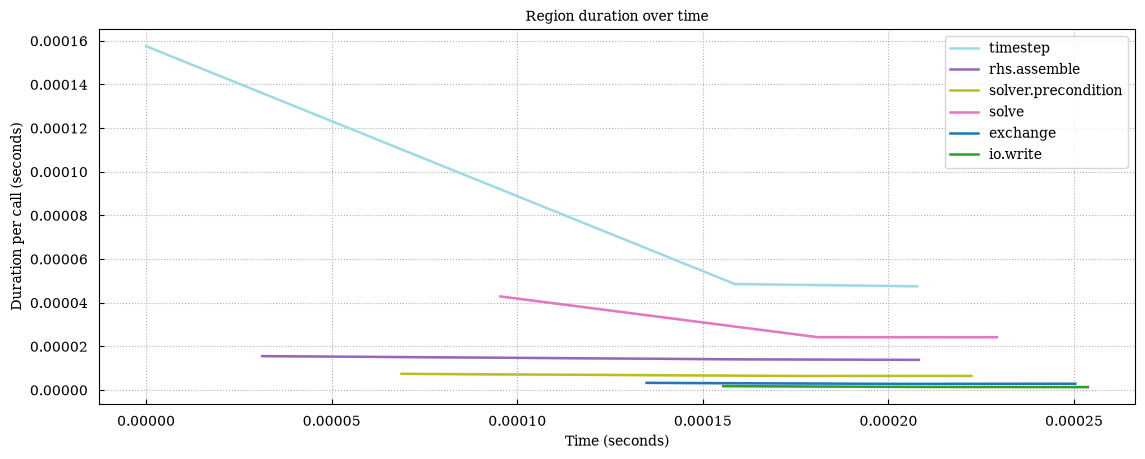
One line per region tracks the mean duration of each call over wall-clock time, shaded between the minimum and maximum across the selected ranks, so rank imbalance and drift over the run become visible.
Statistics JSON from Python
Section titled “Statistics JSON from Python”from scope_profiler.plotting_scripts import ( collect_region_statistics, write_region_statistics_json,)
stats = collect_region_statistics(runs) # dict, nothing writtenstats = write_region_statistics_json(runs, "stats.json") # same dict, and a fileprint(list(stats))['units', 'filters', 'common_regions', 'files']Both return per-file, per-region aggregates (count, average, min,
max, std, total, all in seconds), per-rank statistics for each region,
and the region names common to all inputs. This is the same document
scope-profiler plot default -o ... writes as region_statistics.json.
Speedup graph from Python
Section titled “Speedup graph from Python”from scope_profiler import read_h5from scope_profiler.plotting_scripts import plot_speedup
runs = [ read_h5("run_1.h5"), read_h5("run_2.h5"), read_h5("run_4.h5"),]
plot_speedup( runs, filepath="speedup.png", show=True,)This is the form for runs of 1, 2 and 4 MPI ranks, which needs an MPI launcher
and is not executed here. The run_1, run_2 and run_4 files above are
serial runs that differ in OMP_NUM_THREADS, so the executable version below
scales over threads instead (x_field="omp_num_threads", one of the options
described below):
from scope_profiler.plotting_scripts import plot_speedup
runs = [read_h5(f"run_{threads}.h5") for threads in (1, 2, 4)]
plot_speedup(    runs,    x_field="omp_num_threads",    filepath="speedup.png",    show=True,)
Plotting speedup comparison using x_field='omp_num_threads', values: 4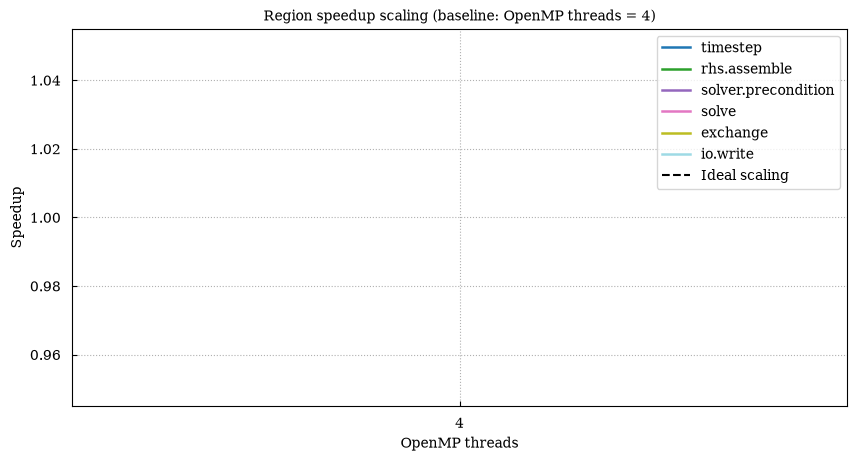
The speedup plot shows one line per scope, with MPI rank count on the x-axis
and speedup on the y-axis, derived from average per-call durations for each
matching scope. The dashed reference line shows optimal scaling relative to
the smallest rank count present in the inputs. x_field="num_nodes",
"omp_num_threads" or "total_cores" scales over nodes, threads, or
ranks × threads instead.
create_html_report(runs, "scaling.html", speedup_x="nodes") sets the
x-axis of a comparison report’s speedup chart the same way: "auto"
(default), "ranks", "nodes", "threads" or "cores". A named axis that
some run did not record raises scope_profiler.html_report.SpeedupAxisError
(a ValueError).
from scope_profiler import create_html_report
create_html_report(runs, "scaling.html", speedup_x="threads")print(Path("scaling.html").exists())
True