7. Notebook magics
Install for this tutorial:
pip install "scope-profiler[notebook,pproc,line-profiler]".
scope-profiler ships eleven IPython magics that wrap the same
ProfileManager.session()/region() API the other tutorials use by
hand: %%scope, %scope_timeit, %%scope_line, %%scope_recursive,
%%scope_agg, %scope_load, %scope_df, %scope_last, %scope_compare,
%scope_export, and %scope_reset. They
are meant for the “how long is this cell/line taking, and did my change help”
loop you run dozens of times while developing in a notebook, without writing
the session boilerplate out each time.
The combined install above adds IPython, the plotting/DataFrame dependencies,
and line_profiler. The equivalent explicit groups are:
pip install "scope-profiler[notebook,pproc,line-profiler]"Nothing here writes an HDF5 file — every magic below runs with
deactivate_file_output=True, so results live only in the kernel’s memory for
the duration of this session. See Jupyter/IPython magics for the full
reference.
%load_ext scope_profiler.ipython_magics
import time
from scope_profiler import ProfileManager
A toy workload
Section titled “A toy workload”Two versions of the same computation, one deliberately slower than the other,
so there is something worth comparing below. time.sleep stands in for real
work, as in the other tutorials, so the timings are stable regardless of the
machine running this notebook.
def naive_sum_of_squares(n):    total = 0    for i in range(n):        time.sleep(0.0001)  # pretend each term is expensive to compute        total += i * i    return total

def fast_sum_of_squares(n):    # closed form: 0^2 + 1^2 + ... + (n-1)^2    time.sleep(0.001)  # a little fixed overhead, no per-term cost    return (n - 1) * n * (2 * n - 1) // 6
%%scope — profile a cell
Section titled “%%scope — profile a cell”%%scope name runs the cell inside a profiling region called name (default
"cell") and prints the summary table right after. The result is kept in
memory under that name for %scope_last/%scope_compare to refer back to.
%%scope naiveresult_naive = naive_sum_of_squares(50)result_naive40425%%scope 'naive' ╭──────────────────────────────────────────────────────╮ │ region % session total [s] │ ├──────────────────────────────────────────────────────┤ │ scope_profiler.session 100.00% 0.009928 │ │ └─ (own) 0.71% 0.000070 │ │ └─ naive 99.29% 0.009858 │ ╰──────────────────────────────────────────────────────╯Nested regions work exactly as they do in a script — %%scope only adds the
outer region and the in-memory session. Add -p/--plot to also show a
duration bar chart of everything the cell recorded, or -q to skip the
printed table (the run is still recorded).
%%scope -pwith ProfileManager.region("load"):    time.sleep(0.02)
with ProfileManager.region("process"):    time.sleep(0.01)
%%scope 'cell' ╭────────────────────────────────────────────────────────╮ │ region % session total [s] │ ├────────────────────────────────────────────────────────┤ │ scope_profiler.session 100.00% 0.030701 │ │ └─ (own) 0.16% 0.000049 │ │ └─ cell 99.84% 0.030652 │ │ │ └─ (own) 1.70% 0.000521 │ │ │ └─ load 65.37% 0.020070 │ │ │ └─ process 32.77% 0.010061 │ ╰────────────────────────────────────────────────────────╯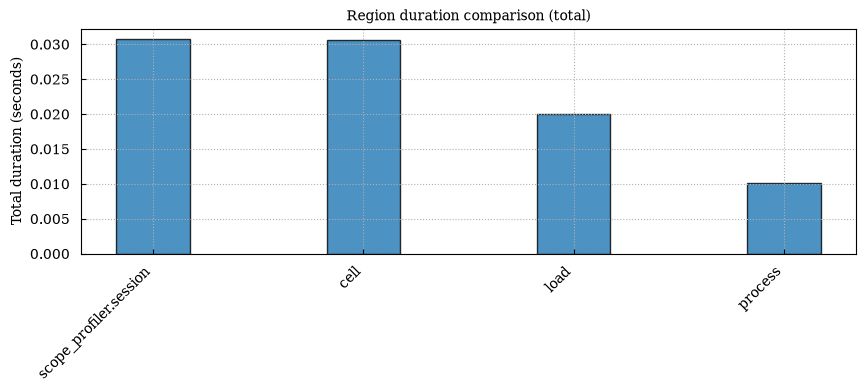
%scope_timeit — time a statement
Section titled “%scope_timeit — time a statement”%scope_timeit answers the same question as the built-in %timeit, but
through scope-profiler’s own region timer and table, so its output is
directly comparable to %%scope/%scope_compare.
%scope_timeit -n 5 fast_sum_of_squares(50)%scope_timeit 'fast_sum_of_squares(50)' (5 runs) ╭──────────────────────────────────────────────────────────────────────────────────────────╮ │ region n total [s] avg/call [s] min [s] max [s] │ ├──────────────────────────────────────────────────────────────────────────────────────────┤ │ scope_profiler.session 1 0.005434 5.434e-03 0.005 0.005 │ │ └─ (own) 0.000057 5.737e-05 │ │ └─ timeit 5 0.005377 1.075e-03 0.001 0.001 │ ╰──────────────────────────────────────────────────────────────────────────────────────────╯%%scope_recursive — profile a cell with nothing instrumented
Section titled “%%scope_recursive — profile a cell with nothing instrumented”Everything so far needed you to say what to measure. %%scope_recursive
does not: it records every Python call the cell makes as its own region, so
it answers “where did the time go?” before you know what to instrument. This
is recursive_profile=True — the same thing scope-profiler run does to a
script.
%%scope_recursivedef step(values):    return [value * 2 for value in values]

def simulate(num_steps):    values = list(range(2_000))    for _ in range(num_steps):        values = step(values)        time.sleep(0.001)    return values

final = simulate(10)
%%scope_recursive 'cell' ╭──────────────────────────────────────────────────────────────────────╮ │ region % session total [s] │ ├──────────────────────────────────────────────────────────────────────┤ │ scope_profiler.session 100.00% 0.011124 │ │ └─ (own) 1.33% 0.000148 │ │ └─ cell 98.67% 0.010976 │ │ │ └─ (own) 0.17% 0.000019 │ │ │ └─ __main__.<module> 98.50% 0.010957 │ │ │ │ └─ (own) 0.08% 0.000009 │ │ │ │ └─ __main__.simulate 98.41% 0.010947 │ │ │ │ │ └─ (own) 96.17% 0.010698 │ │ │ │ │ └─ __main__.step (10x) 2.25% 0.000250 │ ╰──────────────────────────────────────────────────────────────────────╯The table is sorted by total time and nests by call depth, so simulate and
step show up on their own without a single decorator. Use this first, then
reach for %%scope/%%scope_line on whatever it points at.
Two things to keep in mind: library internals called from the cell are traced
too (noisy, and each traced call costs overhead — keep such cells small,
and filter with --include), and the cell runs via exec, so a trailing
expression is not echoed as Out[n].
%%scope_agg — aggregation mode for very hot regions
Section titled “%%scope_agg — aggregation mode for very hot regions”A region entered a million times would store a million timestamps. With
aggregation_mode=True each region keeps only its count, total, min/max and
exclusive time — bounded memory, and cheap enough to leave in a hot loop.
%%scope_agg hotfor _ in range(50_000): with ProfileManager.region("tick"): pass%%scope_agg 'hot' ╭──────────────────────────────────────────────────────╮ │ region % session total [s] │ ├──────────────────────────────────────────────────────┤ │ scope_profiler.session 100.00% 0.036273 │ │ hot 99.87% 0.036225 │ │ tick (50kx) 18.46% 0.006695 │ ╰──────────────────────────────────────────────────────╯The trade-off: there is no per-call timeline, so Gantt charts and
%scope_df --events have nothing to show for this run. Summaries and
comparisons work as usual.
%scope_last — reprint a previous run
Section titled “%scope_last — reprint a previous run”Reprints a recorded run’s table without re-running anything — handy after
scrolling past a result, or to re-render it with a different --include.
With no name, it reprints the most recently recorded run:
%scope_last'hot' (last) ╭──────────────────────────────────────────────────────╮ │ region % session total [s] │ ├──────────────────────────────────────────────────────┤ │ scope_profiler.session 100.00% 0.036273 │ │ hot 99.87% 0.036225 │ │ tick (50kx) 18.46% 0.006695 │ ╰──────────────────────────────────────────────────────╯Or name one explicitly:
%scope_last naive'naive' (last) ╭──────────────────────────────────────────────────────╮ │ region % session total [s] │ ├──────────────────────────────────────────────────────┤ │ scope_profiler.session 100.00% 0.009928 │ │ └─ (own) 0.71% 0.000070 │ │ └─ naive 99.29% 0.009858 │ ╰──────────────────────────────────────────────────────╯%scope_compare — compare two runs
Section titled “%scope_compare — compare two runs”Record the optimized version under its own name, then compare it against the
naive one region-by-region — the same table scope-profiler diff prints
for two HDF5 files, here for two in-notebook runs.
%%scope optimizedresult_optimized = fast_sum_of_squares(50)assert result_optimized == result_naive%%scope 'optimized' ╭──────────────────────────────────────────────────────╮ │ region % session total [s] │ ├──────────────────────────────────────────────────────┤ │ scope_profiler.session 100.00% 0.001364 │ │ └─ (own) 3.29% 0.000045 │ │ └─ optimized 96.71% 0.001319 │ ╰──────────────────────────────────────────────────────╯%scope_compare naive optimized'naive' -> 'optimized' ╭────────────────────────────────────────────────────────────────────────────────────────────╮ │ region total [s] (a) total [s] (b) delta delta [%] │ ├────────────────────────────────────────────────────────────────────────────────────────────┤ │ naive 0.00985836 - -0.00985836 -100% │ │ scope_profiler.session 0.00992841 0.00136385 -0.00856457 -86.26% │ │ optimized - 0.00131902 +0.00131902 - │ ╰────────────────────────────────────────────────────────────────────────────────────────────╯
Only in a: naive Only in b: optimizedRegions are matched by name, so naive and optimized - named after their
own %%scope cell - each show up as “only in a”/“only in b”: there is
nothing on the other side to diff them against. scope_profiler.session, the
outer region every run has, is present in both, and its row is the real
before/after number. To get a per-region diff instead of just the session
total, give the part you want compared the same name in both cells, e.g. wrap
it in ProfileManager.region("compute") inside each %%scope cell.
With no arguments, %scope_compare compares the two most recently recorded
runs, so plain %scope_compare would have worked here too. Pass --metric
(total, avg, min, max, p50, p95, p99, imbalance, or calls)
or --sort (delta, pct, name) to change what is compared or how rows
are ordered.
%scope_compare naive optimized --metric avg --sort name'naive' -> 'optimized' ╭────────────────────────────────────────────────────────────────────────────────────────╮ │ region avg [s] (a) avg [s] (b) delta delta [%] │ ├────────────────────────────────────────────────────────────────────────────────────────┤ │ naive 0.00985836 - -0.00985836 -100% │ │ optimized - 0.00131902 +0.00131902 - │ │ scope_profiler.session 0.00992841 0.00136385 -0.00856457 -86.26% │ ╰────────────────────────────────────────────────────────────────────────────────────────╯
Only in a: naive Only in b: optimized%%scope_line — line-by-line profiling for a cell
Section titled “%%scope_line — line-by-line profiling for a cell”Wall-clock totals tell you that naive_sum_of_squares is slow; line
profiling tells you which line. %%scope_line runs the cell with
use_line_profiler=True and prints per-line hit counts and time for whatever
the cell hands to line_profiler - needs the line-profiler extra. Prefer
decorating the function you care about with @ProfileManager.profile, as
below: it registers cleanly regardless of where it’s called from.
%%scope_line@ProfileManager.profile("naive_line")def naive_sum_of_squares_traced(n):    total = 0    for i in range(n):        time.sleep(0.0001)        total += i * i    return total

naive_sum_of_squares_traced(20)
Per-line timings
2470%%scope_line 'cell' ╭──────────────────────────────────────────────────────╮ │ region % session total [s] │ ├──────────────────────────────────────────────────────┤ │ scope_profiler.session 100.00% 0.006325 │ │ └─ (own) 49.61% 0.003137 │ │ └─ naive_line 50.39% 0.003187 │ ╰──────────────────────────────────────────────────────╯
Timer unit: 1e-09 s
Total time: 0.00317173 sFile: /tmp/ipykernel_3272/189735869.pyFunction: naive_sum_of_squares_traced at line 1
Line # Hits Time Per Hit % Time Line Contents============================================================== 1 @ProfileManager.profile("naive_line") 2 def naive_sum_of_squares_traced(n): 3 1 451.0 451.0 0.0 total = 0 4 21 4123.0 196.3 0.1 for i in range(n): 5 20 3162080.0 158104.0 99.7 time.sleep(0.0001) 6 20 4568.0 228.4 0.1 total += i * i 7 1 510.0 510.0 0.0 return totalThe time.sleep line dominates the table, as expected - in a real
workload this is exactly how you’d spot the line actually worth optimizing.
%scope_export — save a run to a file
Section titled “%scope_export — save a run to a file”A recorded run doesn’t have to stay in the notebook. Export it to a .prof
file for snakeviz/pstats, or to speedscope JSON, via
export_prof/export_speedscope - the same functions
scope-profiler export uses on an HDF5 file, here applied directly to the
in-memory result.
from pathlib import Path
%scope_export -n optimized optimized.prof%scope_export -n optimized optimized.speedscope.jsonsorted(p.name for p in Path.cwd().glob("optimized*"))
wrote optimized_rank0.profwrote optimized.speedscope.json['optimized.speedscope.json', 'optimized_rank0.prof']%scope_load — compare against a run from outside the notebook
Section titled “%scope_load — compare against a run from outside the notebook”Profiling data from an MPI job or a scope-profiler run is just an HDF5
file. %scope_load reads one (via read_h5) into the same name registry the
cell magics use, so a cluster run becomes directly comparable with what you
just measured here. Let’s write one out to stand in for that file.
cluster_file = "cluster_run.h5"with ProfileManager.session(file_path=cluster_file, verbose=False):    with ProfileManager.region("optimized"):        fast_sum_of_squares(50)
%scope_load cluster_run.h5
%scope_load cluster_run.h5 as 'cluster_run' ╭──────────────────────────────────────────────────────╮ │ region % session total [s] │ ├──────────────────────────────────────────────────────┤ │ scope_profiler.session 100.00% 0.001097 │ │ └─ (own) 2.77% 0.000030 │ │ └─ optimized 97.23% 0.001066 │ ╰──────────────────────────────────────────────────────╯%scope_compare cluster_run optimized'cluster_run' -> 'optimized' ╭─────────────────────────────────────────────────────────────────────────────────────────────╮ │ region total [s] (a) total [s] (b) delta delta [%] │ ├─────────────────────────────────────────────────────────────────────────────────────────────┤ │ scope_profiler.session 0.00109683 0.00136385 +0.000267012 +24.34% │ │ optimized 0.0010665 0.00131902 +0.00025252 +23.68% │ ╰─────────────────────────────────────────────────────────────────────────────────────────────╯%scope_df — the run as a pandas DataFrame
Section titled “%scope_df — the run as a pandas DataFrame”For anything the printed table doesn’t cover, take the DataFrame: it is the magic’s return value, so it renders on its own and can be assigned and analysed further — everything tutorial 2 does with a file, on the run you just measured.
df = %scope_df -n optimizeddf[["name", "num_calls", "total_duration", "average_duration"]]| name | num_calls | total_duration | average_duration | |
|---|---|---|---|---|
| 0 | scope_profiler.session | 1 | 0.001364 | 0.001364 |
| 1 | optimized | 1 | 0.001319 | 0.001319 |
%scope_df --events -n optimized| name | rank | call_index | start | end | duration | |
|---|---|---|---|---|---|---|
| 0 | scope_profiler.session | 0 | 0 | 0.000988 | 0.002352 | 0.001364 |
| 1 | optimized | 0 | 0 | 0.001031 | 0.002350 | 0.001319 |
%scope_reset — drop recorded runs
Section titled “%scope_reset — drop recorded runs”Recorded runs accumulate in memory for the life of the kernel. Clear one by name, then clear everything else that is left:
%scope_reset naive%scope_resetcleared recorded run 'naive'cleared all recorded scope-profiler runsWhere to go next
Section titled “Where to go next”These magics are a thin layer over ProfileManager and ProfilingResults —
everything from 2. Post-processing profiling data and 3. Visualizing results (custom
filtering, DataFrames, Gantt/flame charts) still works on the
ProfilingResults objects they record; reach into
get_ipython().magics_manager.registry["ScopeMagics"]._runs if you want one
back as a Python object instead of a printed table.