Quickstart
Install for this page:
pip install "scope-profiler[pproc]". The base install is sufficient through the text summary;pprocadds the plotted example in step 4.
This page walks through the lowest-touch workflow first: mark regions, run, and inspect. It then shows the equivalent Python lifecycle API.
1. Run an instrumented script
Section titled “1. Run an instrumented script”Add regions where the application has meaningful phases; no in-source session or setup call is required:
import scope_profiler as sp
def main():    with sp.region("iteration", tags=["solver"]):        evolve()
main()
Run the script through the CLI:
scope-profiler run example.py -o profile.h5The same script run with python example.py leaves the regions disabled and
writes no profile. To trace functions that were not explicitly marked, opt in
to recursive tracing:
scope-profiler run --recursive example.pyYou can select tagged regions and filter recursive function names without editing the script again:
scope-profiler run --tag solver --include 'my_app.*' example.pyFor a named application entrypoint, use --entrypoint main.
2. Start a session
Section titled “2. Start a session”Use ProfileManager.session() as the default entry point. Configuration
arguments are passed directly to the session:
from scope_profiler import ProfileManager
with ProfileManager.session():    # Profile regions inside this block.    run_application()
All regions created inside the session — even in other modules — share its configuration.
For a callable entrypoint, sp.run() provides the same setup/finalize safety
without a context-manager block:
import scope_profiler as sp
sp.run(run_application, output="profile.h5")
Use sp.setup(auto_finalize=True) when a long-running script needs one startup
call and cannot wrap its whole application in a with block.
3. Instrument your code
Section titled “3. Instrument your code”Decorator
Section titled “Decorator”Use @ProfileManager.profile to wrap an entire function:
@ProfileManager.profile("matrix_multiply")def matrix_multiply(a, b): return a @ bThe decorator also works without an explicit name — it uses the function name by default:
@ProfileManager.profiledef matrix_multiply(a, b): return a @ bTo include nested Python calls made by a decorated function:
with ProfileManager.session(recursive_profile=True): @ProfileManager.profile("solver_step") def solver_step(): return advance_state() # nested calls are recorded automaticallyContext manager
Section titled “Context manager”Use ProfileManager.region() for finer-grained control:
for step in range(num_steps):    with ProfileManager.region("time_step"):        evolve(state, dt)
    with ProfileManager.region("io"):        write_checkpoint(state)
The two styles can be mixed freely.
4. Finish the session
Section titled “4. Finish the session”When the with block exits, the session writes all buffered data, merges
per-rank HDF5 files, and prints a summary. Use return_results=True to keep
the finalized results in memory:
with ProfileManager.session(return_results=True) as run:    run_application()
results = run.results
Output:
  ╭─────────────────────────────────────────────────────────╮  │ region                       % session      total [s]   │  ├─────────────────────────────────────────────────────────┤  │ scope_profiler.session       100.00%        0.001488    │  │ └─ (own)                        41.40%         0.000616 │  │ └─ matrix_multiply (100x)       5.59%          0.000083 │  │ └─ time_step (1kx)              53.01%         0.000789 │  ╰─────────────────────────────────────────────────────────╯
  ╭─ Info ──────────────────────────────────────────────────────────────────────────────────────────────────────────────────────────╮  │ Summary: profiling_data.h5  (1 rank(s))                                                                                         │  │                                                                                                                                 │  │ Explore:                                                                                                                        │  │   Inspect: scope-profiler inspect ../../../../../tmp/scope-profiler-docs-output-lat7ezsv/profiling_data.h5                      │  │   TUI:     scope-profiler tui ../../../../../tmp/scope-profiler-docs-output-lat7ezsv/profiling_data.h5                          │  │                                                                                                                                 │  │ Visualize and export:                                                                                                           │  │   Plot:    scope-profiler plot default ../../../../../tmp/scope-profiler-docs-output-lat7ezsv/profiling_data.h5 -o plots --show │  │   Report:  scope-profiler report ../../../../../tmp/scope-profiler-docs-output-lat7ezsv/profiling_data.h5 -o report.html        │  │   Export:  scope-profiler export plot-data ../../../../../tmp/scope-profiler-docs-output-lat7ezsv/profiling_data.h5 -o data     │  │   Lines:   scope-profiler line-profile ../../../../../tmp/scope-profiler-docs-output-lat7ezsv/profiling_data.h5                 │  │                                                                                                                                 │  │ Compare runs:                                                                                                                   │  │   Diff:    scope-profiler diff BASE.h5 CANDIDATE.h5                                                                             │  │   Check:   scope-profiler check BASE.h5 CANDIDATE.h5                                                                            │  │                                                                                                                                 │  │ Durations are in seconds.                                                                                                       │  │ Regions may nest, so the summed total can exceed the wall-clock time.                                                           │  │ % session uses wall-clock coverage; overlapping recursive calls count once.                                                     │  ╰─────────────────────────────────────────────────────────────────────────────────────────────────────────────────────────────────╯
The same table is available from ProfilingResults.print_summary() and from
scope-profiler inspect; pass verbose=False to finalize() to suppress it.
5. Inspect the data
Section titled “5. Inspect the data”After finalization the timing data is saved to profiling_data.h5 (default).
Use the built-in CLI to generate a Gantt chart:
scope-profiler plot default profiling_data.h5 --show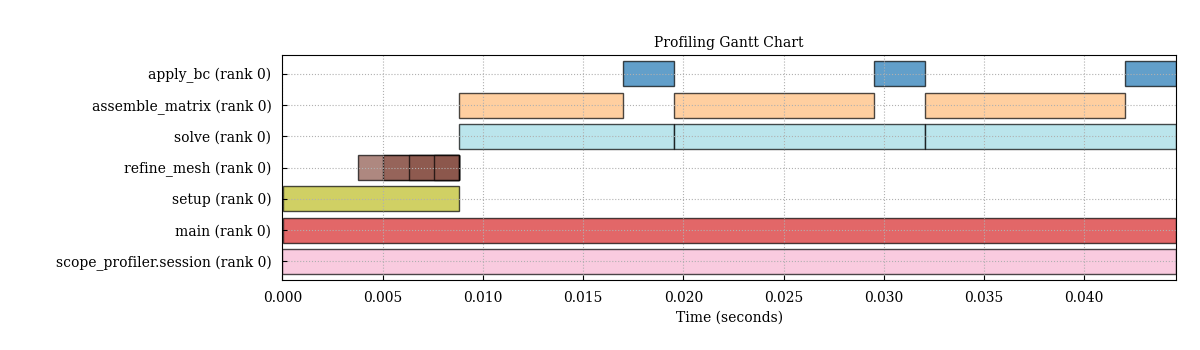
See Plotting with the CLI for the other charts and exports it can produce. Or load the data programmatically:
from scope_profiler import load
results = load("profiling_data.h5")
# The quickest look: a summary table of every region.results.print_summary()
# Or region by region (durations are in seconds).for region in results:    print(f"{region.name}: {region.num_calls} calls, "          f"avg {region.average_duration:.4f} s")
load() reads whichever format the file is in — HDF5 or JSON — so a path
is all you need. read_h5() and read_json() remain available when the
format is already known.
Complete example
Section titled “Complete example”from scope_profiler import ProfileManager
with ProfileManager.session(): @ProfileManager.profile("main") def main(): x = 0 for i in range(10): with ProfileManager.region("iteration"): x += 1
main()python example.py ╭────────────────────────────────────────────────────────╮ │ region % session total [s] │ ├────────────────────────────────────────────────────────┤ │ scope_profiler.session 100.00% 0.000088 │ │ └─ (own) 60.54% 0.000053 │ │ └─ main 39.46% 0.000035 │ │ │ └─ (own) 30.46% 0.000027 │ │ │ └─ iteration (10x) 9.00% 0.000008 │ ╰────────────────────────────────────────────────────────╯
╭─ Info ──────────────────────────────────────────────────────────────────────────────────────────────────────────────────────────╮ │ Summary: profiling_data.h5 (1 rank(s)) │ │ │ │ Explore: │ │ Inspect: scope-profiler inspect ../../../../../tmp/scope-profiler-docs-output-lat7ezsv/profiling_data.h5 │ │ TUI: scope-profiler tui ../../../../../tmp/scope-profiler-docs-output-lat7ezsv/profiling_data.h5 │ │ │ │ Visualize and export: │ │ Plot: scope-profiler plot default ../../../../../tmp/scope-profiler-docs-output-lat7ezsv/profiling_data.h5 -o plots --show │ │ Report: scope-profiler report ../../../../../tmp/scope-profiler-docs-output-lat7ezsv/profiling_data.h5 -o report.html │ │ Export: scope-profiler export plot-data ../../../../../tmp/scope-profiler-docs-output-lat7ezsv/profiling_data.h5 -o data │ │ Lines: scope-profiler line-profile ../../../../../tmp/scope-profiler-docs-output-lat7ezsv/profiling_data.h5 │ │ │ │ Compare runs: │ │ Diff: scope-profiler diff BASE.h5 CANDIDATE.h5 │ │ Check: scope-profiler check BASE.h5 CANDIDATE.h5 │ │ │ │ Durations are in seconds. │ │ Regions may nest, so the summed total can exceed the wall-clock time. │ │ % session uses wall-clock coverage; overlapping recursive calls count once. │ ╰─────────────────────────────────────────────────────────────────────────────────────────────────────────────────────────────────╯