Configuration
Install for this page:
pip install scope-profiler. The compression section additionally needspip install "scope-profiler[compression]".
All profiling behaviour is controlled through ProfileManager.setup().
Decorators and disabled regions may be declared before setup; they become active
when setup installs the run configuration. Calls made on the ProfileManager
class use its process-wide default configuration. Independent ProfileManager()
instances each have their own configuration and regions; see
Multiple sessions.
For a script that should finalize automatically on normal interpreter exit, opt in explicitly:
run = sp.setup(file_path="run.h5", auto_finalize=True)An explicit finalize() cancels the pending exit hook. Avoid automatic
finalization for MPI programs whose ranks may not exit together; use
session() or coordinated explicit finalization there.
Finalizing explicitly cancels the exit hook of the run started above:
sp.finalize(verbose=False)print(Path("run.h5").exists())TrueMultiple sessions
Section titled “Multiple sessions”Instantiate a manager when two profiling sessions need to coexist. Calls must be made through the manager that should receive the event:
compute_profiler = ProfileManager()io_profiler = ProfileManager()
with compute_profiler.session(file_path="compute.h5", verbose=False): with io_profiler.session(file_path="io.h5", verbose=False): with compute_profiler.region("solve"): solve() with io_profiler.region("checkpoint"): write_checkpoint()sorted(path.name for path in WORKDIR.glob("*.h5"))['compute.h5', 'io.h5', 'run.h5']The class-level API remains available as the default manager and is isolated
from instantiated managers. Decorators are isolated in the same way: use
@compute_profiler.profile(...) to attach a function to that session.
The sessions above coexist by nesting distinct managers in one execution
thread. Setting up and finalizing a session is still a single-threaded
operation: do not enter or finalize profiling sessions concurrently from
Python threads. Profiling regions from several threads is supported — see
Threads, tasks and coroutines — but that is a property of track_threads, not of
multiple managers.
Multiple sessions also do not isolate process-global instrumentation backends.
In particular, LIKWID owns one marker state per process, so only one
overlapping manager may use use_likwid=True. Timing-only, aggregation,
line-profiling, GPU-timing, and NVTX configurations retain their existing
behavior.
ProfileManager.setup() parameters
Section titled “ProfileManager.setup() parameters”| Parameter | Type | Default | Description |
|---|---|---|---|
deactivate_profiling | bool | False | Master switch. When True, all regions become no-ops with near-zero cost. |
auto_finalize | bool | False | Finalize once at normal interpreter exit unless finalized explicitly first. |
output | path or None | unset | Direct output destination; format follows the extension, while None keeps the run in memory. |
replace | bool | False | Explicitly replace a configuration that is still active. |
use_likwid | bool | False | Wrap regions with LIKWID marker API calls for hardware counter collection. Requires pylikwid. |
perf_events | list[str] or None | None | Collect selected Linux perf_event_open counts per region. |
| use_line_profiler | bool | False | Enable line-by-line profiling via line_profiler. See Line-by-line profiling. |
| use_memray | bool | False | Record process-wide allocations in a native Memray capture. Requires scope-profiler[extras]. |
| memory_profile_path | str or None | None | Memray capture path; defaults to <file-stem>.memray.bin. |
| use_nvtx | bool | False | Add NVTX ranges for NVIDIA Nsight tools; requires scope-profiler[nvtx]. |
| use_gpu_timing | bool | False | Time asynchronous device work with CUDA events. See GPU timing and synchronization. |
| gpu_timing_backend | str | "auto" | CUDA-event backend: "auto", "cupy" or "torch". |
| gpu_sync_on_exit | bool | False | Wait for the current device when a region exits, before its CPU end time is recorded. |
| recursive_profile | bool | False | Enable recursive nested-call profiling for all decorated functions by default. |
| deactivate_file_output| bool | False | When True, write no HDF5 file at all; the run stays in memory. See below. |
| buffer_limit | int | 1024 | Initial per-region buffer capacity. Buffers grow on demand, so this is a starting size, not a cap. |
| file_path | str | "profiling_data.h5" | Output path for the merged HDF5 file written by finalize(). |
| output_mode | str | "auto" | MPI writer: parallel HDF5 when available, otherwise direct token-ordered writes. Accepts auto, direct, or parallel. |
| hdf5_compression | str or None | None | Compress timestamp, GPU-duration, and line-profile arrays with gzip, lzf, optional zstd, or auto to compress only runs large enough to repay the write CPU. |
| hdf5_compression_level | int or None | None | GZIP level 0—9 or Zstandard level 1—22. LZF has no level. |
| hdf5_chunk_size | int or None | None | Maximum events per HDF5 chunk; enables chunked partial reads even without compression. |
| label | str | None | Short name for the run, used by post-processing wherever a run has to be named. See below. |
| capture_region_source| bool | False | Record where each region is defined (see HDF5 output & post-processing from Python). Off by default; see below for its cost and how to turn it on. |
| metadata_detail | str | "minimal" | How much of the environment is recorded: "minimal" (versions, platform, CPU, rank/thread counts), or "full" to add user, host, directories, environment variables and SLURM_*. See HDF5 output & post-processing from Python. |
| aggregation_mode | bool | False | Keep only count, total, minimum, maximum, and exclusive total per region; individual timeline events are unavailable. |
| track_threads | bool | False | Give every thread its own buffers and lane, and describe every thread the run touched. See Threads, tasks and coroutines. |
| track_async | bool | False | Also follow asyncio tasks and greenlets, and record the await time of every call. Implies track_threads. |
For the richer counter backend, install scope-profiler[perf-events]. It uses
py-perf-event when every selected event is supported by that package and
falls back to the built-in Linux syscall backend otherwise. Both routes remain
subject to the host’s perf_event_paranoid policy.
If a host reports permission denied, an administrator can grant normal users
access for the current boot with sudo sysctl -w kernel.perf_event_paranoid=1.
Run the profiled program as its ordinary user afterwards; sudo python uses a
separate Python environment and commonly cannot import the project or its
optional dependencies.
Grouping settings, and reusing them
Section titled “Grouping settings, and reusing them”The settings in the table above are also the fields of ProfilingOptions,
which holds a set of them so they can be built away from the call site and
reused across runs:
from scope_profiler import ProfileManager, ProfilingOptions
options = ProfilingOptions(use_likwid=True, buffer_limit=8192)
ProfileManager.setup(options=options, file_path="run_a.h5")ProfileManager.setup(options=options, file_path="run_b.h5")
The cell above needs pylikwid (and a second setup() would need the first run
to be finalized or replaced), so it is shown but not run here. This cell reuses
one set of options for two consecutive runs with a setting that needs no extra
install:
from scope_profiler import ProfilingOptions
options = ProfilingOptions(buffer_limit=8192)
ProfileManager.setup(options=options, file_path="run_a.h5")ProfileManager.finalize(verbose=False)ProfileManager.setup(options=options, file_path="run_b.h5")ProfileManager.finalize(verbose=False)
A keyword argument passed alongside options wins over the same field on it,
which in turn wins over a config_path TOML file.
ProfileManager.setup(options=ProfilingOptions(buffer_limit=8192), buffer_limit=64)print(ProfileManager.get_config().buffer_limit)ProfileManager.finalize(verbose=False)64The settings that share a prefix - the Memray, GPU and HDF5 ones - can also be given as groups, which spell them without the prefix:
from scope_profiler import GPUOptions, HDF5Options, MemrayOptions, ProfilingOptions
options = ProfilingOptions(    file_path="run.h5",    hdf5=HDF5Options(compression="gzip", compression_level=4, chunk_size=65_536),    memray=MemrayOptions(enabled=True, native_traces=True),    gpu=GPUOptions(timing=True, backend="torch"),)
The two spellings configure identical runs; setting one thing both ways raises
ValueError rather than picking a winner.
Building the options only collects the settings. Passing them to setup() would
start Memray and GPU timing, so this cell sets up a run with the HDF5 group alone:
ProfileManager.setup( options=ProfilingOptions( file_path="run.h5", hdf5=HDF5Options(compression="gzip", compression_level=4, chunk_size=65_536), ))print(ProfileManager.get_config().hdf5_compression)ProfileManager.finalize(verbose=False)gzipSetting one thing both ways, directly and on its group, is rejected at setup():
ProfileManager.setup( options=ProfilingOptions( hdf5_compression="gzip", hdf5=HDF5Options(compression="lzf"), ))---------------------------------------------------------------------------ValueError Traceback (most recent call last)Cell In[10], line 1----> 1 ProfileManager.setup( 2 options=ProfilingOptions( 3 hdf5_compression="gzip", 4 hdf5=HDF5Options(compression="lzf"),
File ~/work/scope-profiler/scope-profiler/src/scope_profiler/profile_manager.py:2769, in ProfileManager.setup(cls, options, auto_finalize, output, replace, region_tags, config_path, **overrides) 2767 settings.update(load_profiling_config(config_path)) 2768 if options is not None:-> 2769 settings.update(options.to_kwargs()) 2770 settings.update( 2771 {key: value for key, value in overrides.items() if value is not None}, 2772 ) 2773 requested_output = None
File ~/work/scope-profiler/scope-profiler/src/scope_profiler/profile_config.py:368, in ProfilingOptions.to_kwargs(self) 366 for key, value in group.to_kwargs().items(): 367 if key in kwargs:--> 368 raise ValueError( 369 f"{key!r} is set both directly and on the {name!r} " 370 f"option group; set it in one place", 371 ) 372 kwargs[key] = value 373 return kwargs
ValueError: 'hdf5_compression' is set both directly and on the 'hdf5' option group; set it in one placeSettings in a TOML file
Section titled “Settings in a TOML file”setup(config_path=...) reads the same settings from a [profiling] table,
flat or grouped into the matching sub-tables:
[profiling]file_path = "run.h5"buffer_limit = 8192
[profiling.hdf5]compression = "gzip"compression_level = 4
An unrecognised setting is an error naming the closest real one, in the file
and at the setup() call alike.
The same file can be written and read back here:
Path("profiling.toml").write_text(    """[profiling]file_path = "run.h5"buffer_limit = 8192
[profiling.hdf5]compression = "gzip"compression_level = 4""",)
ProfileManager.setup(config_path="profiling.toml")config = ProfileManager.get_config()print(config.buffer_limit, config.hdf5_compression, config.hdf5_compression_level)ProfileManager.finalize(verbose=False)
8192 gzip 4A misspelled setting is an error naming the closest real one, in the file and
at the setup() call alike:
Path("typo.toml").write_text("[profiling]\nbufer_limit = 8192\n")ProfileManager.setup(config_path="typo.toml")---------------------------------------------------------------------------ValueError Traceback (most recent call last)Cell In[12], line 2 1 Path("typo.toml").write_text("[profiling]\nbufer_limit = 8192\n")----> 2 ProfileManager.setup(config_path="typo.toml")
File ~/work/scope-profiler/scope-profiler/src/scope_profiler/profile_manager.py:2767, in ProfileManager.setup(cls, options, auto_finalize, output, replace, region_tags, config_path, **overrides) 2765 settings: dict = {} 2766 if config_path is not None:-> 2767 settings.update(load_profiling_config(config_path)) 2768 if options is not None: 2769 settings.update(options.to_kwargs())
File ~/work/scope-profiler/scope-profiler/src/scope_profiler/profile_config.py:495, in load_profiling_config(path) 493 unknown = set(settings) - _CONFIG_FIELDS 494 if unknown:--> 495 raise ValueError(_unknown_setting_error(unknown)) 496 return dict(settings)
ValueError: Unknown profiling setting(s): 'bufer_limit' (did you mean 'buffer_limit'?)ProfileManager.setup(bufer_limit=8192)---------------------------------------------------------------------------TypeError Traceback (most recent call last)Cell In[13], line 1----> 1 ProfileManager.setup(bufer_limit=8192)
File ~/work/scope-profiler/scope-profiler/src/scope_profiler/profile_manager.py:2745, in ProfileManager.setup(cls, options, auto_finalize, output, replace, region_tags, config_path, **overrides) 2743 unknown = set(overrides) - _CONFIG_FIELDS 2744 if unknown:-> 2745 raise TypeError(_unknown_setting_error(unknown)) 2747 if output is not _UNSET: 2748 conflicts = { 2749 name 2750 for name in ("file_path", "deactivate_file_output") 2751 if overrides.get(name) is not None 2752 }
TypeError: Unknown profiling setting(s): 'bufer_limit' (did you mean 'buffer_limit'?)Output file size
Section titled “Output file size”Three things decide how large a profile is, and the defaults are chosen to keep the write cheap rather than the file small.
Small profiles are packed on publication. HDF5 gives every growable dataset chunked storage, and a full chunk plus its index is allocated as soon as the first element is written — which for a profile with a handful of events is the file. The finished file is rewritten with those datasets stored contiguously, which takes a one-region run from 193 KiB to 17 KiB. Nothing to configure; files too large for it to matter are left alone.
Timestamps are stored as gaps and durations. A region’s calls are recorded as the gap since its previous call and the duration of each call, rather than two absolute nanosecond timestamps. The information is identical — the first value of each run is absolute — but the numbers are ~15 bits instead of ~60, which is most of what makes compression effective here.
Compression is opt-in. hdf5_compression="auto" compresses a run once it
is large enough for the saving to repay the write CPU, and leaves small ones
alone:
run = ProfileManager.setup(hdf5_compression="auto")with ProfileManager.region("small_run"): passProfileManager.finalize(verbose=False)print(Path("profiling_data.h5").stat().st_size < 32 * 1024)TrueA run this small is below the threshold at which "auto" starts applying a
filter, so it is stored uncompressed and packed contiguously: the file above is
the ~17 KiB one-region case described below.
What a profile actually costs
Section titled “What a profile actually costs”Two numbers describe any profile: a fixed cost that does not depend on the run, and a marginal cost per recorded call.
| size | |
|---|---|
| fixed floor (one region, one call) | ~15.7 KiB |
| per event, uncompressed | ~16.3 bytes |
per event, hdf5_compression="auto" | ~3.1 bytes |
The floor is HDF5’s own bookkeeping for the ~15 objects the schema uses — object headers, group tables, the region dictionary. It does not grow with the region count (10 regions cost the same as 1), and it is what dominates a profile of a few hundred calls.
The marginal cost is two int64 per call and essentially nothing else: 16.3
measured against 16 bytes of information stored. That holds as the run grows
in events, in ranks, and in regions — a profile with 200 regions costs about
1.3x one with 2 regions holding the same number of events, because a region
costs one index row rather than anything per call.
Measured end to end on a 100,000-event profile, against 3313 KiB for the same run before any of this:
| size | ||
|---|---|---|
| default | 3180 KiB | 1.0x |
hdf5_compression="auto" | 142 KiB | 23x |
Compression ratios depend on the data. That 23x is a real profile, whose gaps between calls are small and regular. On deliberately jittered synthetic data — the pessimistic case — the same setting gives ~5x, and the delta encoding on its own accounts for ~1.4x of it against absolute timestamps at the same filter. A real profile is closer to the former.
aggregation_mode=True is smaller still, and is the only option whose size
does not grow with the call count at all: it records no timeline, so 10,000
calls cost exactly what 10 do.
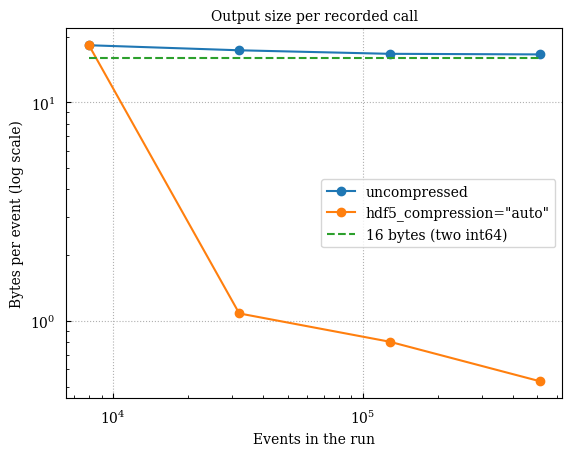
The shape is what the table cannot show. Uncompressed, the curve falls from the
fixed cost of an almost-empty file onto the flat 16 bytes a call actually
stores. Compressed, it steps down sharply once the run crosses the threshold at
which "auto" starts applying a filter — below it the two curves are the
same file. Regenerate it with:
python examples/benchmark_io.py --scaling 2,8,32,128 --figure figuresThat script also reports the write and read cost of compression alongside the space it saves, since the space is only worth it against those.
These figures are asserted, not just documented. test_storage_size.py builds
profiles from fixed synthetic arrays — file size is deterministic, unlike a
timing — so its budgets are tight enough to catch a lost encoding or a third
column per call immediately. See
Profiling overhead for how that fits with
the timing budgets.
HDF5 compression and chunking
Section titled “HDF5 compression and chunking”The default remains contiguous and uncompressed, which minimizes write CPU cost for small profiles. Large traces can trade some CPU time for smaller files and chunk-addressable reads:
run = ProfileManager.setup( hdf5_compression="gzip", hdf5_compression_level=4, hdf5_chunk_size=65_536,)gzip is portable across HDF5 installations and usually gives the smallest
files of the built-in filters. lzf is faster but generally compresses less.
Both use HDF5’s byte-shuffle filter, which is particularly effective for
nearby int64 timestamps. Zstandard is available through the optional filter
plugin:
pip install "scope-profiler[compression]"ProfileManager.setup( hdf5_compression="zstd", hdf5_compression_level=3, hdf5_chunk_size=65_536,)Readers of a Zstandard-compressed file must also have hdf5plugin installed
so HDF5 can load the filter. Compression automatically makes datasets chunked;
set only hdf5_chunk_size when partial reads are desired without compression.
In MPI auto mode, scope-profiler uses the direct single-file writer if the
parallel HDF5 library lacks the requested filter. Explicit output_mode="parallel"
instead fails early with a diagnostic, so a parallel-HDF5 test cannot silently
exercise the direct backend.
Enabling capture_region_source
Section titled “Enabling capture_region_source”Every Python region records just its defining filename and line number for decorators and direct context-manager regions, using a one-time frame/code-object lookup. It neither reads nor parses source files and adds no per-call work.
Off by default, because its cost - while cheap for a typical file - is not always. Capturing a region’s source parses its defining file’s AST and walks it once per distinct file, the first time any of its regions is created — not once per region, and not on any later call. Measured cost tracks that file’s total size, not the size or number of the regions it defines:
| File | Cost, 1 rank | Cost per rank, 64 ranks (shared, oversubscribed node) |
|---|---|---|
| Typical, a few hundred lines | < 1 ms | a few ms |
| ~10,000 lines, ~1,000 regions (one spanning 3,000 lines) | ~0.3 s | ~2.9 s |
The per-region text itself is cheap to extract even when huge (~0.1 ms for a 3,000-line block) - the file-wide parse dominates. Every rank pays this independently and concurrently, so on a job with more ranks than idle cores it compounds under contention; at rank counts within the idle core count (1—8 ranks, above), it stays flat. For a typical, modestly sized codebase this is negligible either way - turn it on with:
run = ProfileManager.setup(capture_region_source=True)Naming a run with label
Section titled “Naming a run with label”Post-processing names a run after its output file: run_a.h5 becomes run_a
in chart legends, summary headings and the JSON statistics. label overrides
that with something you choose:
run = ProfileManager.setup(file_path="run_a.h5", label="128 ranks")Reading it back:
results = sp.read_h5("run_a.h5")print(results.label, "|", results.display_label)128 ranks | 128 ranksWithout a label, label is None and display_label is the file stem:
ProfileManager.setup(file_path="run_b.h5")ProfileManager.finalize(verbose=False)results = sp.read_h5("run_b.h5")print(results.label, "|", results.display_label)None | run_bThe label is stored as metadata in the output file, so it survives into every
later step — scope-profiler plot, scope-profiler inspect, the plotting
functions and the exporters all pick it up with no extra flags. It is
especially worth setting for scaling studies, where a legend reading
128 ranks beats one reading run_a.
Reading it back, results.label is the label or None, while
results.display_label is the label or the file stem — what post-processing
actually prints.
Profiling modes
Section titled “Profiling modes”Every active region records nanosecond timestamps; the remaining flags decide
what it records on top of them. This strategy dispatch picks the region
class once, at setup(), so there are no runtime conditionals in the hot path:
| Flags | Region class | What it records |
|---|---|---|
deactivate_profiling | DisabledProfileRegion | Nothing (profiling off) |
| (defaults) | TimeOnlyProfileRegion | Timestamps |
use_likwid | FullProfileRegion | Timestamps + LIKWID |
use_line_profiler | LineProfilerRegion | Timestamps + line-by-line |
use_nvtx | NVTXProfileRegion | Timestamps + NVTX ranges |
perf_events | PerfEventProfileRegion | Timestamps + Linux perf counts |
use_gpu_timing | CUDATimingProfileRegion | Timestamps + CUDA-event GPU time |
use_gpu_timing + use_nvtx | CUDATimingNVTXProfileRegion | Timestamps + GPU time + NVTX ranges |
aggregation_mode | AggregateProfileRegion | Count and totals, no timeline |
track_threads | ThreadedProfileRegion | Timestamps, one lane per thread |
use_line_profiler=True takes precedence over use_likwid=True. In general the first match wins, in the order deactivate_profiling, use_line_profiler, use_likwid, perf_events, use_nvtx together with use_gpu_timing, use_gpu_timing, use_nvtx, aggregation_mode, track_threads.
settings = { "deactivate_profiling": {"deactivate_profiling": True}, "(defaults)": {}, "aggregation_mode": {"aggregation_mode": True}, "track_threads": {"track_threads": True},}for flags, kwargs in settings.items(): ProfileManager.setup(replace=True, **kwargs) print(f"{flags:22} {type(ProfileManager.region('x')).__name__}")ProfileManager.finalize(verbose=False)deactivate_profiling DisabledProfileRegion(defaults) TimeOnlyProfileRegionaggregation_mode AggregateProfileRegiontrack_threads ThreadedProfileRegionuse_nvtx=True adds NVTX annotations while retaining the normal CPU timing
records. NVTX does not measure GPU kernel duration itself; use NVIDIA Nsight
Systems/Compute or CUDA events for device-side timings. use_likwid=True and
use_nvtx=True are currently separate modes, with LIKWID taking precedence.
deactivate_file_output is not part of this dispatch: recording is identical
either way, and the flag only decides whether finalize() writes the buffers
out. With deactivate_file_output=True, use finalize(return_results=True)
to get the recorded data back — see
the Python API guide.
What is no longer configurable
Section titled “What is no longer configurable”Two things used to be options and are now decided for you, because there was only ever one sensible answer:
- The run’s start time is the moment
setup()is called. It is stored as thestart_time_nsmetadata field and is the origin of the relative timeline in post-processing. - MPI is used exactly when the process was started by an MPI launcher
(
mpirun,mpiexec,srun, …), so a plainpython script.pynever importsmpi4py. SetSCOPE_PROFILER_MPI=0or=1in the environment to overrule the detection.
Toggling profiling at runtime
Section titled “Toggling profiling at runtime”With the default class-level manager, you can leave all instrumentation in place and simply flip the master switch:
import os
from scope_profiler import ProfileManager
run = ProfileManager.setup(    deactivate_profiling=os.environ.get("DISABLE_PROFILING", "0") == "1",)
Recursive profiling of decorated entrypoints
Section titled “Recursive profiling of decorated entrypoints”Set recursive_profile=True to record Python function calls made inside
decorated functions:
def compute_step():    time.sleep(0.001)

ProfileManager.setup(recursive_profile=True)

@ProfileManager.profile("entry")def entry(): compute_step()entry()[name for name in ProfileManager.recorded_regions() if "compute_step" in name]['__main__.compute_step']You can override this per function with
@ProfileManager.profile(..., recursive=False) or
@ProfileManager.profile(..., recursive=True).
When deactivate_profiling=True, every region is a DisabledProfileRegion
whose __enter__ / __exit__ / wrap are trivial no-ops, adding only
the cost of a Python function call (~0.1 µs).
Re-configuring
Section titled “Re-configuring”After a run has been finalized, calling setup() starts a fresh session with
new configuration. Calling it while a run is still active raises an error;
pass replace=True when intentionally replacing that active run:
ProfileManager.setup(file_path="run_a.h5")# ... profile some code ...with ProfileManager.region("first_run"):    passProfileManager.finalize(verbose=False)
# Start a fresh session with different settings. The page's example uses# use_line_profiler=True (which needs `pip install line_profiler`); any other# setting works the same way.ProfileManager.setup(file_path="run_b.h5", aggregation_mode=True)# ...with ProfileManager.region("second_run"):    passProfileManager.finalize(verbose=False)
Calling setup() while a run is still active raises an error:
ProfileManager.setup(file_path="run_a.h5")ProfileManager.setup(file_path="run_b.h5")---------------------------------------------------------------------------RuntimeError Traceback (most recent call last)Cell In[31], line 2 1 ProfileManager.setup(file_path="run_a.h5")----> 2 ProfileManager.setup(file_path="run_b.h5")
File ~/work/scope-profiler/scope-profiler/src/scope_profiler/profile_manager.py:2738, in ProfileManager.setup(cls, options, auto_finalize, output, replace, region_tags, config_path, **overrides) 2539 """ 2540 Initialize and configure the profiling system. 2541 (...) 2731 ``SCOPE_PROFILER_MPI`` override. 2732 """ 2733 if ( 2734 cls._configured 2735 and cls._lifecycle_state is _LifecycleState.ACTIVE 2736 and not replace 2737 ):-> 2738 raise RuntimeError( 2739 "profiling is already configured; finalize it first or " 2740 "pass replace=True", 2741 ) 2743 unknown = set(overrides) - _CONFIG_FIELDS 2744 if unknown:
RuntimeError: profiling is already configured; finalize it first or pass replace=TruePass replace=True to replace the active run on purpose:
ProfileManager.setup(file_path="run_b.h5", replace=True)ProfileManager.finalize(verbose=False)GPU timing and synchronization
Section titled “GPU timing and synchronization”Enable CUDA-event timing to measure asynchronous device work:
ProfileManager.setup( use_gpu_timing=True, gpu_timing_backend="cupy", # or "torch" gpu_sync_on_exit=True, # optional; defaults to False)gpu_sync_on_exit=True waits for the current device after recording each
region’s GPU end event and before recording its CPU end time. It applies to
context managers and decorators, including exceptional exits. This includes
the wait in CPU durations and removes CPU/GPU overlap, changing the workload
being measured. The wait can also include work queued before the region or
on other streams; it is not an isolated kernel timing. GPU events continue
to measure the backend’s current stream. Synchronization requires
use_gpu_timing=True; custom backends must implement synchronize().
The grouped equivalent is
GPUOptions(timing=True, backend="cupy", sync_on_exit=True), or in TOML:
[profiling.gpu]timing = truebackend = "cupy"sync_on_exit = trueinspect, HTML report, and the end-of-run summary automatically add
gpu total [s] and gpu avg [s] when selected regions have GPU timings.
Explicit column selections can include gpu_total and gpu_avg.
GPU averages use only calls with GPU measurements. CPU-only regions show
a dash. A warning flags GPU totals over twice the CPU total as possible
asynchronous enqueue timing. Nested totals are inclusive.
Compare device timings with:
scope-profiler diff baseline.h5 candidate.h5 --metric gpu_totalscope-profiler diff baseline.h5 candidate.h5 --metric gpu_avg