Regridding: patches that follow the solution
Placing patches by hand works for fixed features such as electrodes. For a feature that moves
or that you cannot place in advance, let patchwork place them: tag the cells that need finer
cells, and regrid covers them with patches, level by level, and moves the fields over.
import matplotlib.pyplot as pltimport numpy as np
from patchwork import AMRHierarchy, cluster, function_tags, gradient_tags, plot_patches
Clustering tagged cells
Section titled “Clustering tagged cells”cluster covers the tagged cells of a level with rectangles (the Berger-Rigoutsos
algorithm). A box is kept when at least efficiency of its cells are tagged; otherwise it
is cut, at a gap in the tags if there is one, else where the tag count per row or column
bends most. max_size caps the side of a box.
i, j = np.ogrid[:40, :40]tags = (np.hypot(i - 14, j - 14) < 8) | ((np.abs(i - 30) < 3) & (j > 8))
fig, axes = plt.subplots(1, 2, figsize=(9, 4.5), constrained_layout=True)for ax, (efficiency, max_size) in zip(axes, [(0.7, None), (0.9, 8)], strict=True):    ax.imshow(tags.T, origin="lower", cmap="Greys", alpha=0.4)    boxes = cluster(tags, efficiency=efficiency, max_size=max_size)    for (i0, i1), (j0, j1) in boxes:        ax.add_patch(            plt.Rectangle((i0 - 0.5, j0 - 0.5), i1 - i0, j1 - j0, fill=False, lw=1.5)        )    ax.set_title(f"efficiency {efficiency}, max_size {max_size}: {len(boxes)} boxes")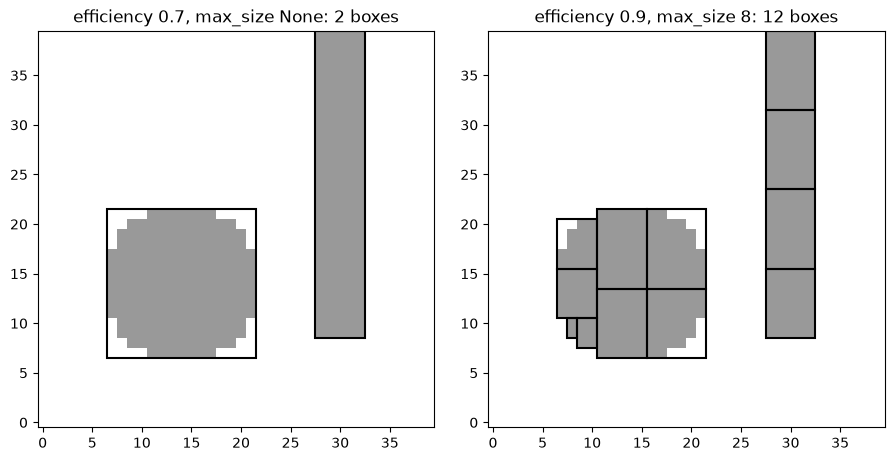
Tagging and regridding
Section titled “Tagging and regridding”The tags of level ask for patches on level : a boolean array of the level’s
shape (level_shape(k)) per level. function_tags makes them from a function of the
position. Here three levels refine a ring.
regrid returns a new hierarchy; the old one is left as it is. On the way it
- grows the tags by
buffercells (1), so that a feature moving by a cell stays covered; - makes each level cover, with a margin, what the finer levels need;
- keeps every patch
nestingcells (1) of the level below away from that level’s edge, except at the edge of the domain, so that its halo can be interpolated from below; - caps patches at
max_patch_sizecells.
mesh = AMRHierarchy(base_shape=(32, 32))mesh.allocate_field("u", centering="node")

def ring(x, y):    return np.abs(np.hypot(x - 0.5, y - 0.5) - 0.3) < 0.03

mesh = mesh.regrid(function_tags(mesh, ring, levels=3), max_patch_size=32)for level in range(1, mesh.max_level + 1):    print(f"level {level}: {len(mesh.patches_at_level(level))} patches")fig, ax = plot_patches(mesh)
level 1: 4 patcheslevel 2: 24 patcheslevel 3: 70 patches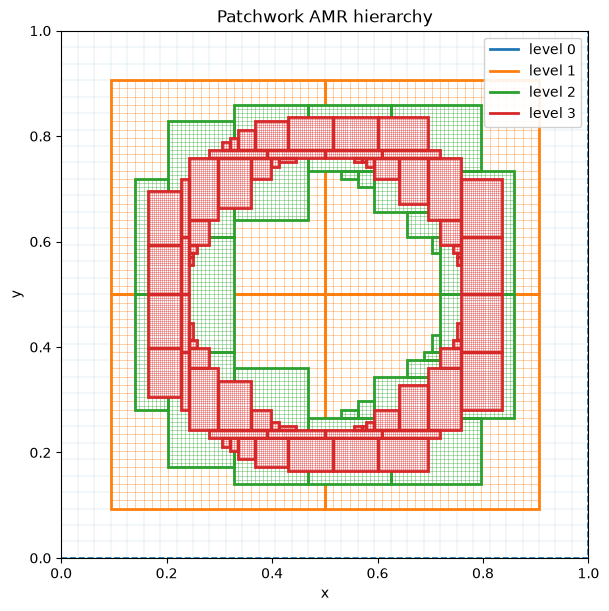
Following a moving feature
Section titled “Following a moving feature”A Gaussian pulse moves across the domain. The cells across which the field changes by more
than a threshold are tagged (gradient_tags) and the mesh is regridded. The change is
measured per cell of each level, so a level whose cells resolve the pulse tags nothing and
the refinement stops there by itself: no maximum level is needed.
A level can only be tagged where it exists. To build the levels the first time, regrid a few times; then regrid often enough that the feature moves by no more than a few cells of the finest level in between, and every level follows it. Here the pulse crosses a 16 x 16 base in twenty steps, with a regrid after each; two levels resolve it.
def pulse(x, y, t):    cx, cy = 0.2 + 0.5 * t, 0.25 + 0.35 * t    return np.exp(-((x - cx) ** 2 + (y - cy) ** 2) / 0.004)

def set_field(mesh, t):    for patch in mesh.local_patches:        x, y = patch.local_node_coordinates(mesh, "u")        patch.field("u").local[...] = pulse(x, y, t)

def adapt(mesh, t):    tags = gradient_tags(mesh, "u", threshold=0.35)    mesh = mesh.regrid(tags, max_patch_size=16)    set_field(mesh, t)  # in a simulation, the solver's next step    return mesh

mesh = AMRHierarchy(base_shape=(16, 16))mesh.allocate_field("u", centering="node")set_field(mesh, 0.0)for _ in range(3):  # one more level each time    mesh = adapt(mesh, 0.0)
fig, axes = plt.subplots(1, 3, figsize=(13, 4.2), constrained_layout=True)snapshots = iter(axes)for step in range(21):    t = step / 20    if step:        set_field(mesh, t)  # the solution has moved on        mesh = adapt(mesh, t)    if step % 10 == 0:        ax = next(snapshots)        plot_patches(mesh, field="u", ax=ax, show_grid=False)        ax.set_title(f"t = {t}: {mesh.max_level} levels, {len(mesh.patches)} patches")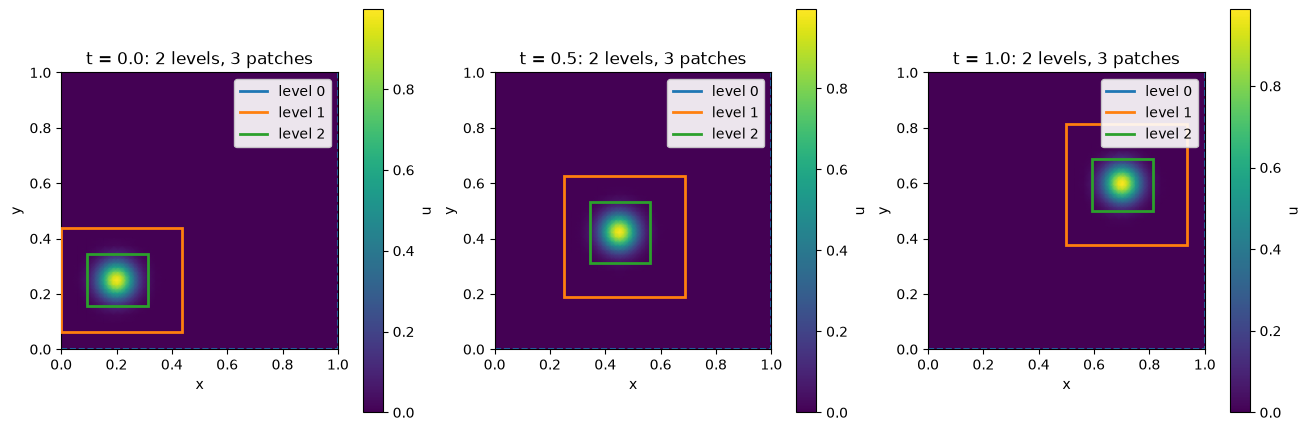
The same run as an animation, one frame per regrid, forty of them, with the cells of
every patch: each frame is drawn with plot_patches and the frames are joined into a GIF.
import io
from IPython.display import Imagefrom PIL import Image as PILImage

def frame(mesh, t):    fig, ax = plt.subplots(figsize=(7, 5.6), dpi=80, constrained_layout=True)    # the cells of every patch, in lines strong enough for a small frame    plot_patches(mesh, field="u", ax=ax, grid_linewidth=0.7, grid_alpha=0.8)    ax.set_title(f"t = {t:.2f}: {mesh.max_level} levels, {len(mesh.patches)} patches")    fig.canvas.draw()    image = PILImage.fromarray(np.asarray(fig.canvas.buffer_rgba())).convert("RGB")    plt.close(fig)    return image

mesh = AMRHierarchy(base_shape=(16, 16))mesh.allocate_field("u", centering="node")set_field(mesh, 0.0)for _ in range(3):    mesh = adapt(mesh, 0.0)frames = [frame(mesh, 0.0)]for step in range(1, 41):    t = step / 40    set_field(mesh, t)    mesh = adapt(mesh, t)    frames.append(frame(mesh, t))
gif = io.BytesIO()frames[0].save(    gif, format="GIF", save_all=True, append_images=frames[1:], duration=120, loop=0)Image(data=gif.getvalue(), format="gif")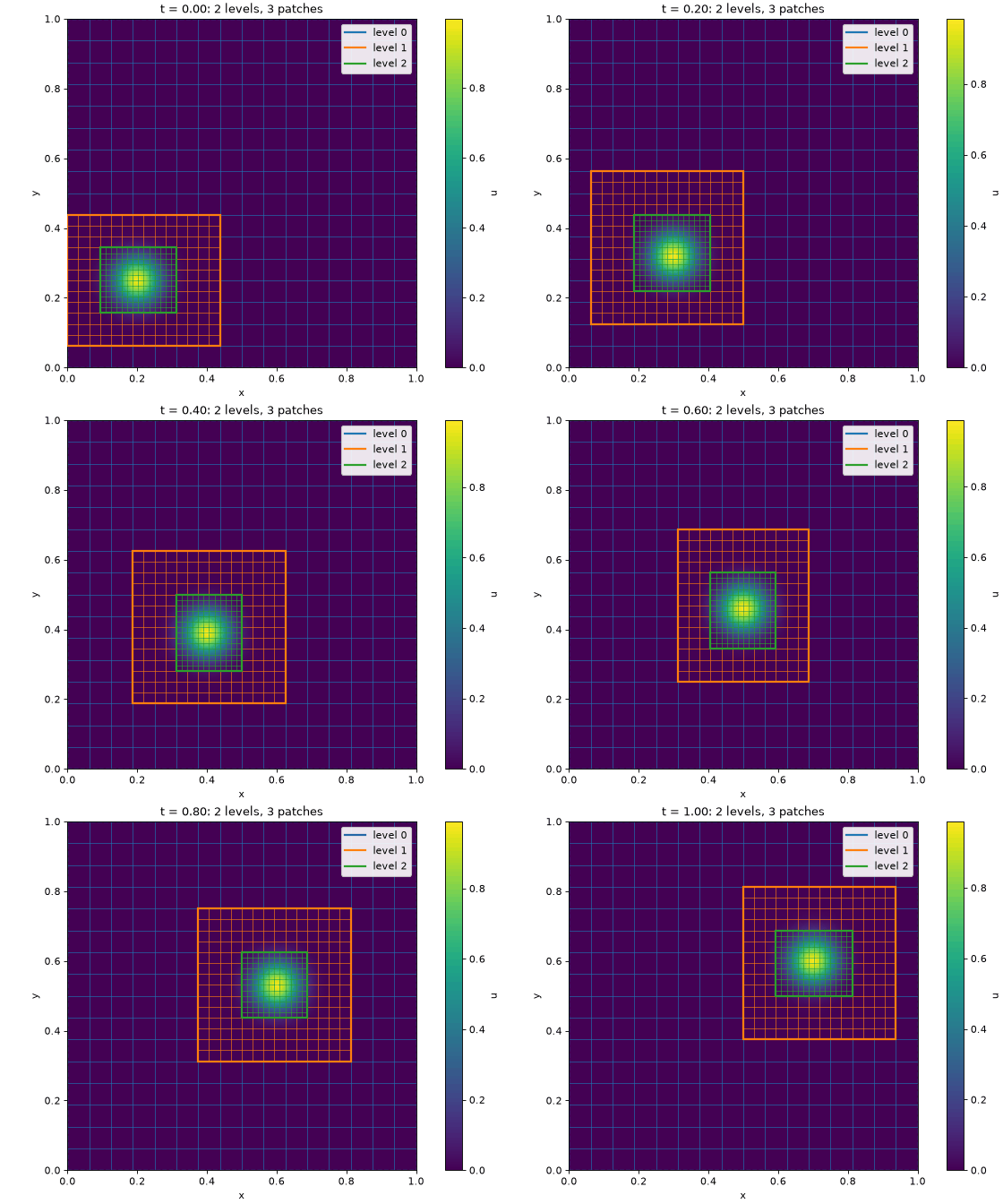
In a simulation the field is not set from a formula after each regrid: regrid moves it.
A point of a new patch takes the value of an old patch of the same level that has it, and is
otherwise interpolated (bilinearly) from the new level below. Both are exact for a linear
field, which makes for a quick check:
def plane(x, y):    return 1.0 + 2.0 * x - 3.0 * y

for patch in mesh.local_patches:    x, y = patch.local_node_coordinates(mesh, "u")    patch.field("u").local[...] = plane(x, y)
moved = mesh.regrid(function_tags(mesh, lambda x, y: x < 0.4, levels=2))error = max(    float(        np.abs(            patch.field("u").local - plane(*patch.local_node_coordinates(moved, "u"))        ).max()    )    for patch in moved.local_patches)print(    f"{len(moved.patches)} patches, largest error after moving the field: {error:.1e}")
3 patches, largest error after moving the field: 0.0e+00Densities keep their integral
Section titled “Densities keep their integral”Bilinear interpolation is right for a potential, but it does not keep the amount of a
density: the fine cells of a coarse cell do not add up to it. A cell-centered field
allocated with conservative=True is moved so that they do. Before a regrid it is
restricted (each coarse cell under a patch gets the mean of its fine cells), and new cells
are filled with limited slopes: the integral (integral) is the same before and after, and
no new extrema appear, so a positive density stays positive. Here a density and a plain
copy of it go through regrids that follow a moving disc:
def density(x, y):    return np.exp(-((x - 0.5) ** 2 + (y - 0.5) ** 2) / 0.02) + 0.2

densities = AMRHierarchy(base_shape=(32, 32))densities.allocate_field("rho", conservative=True)densities.allocate_field("copy")for patch in densities.local_patches:    x, y = patch.local_cell_centers(densities, "rho")    patch.field("rho").local[...] = density(x, y)    patch.field("copy").local[...] = density(x, y)start = densities.integral("rho")
for centre in (0.3, 0.4, 0.5, 0.6, 0.7):    disc = lambda x, y, c=centre: np.hypot(x - c, y - 0.5) < 0.15  # noqa: E731    densities = densities.regrid(function_tags(densities, disc, levels=2))print(f"conservative: {densities.integral('rho') / start - 1:+.1e} relative change")print(f"bilinear:     {densities.integral('copy') / start - 1:+.1e} relative change")
conservative: +2.2e-16 relative changebilinear: -6.4e-04 relative changeOnly the patches’ own points are filled: call exchange_halos before using the halos.
Under MPI
Section titled “Under MPI”Tags may be computed from the data each rank holds; regrid combines them over the ranks.
With placement="balanced" each new patch goes to the rank with the fewest cells, the
largest patches first, and max_patch_size makes patches small enough to share out.
cells_on_rank shows the result. In this serial run there is one rank:
balanced = mesh.regrid( gradient_tags(mesh, "u", 0.05), placement="balanced", max_patch_size=16)print("cells on each rank:", balanced.cells_on_rank)cells on each rank: (3200.0,)