Slices and coordinate sampling
Evaluate geometry with Picnic-like coordinate selections, then reuse axis-aligned and oblique sections for queries and plotting. Unlike an interpolated field, membership is evaluated directly at each requested coordinate.
evaluate() requires simgeometry[evaluate]; plotting additionally needs simgeometry[plot]. Results are host xarray.DataArray objects. These inspection calls do not gather MPI data.
import matplotlib.pyplot as pltimport numpy as npimport xarray as xr
from simgeometry import Sphere
ball = Sphere((0, 0, 0), 1)xs = np.linspace(-1.2, 1.2, 121)ys = np.linspace(-1.2, 1.2, 121)plane = ball.evaluate(x=xs, y=ys, z=0.4)assert plane.dims == ("x", "y")assert plane.coords["z"].item() == 0.4print(plane)plane.astype(int).plot(x="x", y="y", cmap="Blues")plt.gca().set_aspect("equal")plt.title("Sphere membership at z = 0.4")plt.show()
<xarray.DataArray 'occupancy' (x: 121, y: 121)> Size: 15kBarray([[False, False, False, ..., False, False, False], [False, False, False, ..., False, False, False], [False, False, False, ..., False, False, False], ..., [False, False, False, ..., False, False, False], [False, False, False, ..., False, False, False], [False, False, False, ..., False, False, False]], shape=(121, 121))Coordinates: * x (x) float64 968B -1.2 -1.18 -1.16 -1.14 ... 1.14 1.16 1.18 1.2 * y (y) float64 968B -1.2 -1.18 -1.16 -1.14 ... 1.14 1.16 1.18 1.2 z float64 8B 0.4Attributes: sampling: direct geometry queries; host arrays; no MPI gather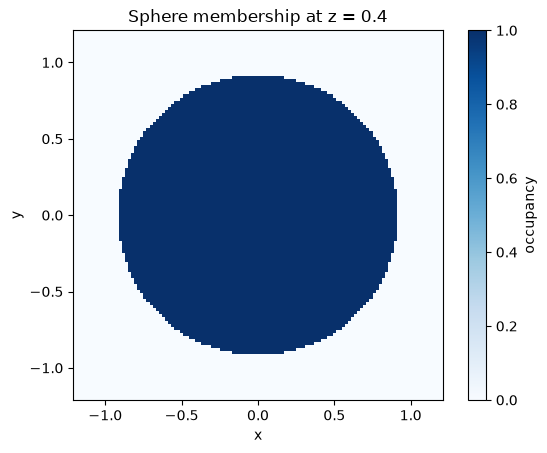
Coordinate conventions
Section titled “Coordinate conventions”A scalar fixes an axis and drops its dimension; sequences form a tensor-product mesh. Omitted coordinates use a supplied grid, or the shape bounds with resolution samples per axis. For scattered points, provide DataArrays sharing a dimension. Sampling outside a bounded object returns false.
Array queries such as contains_points() and signed_distance() instead use the existing (ndim, number_of_points) layout.
points_x = xr.DataArray([0.0, 0.5, 1.5], dims="points")points_y = xr.DataArray([0.0, 0.5, 0.0], dims="points")scattered = ball.evaluate(x=points_x, y=points_y, z=0.0)assert scattered.values.tolist() == [True, True, False]print(scattered)print("Signed distances:", ball.signed_distance([[0, 2], [0, 0], [0, 0]]))<xarray.DataArray 'occupancy' (points: 3)> Size: 3Barray([ True, True, False])Coordinates: x (points) float64 24B 0.0 0.5 1.5 y (points) float64 24B 0.0 0.5 0.0 z float64 8B 0.0Dimensions without coordinates: pointsAttributes: sampling: direct geometry queries; host arrays; no MPI gatherSigned distances: [-1. 1.]Query a section with a hole
Section titled “Query a section with a hole”A section retains membership, including holes and disconnected regions. Axis-aligned sections preserve the remaining world-axis names: a section at x=0 evaluates with y= and z=. In contains((u, v)), coordinates follow that remaining-axis order.
shell = Sphere((0, 0, 0), 1) - Sphere((0, 0, 0), 0.55)section = shell.slice(z=0.2)assert not section.contains((0, 0))assert section.contains((0.8, 0))print("Local point mapped to 3D:", section.to_world([0.8, 0]))section.show(resolution=180, labels=False, display=False)plt.title("Shell section at z = 0.2")plt.show()print("Section at x = 0:", shell.slice(x=0).evaluate(y=[0, 0.8], z=0).values)Local point mapped to 3D: [0.8 0. 0.2]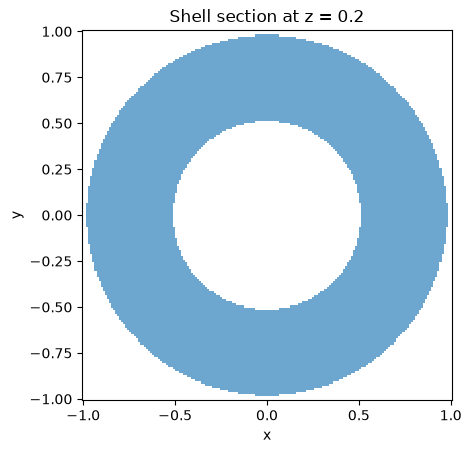
Section at x = 0: [False True]Oblique planes
Section titled “Oblique planes”Provide a plane origin and normal. The section constructs an orthonormal basis; its x and y coordinates now refer to that plane, rather than world axes. to_world() maps plane points into 3D and to_local() projects 3D points onto the plane.
oblique = shell.slice(origin=(0, 0, 0.1), normal=(1, 1, 1))local = np.array([[0.0, 0.8], [0.0, 0.0]])world = oblique.to_world(local)np.testing.assert_allclose(oblique.to_local(world), local, atol=1e-14)np.testing.assert_allclose( np.sum(world - np.array([[0], [0], [0.1]]), axis=0), 0, atol=1e-14)oblique.show(resolution=180, labels=False, display=False)plt.title("Oblique shell section; axes are plane coordinates")plt.show()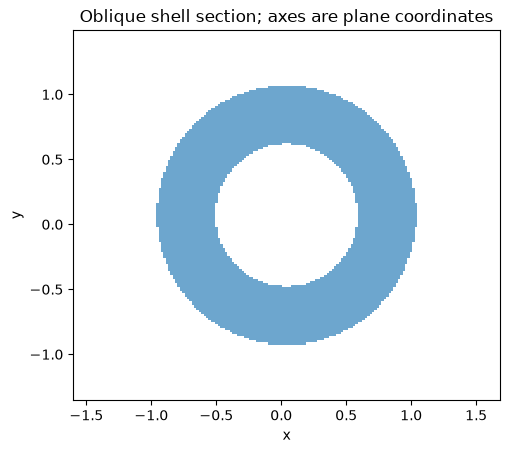
Try moving the plane beyond the sphere: the section should be empty. Then union two separated spheres and slice both at once to inspect disconnected components. A slice and an affine transform take snapshots, so later in-place edits to the original object do not alter them.