A heat equation with halo cells
The 2D heat equation , solved with a five-point stencil on a grid split over the MPI ranks. Each step updates the halo cells from the neighbours, with a zero-flux condition at the walls, and applies the stencil to every rank’s block. Run it serially, or with mpiexec -n 4 python heat_equation.py: the result is the same.
import cunumpy as xpimport matplotlib.pyplot as plt
import mpiarray as mpa
n = 128  # grid points per axish = 1.0 / n  # grid spacingalpha = 1.0  # diffusivitydt = 0.2 * h**2 / alpha  # stable for the explicit scheme (needs dt <= h**2 / 4)

def hot_spot(i, j):    """Initial temperature: a Gaussian, from the global indices of each cell.
    The indices come as the backend's arrays (NumPy or CuPy), hence ``xp``.    """    x, y = (i + 0.5) * h, (j + 0.5) * h    return xp.exp(-((x - 0.3) ** 2 + (y - 0.6) ** 2) / 0.005)

u = mpa.fromfunction(hot_spot, (n, n), split=(0, 1), halo=1)rank = u.layout.rankprint(u.layout)
Layout(shape=(128, 128), split=(0, 1), halo=(1, 1), periodic=(False, False), process_grid=(1, 1), rank=0 of 1)fromfunction computes every rank’s block from its global indices, so the whole grid never exists on one rank. split=(0, 1) cuts both axes, and halo=1 gives every block one layer of halo cells, which is what the five-point stencil reads.
One time step
Section titled “One time step”update_halos copies the neighbours’ boundary values into the halo cells. At the walls there is no neighbour; boundary="edge" copies the nearest cell instead, so no heat flows through the walls. The stencil reads the storage with its halos and writes the block.
def laplacian(v):    """The five-point Laplacian of the cells inside a storage array ``v``."""    return (        v[2:, 1:-1] + v[:-2, 1:-1] + v[1:-1, 2:] + v[1:-1, :-2] - 4 * v[1:-1, 1:-1]    ) / h**2

def step(u):    u.update_halos(boundary="edge")  # zero flux through the walls    u.local[...] += dt * alpha * laplacian(u.local_with_halos)

total, peak = u.sum(), u.max()for _ in range(400):    step(u)new_total, new_peak = u.sum(), u.max()  # collective: on every rankif rank == 0:    print(f"total heat: {total:.6f} -> {new_total:.6f}")    print(f"peak:       {peak:.4f} -> {new_peak:.4f}")
total heat: 257.359270 -> 257.359270peak: 0.9988 -> 0.2036The total heat stays the same, to rounding: with zero flux at the walls the stencil only moves heat around. sum and max are collective: every rank gets the same value.
Looking at the result
Section titled “Looking at the result”to_numpy(root=0) assembles the whole grid on rank 0, as a NumPy array for plotting (gather() keeps the backend’s array type, NumPy or CuPy). It is collective, so it is called on every rank, outside the if; only rank 0 plots.
field = u.to_numpy(root=0) # NumPy, also with CuPy storageif rank == 0: fig, ax = plt.subplots(figsize=(4, 3.5)) image = ax.imshow(field.T, origin="lower", extent=(0, 1, 0, 1), cmap="inferno") fig.colorbar(image, ax=ax, label="u") ax.set(xlabel="x", ylabel="y", title="after 400 steps")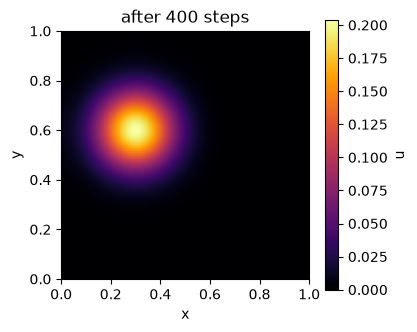
Hiding the communication
Section titled “Hiding the communication”With wait=False, update_halos starts the messages and returns at once. The cells that do not touch a halo can be updated meanwhile; wait() then completes the halos, and the frame of the block follows. The result is the same as with wait=True, corner halo cells included. The array must not be written before wait(), so the new values go to a separate array first.
def step_overlapped(u):    pending = u.update_halos(wait=False, boundary="edge")    v = u.local_with_halos    change = xp.empty_like(u.local)    change[1:-1, 1:-1] = laplacian(v[1:-1, 1:-1])  # needs no halo cells    pending.wait()    # the frame of the block: each edge is the Laplacian of a three-cell strip    change[0, :] = laplacian(v[:3, :])[0]    change[-1, :] = laplacian(v[-3:, :])[0]    change[1:-1, 0] = laplacian(v[1:-1, :3])[:, 0]    change[1:-1, -1] = laplacian(v[1:-1, -3:])[:, 0]    u.local[...] += dt * alpha * change

a = mpa.fromfunction(hot_spot, (n, n), split=(0, 1), halo=1)b = mpa.fromfunction(hot_spot, (n, n), split=(0, 1), halo=1)for _ in range(50):    step(a)    step_overlapped(b)same = bool(xp.allclose(a.gather(), b.gather()))if rank == 0:    print("same result:", same)
same result: True